Owner’s manual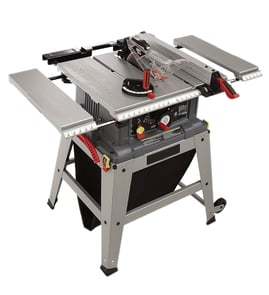

Where is the reset button on a Craftsman table saw?
On the Craftsman table saw model 137218020, the reset is the overload reset switch. You’ll find it on the saw’s base/front control area near the ON/OFF switch; press it after the motor cools to restore power following an overload or overheat (see the 137218020 owner's manual).
What the reset button does (and when to use it)
The overload reset switch protects the motor if it draws too much current.
Use it when:
- The saw shuts off mid-cut and won’t restart
- The motor hums or stalls and then stops
- The saw won’t start after a heavy cut (possible overload)
- You suspect low voltage from a long or undersized extension cord
Safe reset steps we recommend
- Turn the ON/OFF switch OFF.
- Unplug the table saw.
- Remove the workpiece and clear any jammed material.
- Let the motor cool down.
- Press the overload reset button.
- Plug in and switch ON to test.
Common causes of overload trips
These issues make the motor work harder and can trigger the overload:
- Dull, dirty, or incorrect blade for the material
- Blade height set too high for the cut
- Fence not parallel to the blade (binding)
- Misalignment in the blade, arbor, or bevel mechanism
- Extension cord too long or too small gauge
Quick checks before you cut again
| Check | What “good” looks like | Why it matters |
|---|---|---|
| Blade condition | Sharp, clean, spins freely | Reduces load on the motor |
| Fence alignment | Parallel to blade | Prevents binding and kickback risk |
| Material feed | Smooth, steady feed rate | Avoids stalling the blade |
| Power supply | Proper outlet, solid cord | Prevents low-voltage overheating |
Why it matters
Resetting gets you running again, but the overload is a warning that the motor overheated or was overloaded. Fixing the underlying cause helps prevent repeat trips and protects the motor, switch box, and drive components.
For step-by-step operating and safety details, use the 137218020 owner's manual. For parts lookup by model, search on Sears PartsDirect.
Last updated: February 2026
What are the parts of a table saw?
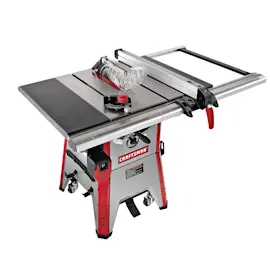
A Craftsman table saw like model 137218020 is built around the table and blade system, plus guiding and safety parts that control the cut. Common core parts include the rip fence, miter gauge, blade insert, height and bevel adjustment mechanisms, and the blade guard and splitter (when equipped). See the 137218020 owner's manual for the full “table of loose parts” and parts list.
Main parts you will see on the Craftsman 137218020
- Table saw assembly: the main body and tabletop that supports the workpiece
- Blade: the cutting tool mounted on the arbor
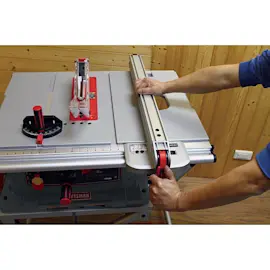
- Rip fence: guides rip cuts parallel to the blade (locks in place with its handle)
- Miter gauge: guides crosscuts and angle cuts in the miter slot
- Blade insert (throat plate): the removable insert surrounding the blade opening
- Handwheel and adjustment rods: raise/lower blade height and adjust bevel angle
- Blade guard and splitter: helps reduce contact with the blade and helps keep the kerf from closing
- Blade wrenches and hex key: used for blade changes and adjustments
- Stand parts (legs, supports, foot pads): supports the saw if your unit uses the included stand
How these parts work together
| Part | What it does | Why you use it |
|---|---|---|
| Rip fence | Holds a straight, parallel guide | Cleaner, safer rip cuts |
| Miter gauge | Sets crosscut angle | Repeatable angle cuts |
| Blade insert | Supports material near the blade | Reduces tear-out and snagging |
| Height/bevel mechanisms | Positions blade depth and tilt | Controls cut depth and bevel |
| Guard and splitter | Adds protection and stability | Helps reduce kickback risk |
Why it matters
Knowing the names and roles of the major table saw parts helps you diagnose symptoms faster (for example, bad cuts often trace back to fence alignment, blade condition, or the height/bevel mechanisms needing cleaning and dry lubrication).
Helpful next steps
- Use the parts list in the 137218020 owner's manual to match names to diagrams.
- If your cuts are off, review table saw bad angle cuts for common alignment checks.
- If you are changing blades, follow how to replace a table saw blade for safe, correct steps.
- For replacement parts by model number, search on Sears PartsDirect.
Last updated: February 2026
What size motor is on a 10 inch Craftsman table saw?
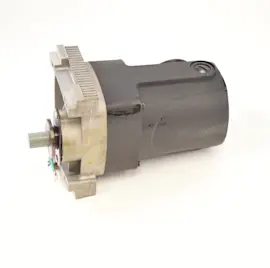
On the Craftsman 137218020 10-inch table saw, the motor is a brush-type universal motor (it uses carbon brushes). The operator’s manual for this model does not list a horsepower rating or a 15-amp specification; it focuses on safe operation, blade requirements, and serviceable motor components. See the 137218020 owner's manual for the model-specific specifications and motor details.
What we can confirm for model 137218020
From the motor parts list in the manual, this saw’s motor includes serviceable components typical of a universal motor:
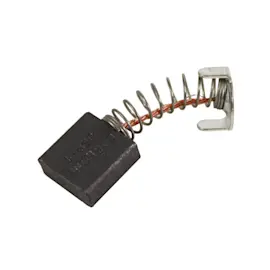
- Carbon brush assemblies and brush covers (brush wear items)
- Armature and field assemblies
- Bearings and a cutter shaft assembly
- Motor cover and strain relief
Quick motor identification table
| What you’re trying to confirm | What this model shows | What it means for you |
|---|---|---|
| Motor type | Brush-type (carbon brushes listed) | Brushes can wear and cause slow start, arcing, or power loss |
| “Motor size” (HP/amps) | Not stated in the provided manual excerpts | Use the motor nameplate on the saw and the manual specs section |
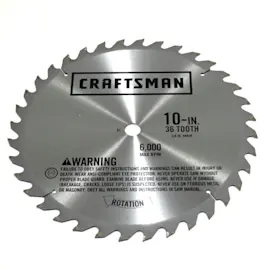
| Blade speed requirement | Blades must be rated 5000 RPM or higher | Use only blades rated for the saw’s operating speed |
How to find the exact motor rating (amps/HP)
Use these checks to get the exact “motor size” for your specific Craftsman 137218020:
- Look for the motor nameplate label on the motor housing (often lists amps, volts, and RPM).
- Check the “Product Specifications” section in the 137218020 owner's manual.
- Match what you find to your power source (most jobsite saws are 120V).
Why it matters
Motor rating affects cut performance and safety. If you install a blade that is not properly rated (RPM, arbor size, diameter), you can get poor cuts, overload trips, or unsafe operation.
If you need replacement motor-related parts for this model, start with the model parts list, or search by model number on Sears PartsDirect.
Last updated: February 2026
What not to do with a table saw?
For the Craftsman table saw model 137218020, the key “don’ts” are the actions that cause kickback or put you in the blade path: never reach over or behind the blade, never pull stock backward during a cut, and never bypass guards and anti-kickback devices except when the procedure specifically calls for it in the 137218020 owner's manual.
Top things we recommend you never do
- Never stand with any part of your body in line with the blade path.
- Never reach behind or over the cutting tool for any reason.
- Never pull the workpiece backward during a cutting operation (kickback risk).
- Never use the rip fence and miter gauge at the same time.
- Never use the rip fence as a cut-off gauge when crosscutting.
- Never reverse out of a cut with the blade running.
Setup mistakes that create unsafe cuts
- Do not start ripping unless the fence is locked and parallel to the blade.
- Do not cut stock that is warped, twisted, bowed, or lacks a straight edge against the fence.
- Do not clear a stall with the saw running; switch OFF and wait for the blade to stop.
| Operation | Do | Do not |
|---|---|---|
| Crosscutting | Remove rip fence; use miter gauge | Use fence as a stop/cut-off gauge |
| Ripping | Feed against blade rotation; keep hands out of blade path | Pull stock backward, reach over blade |
| Blade selection | Use proper wood-cutting blades | Use abrasive or metal-cutting blades |
Why it matters
These “don’ts” prevent kickback, binding, and loss of control, which are the most common causes of sudden movement toward the blade.
You can look up replacement parts by model number on Sears PartsDirect.
Last updated: February 2026