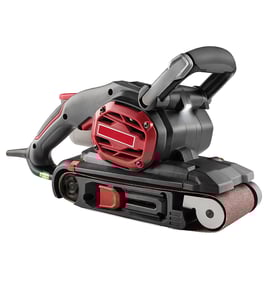

What is the procedure to replace the belt on the belt sander?
To replace the sanding belt on your Craftsman 572247600 belt and disc sander, we remove power, release belt tension, swap the belt in the correct direction, then re-tension and use the tracking knob to center the belt so it runs straight without rubbing the housing.
Step-by-step belt replacement procedure
- Unplug the sander (or remove the battery if your setup uses one). Never work on a belt sander while it is powered.
- Open the belt access area (typically a side cover or guard near the belt path).
- Release belt tension using the belt tension/release lever or knob.
- Slide the old sanding belt off the rollers.
- Install the new belt:
- Match the belt size to your sander.
- Align the belt so any directional arrows on the belt point in the normal belt travel direction.
- Reapply tension (lock the tension lever back in place).
- Plug the sander back in and run it briefly; adjust tracking until the belt stays centered.
How to set belt tracking (so it does not walk off)
Use the tracking knob while the belt is running at speed.
- Turn the tracking knob in small increments.
- Wait a second after each adjustment to see the belt respond.
- Center the belt on the rollers so it does not contact the side guards.
- Recheck tracking after 30 to 60 seconds of running.
Quick tracking guide
| What the belt is doing | What to do |
|---|---|
| Drifting toward the left edge | Turn the tracking knob slightly to move it back toward center |
| Drifting toward the right edge | Turn the tracking knob slightly the opposite direction |
| Flutters or won’t stabilize | Confirm correct belt size and that tension is fully engaged |
Why it matters
Correct tension and tracking prevent premature belt wear, reduce burning and gouging on wood, and protect key components like rollers, bearings, and the belt guard.
Parts and diagrams
For the correct sanding belt size and any related items (guards, rollers, tension hardware) for model 572247600, use the parts diagrams for this model, or search by model number on Sears PartsDirect.
Last updated: February 2026
Which way does a belt go on a belt sander?
On a Craftsman belt & disc sander like model 572247600, the sanding belt installs so the arrow printed on the inside of the belt matches the tool’s belt travel direction. After you tension it, use the tracking/adjustment knob to center the belt so it runs without rubbing the housing.
How to install the belt correctly
- Unplug the sander before touching the belt or guards.
- Look for a directional arrow on the belt’s inside; align it with belt travel.
- Slip the belt over the front and rear rollers (or drums), keeping it flat.
- Engage the tension lever/knob so the belt is snug.
- Turn the sander on briefly and use the tracking knob to center the belt.
- Recheck that the belt is not contacting the side covers or platen edges.
Quick checks if the belt keeps walking off
| Symptom | Most common cause | What we do next |
|---|---|---|
| Belt drifts to one side fast | Tracking not set | Adjust tracking in small turns until centered |
| Belt won’t stay centered | Worn roller, dirty roller, or uneven belt | Clean rollers; replace worn parts as needed |
| Belt flutters or slips | Low tension or wrong belt size | Re-tension; confirm belt length/width |
Why it matters
A belt installed in the correct direction and properly tracked cuts cleaner, runs cooler, and reduces wear on the rollers, platen, and motor bearings. It also helps prevent the belt from tearing or jumping off during sanding.
Parts and belt selection tip
When you shop, match the belt width and length to your Craftsman 572247600 parts listing. If you are searching beyond the model parts list, use Sears PartsDirect and enter the full model number to pull the correct diagrams.
Last updated: February 2026
Why is my belt sander not tracking straight?
On a Craftsman belt & disc sander model 572247600, a belt that will not track straight is almost always caused by incorrect tracking adjustment, uneven belt tension, a worn or dirty roller/platen surface, or a sanding belt that is damaged or installed slightly off-center.
Quick fixes to try first (in order)
- Unplug the sander and remove the sanding belt.
- Reinstall the belt with the arrow (if present) pointing in the normal direction of travel.
- Center the belt by hand on the rollers before powering on.
- Set tension correctly; the belt should feel snug, not floppy.
- Run at low/no load and turn the tracking knob in small increments until the belt stays centered.
Common causes and what they look like
| What’s happening | Most likely cause | What to do |
|---|---|---|
| Belt walks to one side immediately | Tracking knob out of adjustment | Adjust tracking in small steps while running |
| Belt tracks, then drifts under pressure | Too much sanding pressure or tension issue | Reduce pressure; recheck tension |
| Belt “hunts” back and forth | Belt seam issue or roller contamination | Try a new belt; clean rollers |
| Belt won’t stay centered at all | Worn roller bearing, crowned roller wear, or misalignment | Inspect rollers for wobble; replace worn components |
Cleaning and inspection checklist
- Clean dust buildup from drive roller and idler roller (dust can steer the belt).
- Check the platen for grooves or pitch buildup that can push the belt sideways.
- Spin rollers by hand; they should rotate smoothly with no wobble.
- Inspect the sanding belt seam; a lifted seam can force the belt to drift.
- Store belts flat or loosely hung; tight bends can permanently distort the backing.
Why it matters
A belt that tracks off-center can tear the belt, damage the roller edges, and reduce sanding accuracy. Keeping tracking and roller surfaces in good shape also improves finish quality and extends belt life.
Parts and help
If inspection shows a worn roller, bearing, tracking mechanism, or switch issue, use the model number 572247600 to match the correct replacement parts. We list model-specific parts on the parts diagram, and you can also search by model on Sears PartsDirect.
Last updated: February 2026
Why did my belt sander suddenly stop working?
If your Craftsman belt & disc sander model 572247600 suddenly stopped, the most common causes are a power supply issue, a tripped overload/thermal protector, worn brushes (if equipped), a failed switch, or a jammed belt/disc that stalled the motor. Start with quick power checks, then inspect for binding and electrical faults.
Quick checks first (fastest fixes)
- Confirm the outlet works by testing another tool or lamp.
- Reset any tripped breaker or GFCI.
- Unplug the sander and let it cool 20 to 30 minutes (overload protection can trip under heavy load).
- Remove sanding pressure; pushing too hard can stall the belt and overheat the motor.
- Check the power cord for cuts, kinks, or a loose plug.
Mechanical causes that stop the motor
A belt/disc sander can shut down or appear “dead” if the drive system binds.
- Inspect belt tracking and tension; a loose belt can slip, a tight belt can overload bearings.
- Look for debris packed around the drive roller, idler roller, or disc area.
- Spin rollers by hand (unplugged); they should turn smoothly without grinding.
- Check for a seized bearing (common after heavy dust exposure).
| Symptom | Most likely cause | What to do |
|---|---|---|
| Hums but won’t start | Jammed belt/roller, seized bearing | Clear debris; check rollers for free spin |
| Runs briefly then stops | Overload trip, heavy pressure, slipping belt | Let cool; reduce pressure; correct tracking/tension |
| Completely dead | Outlet/GFCI, cord, switch, brushes | Test power path; inspect switch and brushes |
Electrical checks (unplug first)
- If your model uses motor brushes, check for worn-down brushes or a stuck brush spring.
- Test the on/off switch for continuity.
- Inspect internal wiring for a loose spade connector or heat-darkened wire.
For safe testing steps, we recommend using a meter and following a proven process like how to use a multimeter to test electrical parts video.
Why it matters
A sudden stop is often a protection response (overload/heat) or a bind in the belt path. Fixing the root cause prevents repeated overheating that can damage the motor, switch, and bearings.
For diagrams and model-based lookup when you are ready to replace components, search by model number on Sears PartsDirect.
Last updated: February 2026