- Kenmore refrigerator water filters
- Whirlpool refrigerator water filters
- Samsung refrigerator water filters
- GE refrigerator water filters
- LG refrigerator water filters
- Frigidaire refrigerator water filters
- KitchenAid refrigerator water filters
- Maytag refrigerator water filters
- Kenmore Elite refrigerator water filters
- Estate refrigerator water filters
- GE Profile refrigerator water filters
- Amana refrigerator water filters
- Bosch refrigerator water filters
- Dacor refrigerator water filters
- Electrolux refrigerator water filters
Top DIY repair help
View All Repair Categories
Appliances
Lawn & Garden
Power Tools
Home Improvement
Sports & Leisure
Heating & Cooling
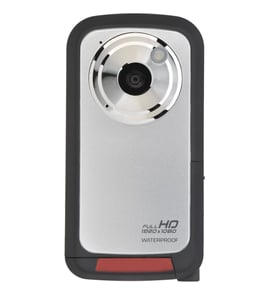
GPX Camcorder Parts — Browse All Models
GPX camcorders have a reputation for rugged dependability. Although GPX camcorders rarely break down, those infrequent failures can occur at any time. When a camcorder failure happens, get the repair parts you need to fix your GPX camcorder at Sears PartsDirect.

GPX S5250 camcorder
Shop Parts
41 Parts
Popular maintenance items for Camcorders

Button Assembly
In Stock
$55.52

Qty

Sony Holder Assembly
Part #X25157801
Replaced by #X-2515-780-1
Manufacturer substitution
This part replaces X25157801. Substitute parts can look different from the original.
In Stock
$183.43
Qty
Base Bt Re
Part #425757601
This item is not returnable
In Stock
$6.49
Qty
Packing
Part #442757601
This item is not returnable
In Stock
$8.74
Qty
Sony Hinge Assembly
In Stock
$36.93
Qty
Pcb Board
In Stock
$25.34
Qty
Safety precautions for your GPX camcorder
- Your camcorder shouldn't be exposed to rain or moisture. Don't plug in the power adapter to a wall outlet or operate your camcorder if it's wet. The camcorder is designed for outdoor use but it isn't designed for sustaining direct exposure to water, rain or spills.
- Unplug your camcorder before cleaning and performing any maintenance on the device.
- Don't expose the camcorder to high temperature such as direct sunlight or heat generated in a closed car during summer. High heat can damage camcorder components.
- Don't leave the power supply for your camcorder turned on when it isn't attended or it's not in use.
- Keep the lens cap installed on the camcorder when you're not using the device to prevent lens damage.
Playing GPX camcorder video using the audio/video cable
- Connect the audio/video cable to audio/video out jacks on your camcorder. Connect the other end of the audio/video cable to audio/video in jacks on your television.
- Turn on your television and select line input to play video from the camcorder.
- Connect your camcorder to a power source such as a battery pack, AC adapter or car battery cord.
- Turn on the camcorder power button and select the VCR or Camera playback mode on the camcorder.
- Start playback or begin recording to send the video signal to the television.
Parts & More
Air Compressor
Bottom-Mount Refrigerator
Chest Freezer
Dishwasher
Front-Engine Lawn Tractor
Gas Walk-Behind Mower
Lawn & Garden Engine
Parts
Rear-Engine Riding Mower
Upright Freezer
Upright Vacuum
Wet/Dry Vacuum