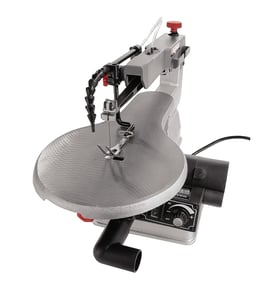

Should I get pinless or pinned scroll saw blades?
For the Pro-Tech 3303 scroll saw, we recommend pinless (plain-end) blades for most users because they handle tighter curves and detailed fretwork better, and they fit through smaller starter holes for inside cuts. Choose pinned blades mainly for fast, thicker, less-detailed cutting.
Pinless vs pinned: what changes in real use
- Detail work: Pinless blades excel for intricate patterns, puzzles, and fine scrollwork.
- Inside cuts: Pinless blades pass through smaller pilot holes, so interior cutouts are easier.
- Blade selection: Pinless has the widest range of tooth styles and sizes.
- Ease of mounting: Pinned blades mount quickly, which can feel simpler for beginners.
- Cut aggressiveness: Pinned blades are often used for thicker stock and rougher cuts.
Quick comparison
| Feature | Pinless (plain-end) | Pinned |
|---|---|---|
| Best for | Fine detail, tight turns, fretwork | Simple cuts, thicker stock |
| Starter hole size for inside cuts | Smaller | Larger |
| Blade variety | Very wide | More limited |
| Setup speed | Slightly slower | Faster |
How to choose the right blade type for your projects
Use this checklist to decide what to buy first:
- If you cut intricate patterns or do inside cutouts, start with pinless.
- If you mostly cut straight or gentle curves in thicker wood, pinned can be fine.
- If your saw accepts both, keep both types on hand: pinless for detail, pinned for quick rough work.
- Match blade size to material: thinner wood and tight curves use smaller blades; thicker wood uses larger blades.
Why it matters
Blade type affects cut quality, turning radius, and how easily you can do interior cuts. For most scroll saw owners, pinless blades unlock more of what a scroll saw is meant to do: controlled, detailed cutting.
Ordering tip
When you shop, search by your exact model number (3303) so you can confirm blade compatibility and any needed blade adapters; you can also search broadly for scroll saw supplies on Sears PartsDirect.
Last updated: February 2026
What are some common scroll saw mistakes?
On the Pro-Tech 3303 scroll saw, the most common mistakes are incorrect blade tension, using the wrong blade for the material, forcing the feed rate, and poor setup (loose hold-downs or an unlevel table). These issues cause broken blades, rough cuts, burning, and loss of control.
Most common mistakes (and what they cause)
- Blade tension too loose: the blade wanders, curves, and chatters.
- Blade tension too tight: blades snap early and the saw vibrates more.
- Feeding the wood too fast: burning, blade deflection, and angled cuts.
- Wrong blade type or size: tear-out in plywood, slow cutting, frequent breakage.
- Teeth facing the wrong direction: the saw barely cuts and the workpiece lifts.
- Not keeping the work flat on the table: bevels, inaccurate patterns, and binding.
- Skipping dust control and PPE: poor visibility at the cut line and more cleanup.
Quick setup checklist for cleaner cuts
- Unplug the saw before changing blades or adjusting tension.
- Confirm blade direction (teeth should cut on the downstroke on most scroll saws).
- Set tension so the blade feels firm and produces a clear “ping” when plucked.
- Keep the table square to the blade for straight, non-beveled edges.
- Use light, steady pressure; let the blade do the work.
- Support thin stock with a backer board to reduce splintering.
Troubleshooting guide
| Symptom | Most likely mistake | What to do next |
|---|---|---|
| Blades keep breaking | Over-tensioning, twisting in tight turns, forcing feed | Reduce tension slightly, slow down, turn the workpiece instead of bending the blade |
| Cut edges look fuzzy or chipped | Wrong blade for material, dull blade, no backer | Switch to a finer blade, replace blade, add backer board |
| Cuts are angled (beveled) | Table not square, work not held flat | Re-square the table, keep steady downward pressure |
| Wood “jumps” or chatters | Loose tension, too much speed, poor support | Increase tension slightly, slow feed, support the workpiece |
Why it matters
Good blade selection, correct tension, and a controlled feed rate protect the Pro-Tech 3303’s blade clamps and motor, improve accuracy on patterns, and reduce rework on detailed scrollwork.
Parts and help
If you need replacement parts for your Pro-Tech 3303 scroll saw (for example, blade clamps, switches, or power cord components), use the model parts list first, or search by model number on Sears PartsDirect. For electrical issues, our guide how to use a multimeter to test electrical parts video helps you test switches and continuity safely.
Last updated: February 2026
What causes scroll saw blades to break?
Scroll saw blades usually break because the blade is over-tensioned or under-tensioned, the workpiece is being forced through the cut, or the blade is twisting in a tight turn. On the Pro-Tech 3303 scroll saw, correct blade tension and a steady feed rate prevent most breakage.
Most common causes (and what to do)
- Too much tension: Back off tension slightly; the blade should feel firm but not “banjo-string” tight.
- Too little tension: Increase tension so the blade tracks straight and does not flutter.
- Pushing too hard (feed rate too fast): Let the teeth cut; reduce pressure and slow down.
- Turning too sharply: Make relief cuts for tight curves so the blade does not bind and twist.
- Wrong blade for the material: Use a finer blade for thin stock and harder materials; use a coarser blade for thicker, softer wood.
- Dull or damaged blade: Replace blades that burn, wander, or require extra force.
Quick troubleshooting checklist
- Unplug the saw.
- Reinstall the blade squarely in the clamps; make sure it is centered and fully seated.
- Set tension, then rotate the upper arm by hand (if accessible) to confirm the blade stays aligned.
- Test-cut scrap material; adjust speed and feed until the cut feels smooth.
Blade choice guide (typical)
| Material / thickness | Typical blade direction | Typical tooth style |
|---|---|---|
| Thin wood, veneers | Smaller, finer blade | Fine-tooth |
| 3/4 in. hardwood | Medium blade | Skip-tooth or reverse-tooth |
| Plastics | Fine blade, slower speed | Fine-tooth |
| Soft metals (if rated) | Very fine blade, slow speed | Metal-cutting |
Why it matters
A breaking blade can damage your workpiece, stress the blade clamps, and increase vibration. Dialing in tension, speed, and blade selection improves cut accuracy and extends blade life.
For model-specific parts lookups and diagrams for your Pro-Tech 3303, search by model number on Sears PartsDirect.
What thickness of wood can you cut with a scroll saw?
Most scroll saws, including the Pro-Tech 3303, are designed to cut wood up to about 1 3/4 to 2 1/4 inches thick (the saw’s maximum cutting depth). In real use, the best results usually come from thinner stock because it reduces blade deflection and burning.
What actually limits thickness on a scroll saw
- Throat and cutting depth: The saw’s design sets the maximum thickness it can physically clear.
- Blade type and condition: A sharp, correct-tooth blade cuts thicker wood cleaner.
- Wood hardness: Hardwood (oak, maple) cuts “thicker” slower than softwood (pine, poplar).
- Cut complexity: Tight curves and intricate fretwork reduce practical thickness.
- Feed rate: Pushing too fast overheats the blade and causes wandering.
Practical thickness guidelines (what we see work best)
| Material type | Typical “easy” thickness | Upper practical range (slow, careful cuts) |
|---|---|---|
| Softwood (pine, cedar) | 1/4 to 1 inch | Up to ~2 inches |
| Hardwood (oak, maple) | 1/4 to 3/4 inch | Up to ~1 1/2 inches |
| Plywood | 1/8 to 3/4 inch | Up to ~1 inch |
Tips to cut thicker wood cleanly
- Use a coarser blade (fewer teeth per inch) for thicker stock.
- Keep the blade properly tensioned and tracking straight.
- Let the blade do the work; use a steady, slower feed rate.
- If you see scorch marks, reduce speed (if adjustable) and pause to cool.
- Support the workpiece flat on the table to prevent twisting.
Why it matters
Trying to cut wood that is too thick for the blade and pattern usually leads to rough edges, blade drift, and broken blades. Staying within a realistic thickness range gives cleaner cuts and better control, especially for detailed scroll work.
For model-specific parts and diagrams that affect cutting performance (blade clamps, tension parts, switches), start with the Pro-Tech 3303 parts list, or search by model on Sears PartsDirect.
Last updated: February 2026