Installation guide
 Owner’s manual


How to reset a GE microwave after power failure?
To reset your GE PVM1870SM1SS microwave/hood combo after a power failure or power surge, unplug the microwave (or switch off the breaker) for about 1 minute, then restore power. If the control is locked, press and hold CLEAR/OFF for about 3 seconds to unlock.
Quick reset steps (recommended)
- Turn the microwave off and stop any cooking cycle.
- Unplug the power cord (or turn the circuit breaker off).
- Wait about 60 seconds.
- Plug it back in (or turn the breaker on).
- Set the clock and test with a short 10 to 20 second heat cycle.
If the display says “CONTROL LOCKED” or “LOCKED”
The control panel lock can look like a power issue because the keypad will not respond.
- Press and hold CLEAR/OFF for about 3 seconds.
- Confirm the display returns to normal.
- Try starting a simple cook cycle.
For the exact lock and control-panel behavior for this model, use the PVM1870SM1SS owner’s manual.
What to check if it still will not start
A power outage can trip protection devices or expose a door-latch issue.
- House fuse blown or circuit breaker tripped; reset the breaker.
- Outlet not supplying power; test the outlet with a small appliance.
- Power cord not fully seated in the outlet.
- Door not closing and latching securely; open and close the door firmly.
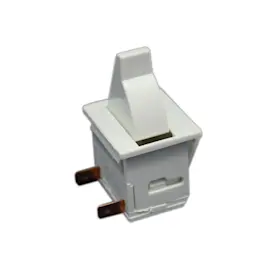
- Interlock switch or latch parts worn; common items include the micro-switch WB24X830 and microwave latch body WB06X10676.
Reset vs. symptom guide
| Symptom after outage | Most likely cause | Best next step |
|---|---|---|
| Display on, keypad unresponsive | Control lock enabled | Hold CLEAR/OFF 3 seconds |
| No display, no fan, no light | No power to unit | Check breaker, outlet, cord |
| Light works but will not run | Door not latched or interlock issue | Reseat door; inspect latch/switch |
Why it matters
A proper reset clears a temporary control glitch from a power surge and helps you quickly separate a simple control lock or power supply issue from a door-interlock problem (a key safety system on over-the-range microwaves).
Last updated: January 2026
Is GE Profile considered high end?
Yes. GE Profile is widely considered GE’s higher-end appliance line, positioned above standard GE models with more premium features, styling, and performance options. For your GE microwave/hood combo model PVM1870SM1SS, “Profile” branding generally signals an upgraded feature set within the GE family.
What “high end” usually means for GE Profile
GE Profile typically focuses on upgrades you notice day to day, such as:
- More advanced cooking and sensor features
- More premium finishes and design details
- More convenience features (controls, lighting, venting options)
- Broader feature sets compared to base GE lines
How to confirm what your specific model includes
The fastest way to verify whether your PVM1870SM1SS is a GE Profile unit (and what features it has) is to check the model label and the feature list in the documentation.
- Look for “GE Profile” on the door badge or control panel
- Confirm the full model number on the rating label
- Match the features and options listed in the PVM1870SM1SS owner’s manual
GE vs GE Profile: quick comparison
| Line | Typical positioning | What you usually get |
|---|---|---|
| GE | Mainstream | Core features, value-focused options |
| GE Profile | Higher-end within GE | More features, upgraded design, more advanced options |
Why it matters
Knowing whether you have GE or GE Profile helps us match the right parts, features, and troubleshooting steps. For example, door and safety-interlock components can vary by model; using the correct replacement part helps ensure proper fit and safe operation.
Last updated: January 2026
What are common problems with GE Profile microwaves?
Common problems on GE Profile microwaves like model PVM1870SM1SS include not heating, not starting, arcing/sparking, vent fan issues, and door latch or interlock problems. Many symptoms trace back to power supply checks, door closure/interlock parts, or high-voltage components; use the PVM1870SM1SS owner’s manual troubleshooting section to narrow the cause.
Most common symptoms and what they usually mean
- Microwave runs but doesn’t heat: often a high-voltage component issue (magnetron, diode, capacitor, transformer).
- Oven will not start: commonly a house fuse/breaker issue, plug not fully inserted, or the door not closing securely.
- Sparking/arcing inside: usually food splatter, damaged waveguide cover area, or metal/foil contact; stop use and clean/inspect.
- “CONTROL LOCKED” on display: control lock is enabled; unlock using the keypad sequence in the manual.
- Vent fan behavior seems odd: some units run the fan automatically under certain conditions.
Quick checks we recommend before ordering parts
- Confirm the outlet has power and the plug is fully seated.
- Open and close the door firmly; a slightly unlatched door can prevent starting.
- Clean grease buildup on the underside and filters; heavy grease can cause performance and odor issues.
- If the unit runs but won’t heat, stop using it and plan for a high-voltage diagnosis.
Parts that commonly relate to these problems (when symptoms match)
| Symptom | Common part area | Example part for PVM1870SM1SS |
|---|---|---|
| Won’t start or stops when door moves | Door interlock system | Micro-switch WB24X830, microwave latch body WB06X10676 |
| Runs but no heat | High-voltage system | Microwave magnetron WB27X10880, microwave high-voltage capacitor WB27X10011 |
| Weak/no venting | Vent fan system | Microwave vent fan motor assembly WB26X10210 |
Why it matters
Door interlock and high-voltage problems can look similar from the outside, but the repair path is very different. Using the model-specific troubleshooting steps helps you avoid replacing the wrong part and gets your GE microwave/hood combo back to safe, normal operation.
Last updated: January 2026
What is the average lifespan of a GE microwave?
A GE microwave typically lasts 8 to 10 years with normal household use. For an over-the-range model like GE PVM1870SM1SS, keeping the interior clean, maintaining airflow through the vent fan and filters, and avoiding misuse helps you reach that expected lifespan (or longer). See the PVM1870SM1SS owner’s manual for care and operating guidance.
What affects lifespan the most
- Daily run time (multiple long heat cycles per day shortens life)
- Ventilation and grease buildup (especially on microwave/hood combos)
- Door closing habits (slamming can damage latches and interlock parts)
- Cleaning practices (abrasives and harsh chemicals can damage surfaces)
- Power quality (frequent breaker trips or voltage issues can stress components)
Quick care checklist for longer life
- Wipe spills promptly; grease and food splatter can cause odors and overheating.
- Keep the underside and filters clean so the vent fan can move air properly.
- Never run the microwave empty.
- Use microwave-safe containers and avoid metal that can cause arcing.
- If the door feels loose or doesn’t close smoothly, inspect the latch area and consider replacing the microwave latch body WB06X10676 if it’s worn.
Typical lifespan expectations (what to plan for)
| Appliance type | Typical lifespan | Notes |
|---|---|---|
| Countertop microwave | 7 to 10 years | Less heat and grease exposure |
| Over-the-range microwave/hood combo (like PVM1870SM1SS) | 8 to 10 years | More grease and heat from cooking below |
Why it matters
A microwave that is nearing end-of-life often shows early warning signs (slower heating, louder fan noise, intermittent operation). Catching issues early can prevent secondary damage and help you decide whether a repair makes sense.
Last updated: January 2026