


What is the life expectancy of a food processor?
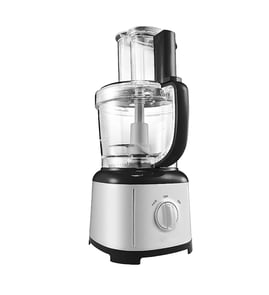
Most food processors, including the KitchenAid KFP1133CU0, last 7 to 10 years with normal home use. With lighter use and good care (especially keeping the bowl, blade, and base clean and dry), it’s common for a quality unit to run 10+ years.
- Light use (1 to 2 times/week): 10 to 15 years
- Moderate use (3 to 5 times/week): 7 to 10 years
- Heavy use (daily, dense doughs, long runs): 3 to 7 years
- Overloading the bowl or forcing hard foods through too fast
- Running the motor continuously for long periods (heat buildup)
- Liquid leaks into the base or around the drive area
- Dull or damaged blades that make the motor work harder (see blade W10721067)
- Worn drive components that cause slipping, wobble, or noise (see sleeve shaft W10648624)
- Unplug before cleaning; wipe the base, do not soak it
- Let the motor cool between long tasks (chopping large batches, kneading)
- Keep seals and mating surfaces clean so the bowl locks correctly
- Stop if you smell hot plastic, hear grinding, or see smoke; inspect before reusing
- Replace worn parts early (bowl, blade, switch) to prevent motor strain
| Symptom | Most likely area | What it means |
|---|---|---|
| Won’t start | Switch or safety interlock | Bowl/lid not locking, or switch issue (see panel switch WPW10648622) |
| Loud grinding | Shaft/drive area | Worn drive parts or misalignment (see sleeve shaft W10648624) |
| Poor chopping | Blade | Dull, bent, or damaged blade (see blade W10721067) |
A food processor’s motor is the most expensive component; keeping blades sharp, loads reasonable, and moisture out of the base prevents overheating and premature motor failure (see motor W10721074).
Last updated: February 2026
Can you replace food processor blades?
Yes. For the KitchenAid KFP1133CU0 food processor, you can replace the blade when it gets dull, bent, chipped, or won’t process evenly; replacing the blade restores cutting performance and helps prevent cracking the bowl or overloading the motor.
Replace the blade if you notice any of these common symptoms:
- Food is tearing or mashing instead of chopping cleanly
- You see nicks, chips, rust, or a bent edge
- The blade wobbles on the shaft or fits loosely
- Processing takes longer than normal and the motor strains
- You get inconsistent results (some pieces fine, others untouched)
These are model-matched blade parts commonly used on this KitchenAid food processor:
| Part | What it’s for | Typical symptom it fixes |
|---|---|---|
| Blade W10721067 | Main cutting/chopping blade | Poor chopping, uneven results |
| Food processor blade W10648616 | Alternate blade assembly used on some configurations | Dull blade, wobble, damage |
- Unplug the food processor before handling any blade.
- Remove the bowl and lid, then lift the blade straight up off the shaft.
- Clean and dry the shaft area so the new blade seats fully.
- Install the replacement blade and confirm it sits flat and spins freely by hand.
- If the blade still wobbles, inspect the shaft components for wear (for example, the sleeve shaft).
A damaged or dull blade makes the motor work harder and can lead to leaks, bowl damage, and inconsistent slicing or chopping. Replacing the blade is one of the fastest ways to bring your KitchenAid food processor back to normal performance.
Last updated: February 2026
How to read KitchenAid model number?
For your KitchenAid food processor model KFP1133CU0, the model number is the exact identifier we use to match the correct parts and diagrams. Read it character-for-character (letters and numbers), then use it when selecting replacements like the food processor bowl W10721072.
Most KitchenAid food processors place the model and serial information on a rating label on the bottom of the base or the underside/back of the motor housing.
- Unplug the food processor before handling it
- Turn the base over and look for a printed sticker or plate
- Copy the full model number (example: KFP1133CU0) exactly
- Record the serial number too (helpful for production variations)
- If the label is worn, use a bright light and take a close-up photo
We treat the model number as a precise code. Small differences can change fit and function.
| What to check | What it means | Example for this unit |
|---|---|---|
| Letters vs numbers | They are not interchangeable | KFP is letters, not numbers |
| Suffix characters | Often indicate a revision/version | …CU0 matters |
| Exact match | Use the full string, no spaces | KFP1133CU0 |
Using the exact model number prevents ordering parts that look similar but do not fit, such as a bowl, blade, motor, or switch that will not lock in correctly or will not engage the safety interlock.
If you are unsure you copied the label correctly, compare the parts you are replacing to the diagrams and part listings for KFP1133CU0, then match by part name and ID (for example, panel switch WPW10648622).
Last updated: February 2026
How to get a food processor to work?
For a KitchenAid KFP1133CU0 food processor to run, it must have power and the safety interlock must be satisfied: the bowl and lid have to be fully seated and locked. If it still will not start, focus on the switch and motor circuit next.
- Plug the unit directly into a known-good outlet (skip power strips).
- Confirm the bowl is fully seated on the base and rotated into the lock position.
- Confirm the lid is aligned and locked; the feed tube area often has to be fully engaged.
- Remove the bowl and lid, then reinstall them slowly to ensure the interlock tabs line up.
- If the unit hums but does not spin, stop immediately and check for a jammed blade or overloaded bowl.
If the interlock is set correctly and you have power, the most common next suspects are the control switch and the motor.
- Check the control area for a sticky or physically damaged switch.
- Inspect the cord and strain relief area for cuts, kinks, or loose connections.
- If you are comfortable with electrical testing, use a multimeter to check continuity through the switch.
- If the motor is dead silent with correct interlock and a good switch, the drive motor circuit is the next focus.
| Symptom | Most likely cause | What to do next |
|---|---|---|
| No lights/sound | No power at outlet, cord issue | Try a different outlet; inspect cord |
| Nothing happens, but outlet is good | Bowl/lid not locked, failed interlock path | Reseat bowl and lid; inspect latch areas |
| Hums but blade does not turn | Jam, overload, seized drive | Unplug; clear jam; reduce load |
| Starts then stops | Overload/thermal protection, intermittent switch | Reduce load; check switch feel |
These parts are commonly related to “won’t start” or “won’t stay running” issues on this model:
- Panel switch WPW10648622 (the on/off control input)
- Motor W10721074 (drives the blade and discs)
- Food processor bowl W10721072 (must seat correctly for the interlock to engage)
Food processors use a safety interlock to prevent the blade from spinning unless the bowl and lid are locked. Getting the interlock alignment right prevents false “dead” symptoms and helps you avoid unnecessary part replacement.
Last updated: February 2026
How can I tell what size my KitchenAid mixer is?
This parts list is for the KitchenAid food processor model KFP1133CU0, not a stand mixer. If you are trying to identify a KitchenAid stand mixer size, use the model number on the mixer’s rating label and match it to the bowl capacity listed for that model; that is the most reliable way to confirm quart size.
- Find the model number on the rating label (commonly under the base or on the back of the stand).
- Write down the full model number exactly as shown (letters and numbers).
- Match that model number to the correct bowl capacity (quart size) before ordering bowls or beaters.
- Use the mixer style as a quick cross-check: tilt-head models are commonly smaller than bowl-lift models.
- If your bowl has capacity markings, use them only as a secondary clue.
For food processors, “size” usually means the work bowl capacity and which bowls and blades fit your base. Use the model number KFP1133CU0 to match the correct replacement components.
| What you’re sizing | What to match | Example part for KFP1133CU0 |
|---|---|---|
| Main work bowl | Bowl shape and locking tabs | Food processor bowl W10721072 |
| Mini bowl | Mini bowl fit to main bowl/base | Food processor mini bowl W10721066 |
| Chopping/mixing blade | Hub style and shaft engagement | Blade W10721067 |
“Size” drives fit. A bowl or blade that looks close can still fail to lock in, leak, or not engage the drive correctly. Matching by model number prevents ordering the wrong KitchenAid part.
Last updated: February 2026
How many watts is the KitchenAid 13-Cup Food Processor?
For the KitchenAid food processor model KFP1133CU0, the wattage is printed on the appliance rating label on the base. We use that label as the correct source because wattage can vary by version and market, even within the 13-cup class.
- Unplug the food processor before checking anything.
- Look for the rating label on the underside of the base or the rear of the base.
- Find a line that lists W (watts) or A (amps) and V (volts).
- If watts are listed, use that number as the motor rating.
- If only amps and volts are listed, calculate: Watts = Volts × Amps.
Most 11 to 13-cup food processors are designed for medium-to-heavy prep (slicing, shredding, chopping, some dough). Wattage varies by design, so the label is the best way to match your unit to the correct electrical expectations.
| Spec shown on label | What it means | How to use it |
|---|---|---|
| Watts (W) | Rated power | Compare to other appliances on the same circuit |
| Volts (V) and amps (A) | Electrical draw | Multiply V × A to estimate watts |
Knowing the rated watts helps you avoid overloading a circuit and helps troubleshoot performance issues. If the unit bogs down, the cause is often a cutting component issue or a motor/control problem rather than “low wattage.”
- Motor W10721074: addresses humming, stalling, overheating smells
- Food processor blade W10648616: improves slow or uneven chopping from a worn blade
- Panel switch WPW10648622: fixes no-start or intermittent operation
Last updated: February 2026