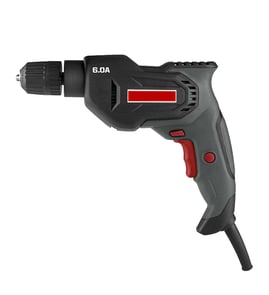

Where can I buy Craftsman replacement parts?
You can buy Craftsman replacement parts by searching your exact model number (25921) on Sears PartsDirect and ordering the matching components from the model’s parts list. Using the full model number helps you avoid lookalike parts that do not fit or function correctly.
How we recommend buying the right part
- Confirm the model number on the tool’s data label (use 25921, not a series name).
- Identify the failed area first (switch, cord, brushes, chuck, gears, or stand hardware).
- Match the part by description and any diagram callouts, not by appearance alone.
- If multiple versions are listed, match by your tool’s type and any revision notes.
- Order the exact replacement, then compare it to the original before installing.
What you need before you order
| What to gather | Why it matters | Example for this model page |
|---|---|---|
| Model number | Ensures correct fit | Craftsman 25921 |
| Symptom | Narrows the part category | Won’t start, sparks, low power |
| Basic tool info | Helps confirm compatibility | Corded vs. cordless, chuck size |
Why it matters
Power tool parts are often model-specific. Even small differences in a Craftsman drill press stand or drill assembly (mounting holes, wiring terminals, brush style, or switch layout) can prevent a part from fitting safely and working correctly.
If you cannot find the part you need
- Re-check the model number characters for accuracy.
- Search by the model number again and review all sections of the parts list.
- If your part is discontinued, compare the original part’s markings and measurements to any listed substitutes.
Last updated: February 2026
What's the difference between an impact drill and a power drill?
A standard power drill (drill/driver) provides steady rotation for drilling holes and controlled screw driving; an impact driver adds rapid rotational impacts to deliver much higher torque for tough fastening. With Craftsman model 25921 (a drill press stand that holds a handheld drill), the “difference” matters because the stand is meant for drilling operations, not impact driving.
Quick comparison
| Feature | Power drill (drill/driver) | Impact driver |
|---|---|---|
| Primary job | Drill holes; drive screws with control | Drive long screws; loosen tight fasteners |
| Torque delivery | Continuous rotation | Rotation plus repeated impacts |
| Bit holding | 3-jaw chuck (often 3/8 in. or 1/2 in.) | 1/4 in. hex quick-change collet |
| Clutch | Usually yes | Typically no clutch |
| Best use cases | Accurate holes, hole saws (within limits), light fastening | Deck screws, structural screws, lag bolts, repetitive driving |
How this applies to Craftsman 25921
A drill press stand like model 25921 is designed to guide a drill straight down for cleaner, more repeatable holes. It is not designed to turn an impact driver into a drill press.
- Use a drill/driver in the stand for:
- Straight, perpendicular holes in wood or plastic
- Controlled drilling with common twist bits
- Repeatable depth when your setup includes a depth stop
- Avoid using an impact driver in the stand for:
- Precision drilling (impact action reduces control)
- Large hole saw work (higher risk of binding)
- Any setup where the tool does not clamp securely
Why it matters
Choosing the right tool reduces bit breakage, wandering holes, and wrist twist. For stand-guided drilling, smooth rotation and chuck compatibility are what deliver accuracy.
Tips for best results
- Clamp the workpiece; never hold it by hand.
- Start with a pilot hole for larger bits.
- Use sharp bits and moderate speed to prevent burning.
- If you need to troubleshoot wiring or switches on a corded drill, use how to use a multimeter to test electrical parts video.
Last updated: February 2026
What are the parts of a power drill?
Craftsman model 25921 is a drill press stand (a stand that holds a separate handheld drill), so its “parts” are stand components like the base, column, and drill-mount clamp, not a drill motor, chuck, or trigger. For model-number help when ordering, use how to find your appliance model number (and what it means for parts).
Main parts on a drill press stand like Craftsman 25921
- Base: the heavy platform that stabilizes the stand and supports the work
- Column (upright post): the vertical support that keeps the drill aligned
- Carriage or head assembly: the sliding section that rides on the column
- Drill-mount clamp or bracket: secures your handheld drill to the stand
- Feed handle and return spring: lowers and raises the drill smoothly
- Depth stop: limits how far the drill can travel for repeatable holes
- Table or work support (if equipped): supports the material being drilled
How this differs from a handheld power drill
| Item | Handheld power drill | Drill press stand (like 25921) |
|---|---|---|
| Provides power | Yes (motor) | No (uses your drill) |
| Holds the bit | Yes (chuck) | No (your drill does) |
| Controls speed/direction | Yes (trigger, switch) | No |
| Provides vertical guidance | Limited (by hand) | Yes (column and carriage) |
Quick identification tips for stand parts
- If the drill wobbles, check the drill-mount clamp tightness and fit.
- If the drill binds while moving, clean the column and inspect the carriage for damage.
- If the drill does not return up, inspect the return spring and feed mechanism.
- If hole depth varies, set and tighten the depth stop.
Why it matters
Knowing whether you have a drill or a drill press stand prevents ordering the wrong components; the 25921 uses stand hardware and mounting parts, while the handheld drill supplies the motor, chuck, and switches.
Last updated: February 2026
Is a 500W drill powerful?
A 500W corded drill is a solid mid-range power level for common DIY drilling and driving. For Craftsman model 25921 specifically, keep in mind it is a drill press stand (it has no motor); the “power” comes from the handheld drill you mount in the stand.
What 500W means for a handheld drill
Wattage is the electrical input to the drill’s motor. In real use, 500W typically supports steady drilling in wood and light metal; performance still depends heavily on the drill’s gearing, speed control, and bit choice.
- Strong for wood, plywood, and drywall
- Good for light metal with sharp bits and slower speed
- Fine for driving screws with proper speed control
- Not ideal for large hole saws or continuous heavy load work
- Masonry depends more on hammer action and the right masonry bit than wattage alone
How the 25921 drill press stand changes the answer
Because the Craftsman 25921 is a stand, it affects control and accuracy, not motor output. It can make a “moderate power” drill feel more capable by keeping the bit straight and reducing wobble.
| What you’re evaluating | Handheld drill (500W) | Craftsman 25921 stand |
|---|---|---|
| Power/torque | Yes | No |
| Speed/hammer action | Yes | No |
| Accuracy and repeatability | Some | Yes |
| Best use | Drilling and driving | Straight, controlled drilling with a mounted drill |
What to check to decide if 500W is enough
- Largest hole size you plan to drill (spade bit, auger, hole saw)
- Material (softwood vs hardwood vs steel)
- How long you’ll run it continuously (heat buildup)
- Whether you need hammer drilling for masonry
- Bit quality and correct speed for the material
Why it matters
Matching drill power to the job prevents stalled bits, overheated motors, and rough holes. The 25921 stand improves precision, but it cannot add power; choosing the right handheld drill does.
For model-number help when ordering stand parts, use how to find your appliance model number (and what it means for parts).
Last updated: February 2026
How to attach things to a power drill?
The Craftsman 25921 is a drill press stand (not a drill). You attach accessories to the handheld drill you mount in the stand by installing the bit, driver, or adapter in the drill’s chuck; the stand’s job is to hold the drill straight and stable.
Step 1: Mount the drill in the 25921 stand
- Remove the battery or unplug the drill.
- Open the stand’s clamp/collar.
- Seat the drill so the chuck points straight down.
- Tighten the clamp evenly so the drill cannot twist or slide.
- Verify the cord/battery clears the stand and the drill can travel smoothly.
Step 2: Attach the accessory to the drill’s chuck
- Open the chuck (keyless: twist by hand; keyed: use the chuck key).
- Insert the accessory shank fully and centered.
- Tighten the chuck firmly.
- Tug-test the accessory; then hand-spin to confirm it clears the stand table.
Common attachments and what you need
| Attachment you want to use | How it connects | Typical extra piece |
|---|---|---|
| Drill bit | Directly in chuck | None |
| Screwdriver bit | In chuck | Bit holder (optional) |
| Socket | In chuck | Hex-to-square socket adapter |
| Hole saw | In chuck | Hole saw arbor with pilot bit |
Why it matters
Mounting the drill securely in the Craftsman 25921 and tightening the chuck correctly prevents wobble, reduces bit binding, and improves hole accuracy.
For help confirming you have the right model number when looking up parts or diagrams, use how to find your appliance model number (and what it means for parts).
Last updated: February 2026