 Owner’s manual
 Error Codes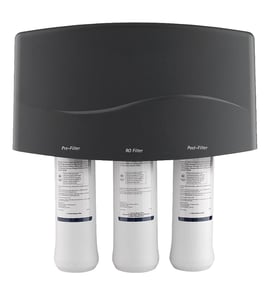




What is the life expectancy of a reverse osmosis system?
For Kenmore reverse osmosis system model 625385750, the system itself commonly lasts 10 to 15 years, while the replaceable treatment components wear out much sooner. Plan on routine filter changes and periodic RO membrane replacement to keep water quality and production rate where they should be (see the 625385750 owner's manual).
Typical lifespan by component
These are the service-life ranges most homeowners see, and they align with the care schedule in the manual.
- Prefilter and postfilter cartridges: replace at least every 6 months (sooner with heavy sediment or chlorine)
- RO membrane cartridge: often 1 to 5 years; higher pH and poor supply water shorten life
- Faucet monitor batteries: replace once per year
- Tank, housings, fittings, shutoff assembly: commonly last many years; replace when leaking, cracked, or not regulating flow/pressure correctly
| Component | What usually ends its life | What you notice first |
|---|---|---|
| Prefilter/postfilter | Clogging, chlorine exposure, exhausted media | Slow flow, taste/odor changes, yellow LED (if equipped) |
| RO membrane | High pH damage, scaling, pinhole leaks | Worse taste, higher TDS, red LED (if equipped) |
| Storage tank | Bladder/air charge issues, internal corrosion | Very little water stored, weak flow at faucet |
What shortens (or extends) RO system life
Water conditions drive lifespan more than the calendar.
- High pH can shorten RO membrane life significantly
- Sediment plugs the prefilter faster and reduces production rate
- Chlorine can damage the RO membrane if the prefilter is overdue
- Soft water generally helps filters and the membrane last longer
- Skipping scheduled changes often causes “chain reaction” wear (a plugged prefilter stresses the membrane)
Why it matters
An RO system can still “run” with worn filters, but it stops performing like an RO system. Staying on the 6‑month filter schedule protects the RO membrane, keeps TDS rejection high, and prevents slow production and bad taste.
Parts that commonly get replaced during service
If you are chasing leaks or doing a rebuild, these model-matched parts are often involved:
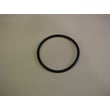
- Water filtration system filter o-ring 7223633 (seals filter housings)
- Kenmore flow control 7199486 (helps regulate drain flow)
- Waterworks reverse osmosis system storage tank 7205326 (restores storage/pressure when the tank fails)
Last updated: January 2026
Why am I thirsty after drinking reverse osmosis water?
Reverse osmosis water from Kenmore model 625385750 can leave you feeling thirsty because the RO membrane is designed to filter out minerals (total dissolved solids) along with impurities; some people notice they do not feel as “quenched” when those minerals are reduced.
What’s happening with RO water
The 625385750 system uses household water pressure to push water through a semi-permeable membrane; clean product water goes to the faucet or storage tank, and minerals and impurities are sent to the drain as waste water. Details and system operation are shown in the 625385750 owner’s manual.
Common reasons you may still feel thirsty:
- Lower mineral content: RO reduces dissolved minerals that can affect taste and perceived hydration.
- Taste change: Very “clean” water can taste flat, so you may drink less than you think.
- High sodium foods or caffeine: These can increase thirst regardless of water type.
- Dry indoor air: Heated or air-conditioned air can make you feel thirsty.
- Not enough total fluids: If you are active, you may simply need more water overall.
Quick checks for the RO system (quality and flow)
If thirst is paired with odd taste, odor, or very slow filling, check the system basics:
- Confirm the system is installed on a proper cold-water supply and within the manual’s supply limits.
- Make sure the storage tank is filling and delivering normally (the manual notes the tank holds over 2 gallons).
- If production is unusually slow, inspect the drain path and flow components; a restriction can affect performance.
- Check for leaks at fittings and housings.
- Replace worn filtration components on schedule; prefilter, postfilter, and membrane wear out over time.
Parts that commonly affect performance
| Symptom | Common area to inspect | Example part for this model |
|---|---|---|
| Slow production, weak flow | Drain flow control path | Kenmore flow control 7199486 |
| Drips or leaks at housings | Seals and housings | Water filtration system filter o-ring 7223633 |
| Low delivery from tank | Storage tank and connections | Waterworks reverse osmosis system storage tank 7205326 |
Why it matters
RO systems are built to reduce total dissolved solids for clearer, better-tasting water; that same mineral reduction can change how the water tastes and how “satisfying” it feels to drink. Keeping filters, seals, and flow components in good shape helps ensure the water quality you expect.
Last updated: January 2026
What is a major problem with reverse osmosis?
A major problem with reverse osmosis (RO) is water waste: to keep the membrane clean and push dissolved solids to the drain, the system produces “reject water” along with purified “product water.” On Kenmore model 625385750, some drain flow during production is normal.
What causes RO “waste water”
RO membranes separate contaminants by sending a portion of incoming water to the drain. That drain stream helps prevent membrane fouling and keeps total dissolved solids (TDS) lower in the drinking water.
Common factors that increase waste or make it seem excessive:
- Low supply pressure reduces production and extends drain time
- High dissolved solids or hard water loads the membrane faster
- Clogged prefilter or postfilter restricts flow
- Leaks at housings or fittings prevent proper shutoff
- A weak storage tank charge causes frequent refills
What to check on Kenmore 625385750
Use the Kenmore 625385750 manual to confirm your system’s pressure and temperature requirements, purge steps, and maintenance intervals. Then check these basics:
- Verify the cold water supply valve is fully open
- Inspect tubing for kinks and loose push-in connections
- Look for drips around filter housings and O-rings
- Confirm the drain line is not blocked or pinched
- Replace filters on schedule to protect the RO membrane
Quick symptom guide
| What you notice | Most likely cause | Best next step |
|---|---|---|
| Constant drain flow even when tank is full | Shutoff not sealing, leak, or tank issue | Check for leaks and tank performance per the manual |
| Very slow faucet flow | Low pressure, clogged filters, or tank issue | Replace filters and verify supply pressure |
| Water tastes “off” or TDS rises | Membrane or filters worn | Replace filters first, then evaluate membrane |
Parts that commonly affect drain flow and shutoff
These model-compatible parts often come into play when waste seems high:
- Kenmore flow control 7199486 (meters reject-water flow to the drain)
- Waterworks reverse osmosis system storage tank 7205326 (stores product water; poor tank performance increases cycling)
- Water filtration system filter o-ring 7223633 (a leak here can prevent proper shutoff)
Why it matters
Reject water is the tradeoff that lets an RO system protect the membrane and maintain water quality. When pressure, filters, or sealing surfaces are off, you waste more water and usually get worse tasting product water.
Last updated: January 2026
How much does it cost to replace RO parts?
For the Kenmore 625385750 reverse osmosis water system, most replacement spending is routine filter changes plus an occasional RO membrane; typical DIY parts costs run about $60 to $200 per year, and a membrane replacement commonly adds about $80 to $200 when needed. Use the 625385750 manual to follow the correct service steps.
Typical cost ranges by part type
Actual prices vary by brand, kit contents, and whether you buy OEM or aftermarket parts.
- Prefilter and postfilter set: $30 to $100
- RO membrane cartridge: $80 to $200
- O-rings, small seals, clamps: $3 to $25
- Tubing and push-in fittings: $10 to $60
- Storage tank (if it fails): $120 to $250
What the manual says to replace and why it affects cost
The manual for model 625385750 calls out regular replacement of the prefilter and postfilter and periodic replacement of the RO membrane based on performance and water conditions (pH, TDS, chlorine exposure). Those intervals drive most of your annual cost.
- Prefilter and postfilter: replace at least every 6 months
- RO membrane: replace when water quality drops or production rate slows after filters are replaced
- Shutoff and sealing parts: replace as needed if you have leaks or shutoff problems
Quick cost comparison table
| Scenario | What you typically replace | Typical parts cost |
|---|---|---|
| Routine upkeep | Prefilter + postfilter | $30 to $100 |
| Taste/odor or high TDS | Prefilter + postfilter, then membrane if needed | $110 to $300 |
| Leak after service | O-ring(s), tubing, fitting(s) | $3 to $60 |
| Major component issue | Storage tank | $120 to $250 |
Model-matched examples that can change your total
These are common “as-needed” items for this Kenmore system.
- Water filtration system filter o-ring 7223633: helps stop drips at the housing after cartridge service
- Kenmore flow control 7199486: affects reject-water flow and overall RO performance
- Waterworks reverse osmosis system storage tank 7205326: higher-cost item if the tank won’t hold pressure
Why it matters
Replacing filters on schedule protects the RO membrane from damage (chlorine is especially hard on membranes) and keeps product-water quality and output steady; that prevents paying for a membrane sooner than necessary.
Last updated: January 2026