


How to reset Jenn-Air wall oven?
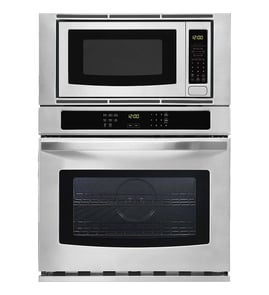
To reset a Jenn-Air wall oven/microwave combo like model JMW2430DS03, turn the oven off, then power-cycle it at the home breaker for about 1 minute and restore power. After power returns, start a Bake cycle and watch for the error to come back.
Quick reset steps (power reset)
- Press Cancel/Off to stop any active cooking cycle.
- Turn OFF the circuit breaker(s) supplying the unit.
- Wait 1 full minute.
- Turn the breaker(s) ON.
- Set a Bake cycle and monitor operation for about 1 minute.
If the display comes back but the oven still will not heat
A reset clears many temporary control glitches, but it will not fix a failed heating or airflow component. Check these common symptoms and likely causes:
- No heat in Bake: failed bake element, wiring issue, or control problem
- Fan runs constantly or unit overheats: cooling fan or temperature-limiting issue
- Intermittent operation: loose harness connection or failing control board
Common parts that can be involved
| Symptom | Part that often relates | Example part for this model |
|---|---|---|
| No heat in Bake | Bake element | Range bake element W11545804 |
| Overheating or shutdown | High-limit thermostat | Range high-limit thermostat WP4449751 |
| Random resets, dead display | Control board/power supply | Control (with power supply) W11179310 |
| Cooling issues | Cooling fan | Cooling fan W11344874 |
Why it matters
A breaker reset restores clean power to the electronic control and can clear a stuck keypad state or temporary error condition. If the same error returns right away, it usually points to a component or wiring problem that needs diagnosis rather than repeated resets.
Last updated: January 2026
What are the disadvantages of a microwave oven combo?
A microwave wall oven combo like the Jenn-Air JMW2430DS03 saves cabinet space, but the tradeoffs are higher purchase and repair costs, more downtime if one section fails, and less flexibility than separate appliances. You also may notice capacity and usability compromises depending on your kitchen layout.
Common disadvantages to plan for
- Higher repair complexity: One chassis houses two appliances, so troubleshooting can involve shared wiring, controls, and cooling.
- More downtime risk: If the microwave section has a failure (for example, a bad microwave door switch W10211972), you may lose microwave use until it is repaired.
- Higher part costs: Key components like an inverter, control, or magnetron can be expensive compared to simpler countertop microwaves.
- Less flexibility in placement: You cannot relocate the microwave independently from the oven.
- Ergonomics: The microwave can end up too high (hard to lift hot liquids) or too low (awkward bending), depending on installation height.
- Capacity tradeoffs: The microwave cavity and oven cavity sizes can be smaller than buying two separate, full-size units.
What this means for repairs and parts
Combo units often use more specialized components than standalone appliances. Here are examples of parts that can drive cost or complexity:
| Area | Example part type | Example part on this model |
|---|---|---|
| Microwave safety/door | Interlock switch | Microwave door switch (W10211972) |
| Microwave power | Magnetron/inverter | Microwave magnetron (W11346197), inverter (W10217711) |
| Oven heating/airflow | Bake element/fan | Range bake element (W11545804), cooling fan (W11344874) |
Why it matters
A combo can be a great space-saver, but it concentrates risk: one built-in cutout, one electrical connection, and tightly packed components. That can mean longer diagnostics, more labor, and more inconvenience compared to separate units.
Last updated: January 2026
How long do Jenn-Air wall ovens last?
Most Jenn-Air wall ovens typically last about 15 years with normal use and basic maintenance; many reach the 12 to 20 year range. For the Jenn-Air JMW2430DS03 wall oven/microwave combo, lifespan depends most on heat stress, ventilation, and keeping key components in good working order.
Typical lifespan (what to expect)
In real-world kitchens, wall oven longevity is driven by how often you bake/roast, how hot you run the oven, and whether cooling airflow stays clear.
- Typical range: 12 to 20 years
- Common “major repair” window: years 8 to 15 (controls, fans, heating)
- Cosmetic parts: can last the full life if cleaned gently
- Electronics: most sensitive to heat and power surges
| Component area | What usually fails first | What it can affect |
|---|---|---|
| Heating system | Bake element | Slow preheat, uneven baking |
| Cooling/airflow | Cooling fan | Overheating, shutdowns |
| Controls | Electronic control board | No heat, error codes, dead display |
| Door system | Door glass, hinges, seals | Heat loss, hot exterior, poor results |
What helps your oven last longer
These steps reduce heat buildup and electrical stress, which are the two biggest lifespan killers for wall ovens.
- Keep vents clear and do not block airflow around the unit
- Avoid slamming the door; it stresses hinges and door glass
- Wipe spills after the oven cools; baked-on spills can damage finishes and create smoke
- Use self-clean sparingly; extreme heat shortens the life of door parts and electronics
- If you have frequent power flickers, use a whole-home surge protector (best option for built-ins)
Parts that commonly impact longevity
When performance drops, replacing the right part often restores normal cooking and prevents secondary damage.
- If preheat is slow or baking is uneven, check the range bake element W11545804
- If the unit overheats or shuts down, check the cooling fan W11344874
- If the oven will not power up or behaves erratically, check the electronic control board WPW10260060
Why it matters
A wall oven that is running hot, struggling to preheat, or cycling incorrectly forces longer cook times and higher internal temperatures; that extra heat load accelerates wear on the control board, wiring, and door components.
Last updated: January 2026
What are common problems with Jenn-Air stoves?
Common Jenn-Air cooking-appliance problems include the oven not heating, uneven baking, a dead or glitchy control panel, and cooling fan or door issues. For the Jenn-Air JMW2430DS03 wall oven/microwave combo, the most frequent fixes involve restoring power, addressing airflow, and replacing failed heating or control components.
Most common symptoms and what they usually mean
- Oven will not heat: failed bake element, high-limit thermostat tripped, or control not sending power
- Uneven baking or slow preheat: convection fan not running, airflow restriction, or weak bake element
- Display is blank or buttons do not respond: control board or power supply issue
- Unit overheats or shuts down: cooling fan problem or high-limit thermostat opening
- Microwave does not start: door interlock switch issue or internal microwave power component failure
Quick checks we recommend before replacing parts
- Reset power: turn the breaker off for 1 minute, then back on (a soft reset clears many control glitches).
- Confirm airflow: keep vents clear; blocked vents can trigger overheating and shutdowns.
- Test a simple bake: preheat to 350°F and note whether heat is steady or cycles off early.
- Check the microwave door close: if the door does not latch firmly, the interlock circuit can prevent operation.
Parts that commonly solve these problems on model JMW2430DS03
| Symptom | Likely part to check | What it does |
|---|---|---|
| Oven not heating | Range bake element W11545804 | Provides primary bake heat in the oven cavity |
| Overheating or thermal shutdown | Range high-limit thermostat WP4449751 | Opens the circuit if temperatures get unsafe |
| Uneven convection cooking | Convection f W10860984 | Circulates hot air for even baking |
| Microwave will not run | Microwave door switch W10211972 | Confirms the door is closed so the microwave can energize |
| Random resets, dead display | Control (with power supply) W11179310 | Manages user interface and power distribution |
Why it matters
Heating and control problems often look similar from the outside, but the correct fix depends on whether the appliance is missing heat, losing power, or shutting down for temperature protection. Matching the symptom to the right component helps avoid repeat failures and unnecessary part swaps.
Last updated: January 2026