
What do numbers on a power drill do?
On the Craftsman 31510514 3/8" electric drill, the numbered ring behind the chuck is the clutch (torque) setting. Higher numbers let the drill apply more turning force before the clutch slips; lower numbers slip sooner to help prevent stripped screws and overdriving.
What the numbers control (and what they do not)
- They control torque limit: how hard the drill will drive before it “clicks” and stops applying force.
- They help with consistency: repeatable screw depth across multiple fasteners.
- They protect materials: reduces cam-out, stripped screw heads, and damaged soft wood.
- They do not set RPM: speed is usually controlled by the trigger and any high/low gear switch.
- They do not change motor power: they change when the clutch disengages.
Quick starting points for common tasks
Use these as a baseline, then adjust up or down based on screw size and material.
| Task | Typical clutch range | Tip |
|---|---|---|
| Driving small screws into softwood | 3 to 8 | Stop when the head is flush |
| Driving medium screws into wood | 8 to 14 | Increase if the clutch slips early |
| Driving large screws or lag-style fasteners | 14 to max | Pre-drill to reduce splitting |
| Drilling holes (not driving screws) | Drill mode or max | Use steady pressure, moderate speed |
How to set it correctly
- Start at a low number.
- Drive a test screw.
- If the clutch slips before the screw seats, increase 1 to 3 numbers.
- If the screw overdrives or strips, decrease the setting.
Why it matters
Using the right clutch setting helps your Craftsman drill drive fasteners cleanly, protects the workpiece, and reduces wear on the chuck and bit.
For electrical troubleshooting (no power, intermittent running), use a meter and safe testing practices like in how to use a multimeter to test electrical parts video.
Last updated: February 2026
How to replace drill bit in power drill?
To replace the drill bit on your Craftsman 31510514 3/8" electric drill, loosen the chuck, remove the old bit, fully seat the new bit, then tighten the chuck evenly so the bit runs straight and does not slip under load.
Steps to change the bit (keyed or keyless chuck)
- Unplug the drill (corded) before touching the chuck or bit.
- Open the chuck:
- Keyless chuck: hold the rear sleeve and turn the front sleeve counterclockwise.
- Keyed chuck: insert the chuck key and turn counterclockwise in each keyhole position.
- Remove the old bit.
- Insert the new bit shank fully, then pull it back out about 1/16 inch so it is not bottomed out.
- Tighten the chuck:
- Keyless: hand-tighten firmly; then give it an extra snug twist.
- Keyed: tighten in all 2 to 3 keyholes so the jaws clamp evenly.
Quick checks if the bit wobbles or slips
- Make sure the bit is centered between the jaws (not clamped on one jaw edge).
- Tighten the chuck more; most slipping is from under-tightening.
- Clean the jaws and bit shank; oil, rust, or sawdust can cause slipping.
- Use the right bit shank type (round shank for most drill bits; hex shank bits can also work in many chucks).
- If the chuck jaws look rounded or won’t grip, the chuck may be worn.
Keyed vs. keyless: what’s different?
| Chuck type | How you loosen/tighten | Most common issue |
|---|---|---|
| Keyless | Twist by hand | Not tightened enough |
| Keyed | Use chuck key in each hole | Tightened in only one hole |
Why it matters
A properly tightened chuck protects the motor and gears, keeps the bit from walking, and helps you drill cleaner holes in wood, metal, and plastic with less vibration.
For general electrical troubleshooting tools and testing tips, see how to use a multimeter to test electrical parts video.
Last updated: February 2026
What are the parts of a power drill?
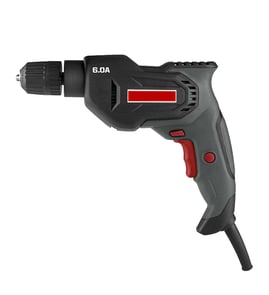
A Craftsman 31510514 3/8-inch electric drill is built around a motor that spins a chuck to hold and drive the bit; the trigger and switchgear control speed and direction, while the housing, cord, and internal wiring deliver power safely.
Main parts you will typically find
- Motor: converts electrical power into rotation
- Chuck: clamps the drill bit or driver bit (often keyed or keyless)
- Trigger switch: turns the drill on and varies speed (variable-speed triggers are common)
- Forward/reverse switch: changes rotation direction for drilling vs. backing out screws
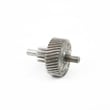
- Gear train/gearbox: transfers motor power to the chuck; may change speed/torque
- Power cord and strain relief: supplies power and protects the cord where it enters the handle
- Housing, handle, and vents: protects internal parts and helps manage heat
What each part does (quick reference)
| Part | What it does | Common symptom when it fails |
|---|---|---|
| Motor | Creates rotation | No power, weak power, burning smell |
| Trigger switch | Controls on/off and speed | Runs only at one speed, cuts out |
| Forward/reverse switch | Changes direction | Stuck in one direction, intermittent run |
| Chuck | Holds the bit | Bit slips, wobble/runout |
| Cord/strain relief | Delivers power safely | Works only when cord is moved |
Why it matters when ordering or troubleshooting
Knowing the drill’s major assemblies helps you narrow a problem fast. For example, a slipping bit points to the chuck, while a drill that only runs when you wiggle the cord points to the cord, strain relief, or internal wire connections.
Basic safety checks we recommend first
- Unplug the drill before inspecting anything
- Check the cord for cuts, kinks, or a loose plug
- Confirm the chuck jaws tighten evenly and the bit is seated straight
- Smell for overheating (a strong burnt odor often indicates motor or switch trouble)
- If you’re testing electrical continuity, use a meter correctly and safely
For step-by-step electrical testing basics, use our guide: how to use a multimeter to test electrical parts video.
Last updated: February 2026
What's the difference between a power drill and a power driver?
A power drill like the Craftsman 31510514 3/8-inch electric drill is built to drill holes and also drive screws with controlled speed and adjustable torque (when using a clutch-equipped drill/driver). A power driver (most often an impact driver) is built primarily for driving fasteners with higher torque and rapid impacts.
Quick comparison
| Feature | Power drill | Power driver (impact driver) |
|---|---|---|
| Main job | Drilling holes; light to moderate screw driving | Driving screws/lag bolts; removing stubborn fasteners |
| Bit holding | 3-jaw chuck (keyed or keyless) | 1/4-inch hex quick-change collet |
| Torque feel | Smooth, steady rotation | Pulsing impacts when load increases |
| Best for | Wood/metal/plastic drilling; general DIY | Long screws; deck screws; tough fasteners |
How to choose for your job
- Choose a drill when you need clean, accurate holes (twist bits, spade bits, hole saws) and controlled starting.
- Choose an impact driver when you need to drive lots of fasteners quickly or you keep stripping screw heads.
- For delicate work (small screws, soft materials), a drill with lower speed and better control is usually easier to manage.
- For heavy fastening (ledger screws, long structural screws), an impact driver reduces wrist twist and stalls less.
- If you only want one corded tool for basic home projects, a 3/8-inch drill like model 31510514 covers the widest range of tasks.
Why it matters
Using the right tool helps prevent stripped screws, broken bits, overheated motors, and damaged workpieces. It also improves safety and accuracy, especially when drilling into metal or driving long fasteners into dense lumber.
Helpful DIY reference
For safe electrical troubleshooting steps (for example, if a corded drill will not power on), use how to use a multimeter to test electrical parts video.
Last updated: February 2026
Is 50 nm torque enough for a drill?
Yes. 50 N·m is enough torque for most household drilling and screwdriving, especially in wood, drywall, and light-duty fastening. For a Craftsman model 31510514 3/8-inch electric drill, torque is usually less important than speed control, bit choice, and using the right pilot hole.
What 50 N·m is good for
In real use, 50 N·m typically covers most common DIY tasks:
- Driving medium to long wood screws into softwood and many hardwoods (with a pilot hole)
- Installing cabinet hardware, hinges, and general fasteners
- Drilling holes with twist bits and many spade bits (within the drill’s capacity)
- Light-duty masonry work (only if you are using the correct bit and the drill is rated for it)
When 50 N·m may not be enough
You usually need more torque (or a different tool) for heavy fastening and high-resistance materials:
- Large lag screws or structural fasteners
- Big hole saws, large auger bits, or self-feed bits
- Repeated drilling in dense hardwood without pilot holes
- Mixing thick materials (thinset, mortar) where a mixing drill is the right choice
Torque vs. tool type (quick guide)
| Task | 50 N·m drill/driver | Better choice if it struggles |
|---|---|---|
| General screwdriving | Works well | Impact driver for long screws |
| Large holes in wood | Sometimes | Higher-torque drill or right-angle drill |
| Concrete/masonry drilling | Limited | Hammer drill/rotary hammer |
| Heavy mixing | Not ideal | Mixing drill |
Why it matters
Torque is only one part of performance. For corded drills like the Craftsman 31510514, real-world results often come down to controlling speed, preventing bit slip, and reducing load with pilot holes.
Tips to get better results (even with “enough” torque)
- Drill a pilot hole for long screws or hardwood
- Use sharp bits and the correct driver bit size to prevent cam-out
- Run slower speeds for larger bits; faster speeds for small bits
- If the drill bogs down, reduce pressure and clear chips more often
- If you suspect an electrical issue (intermittent power, burning smell), use how to tell if a fuse is blown as a quick diagnostic starting point
Last updated: February 2026