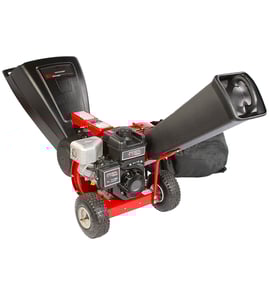

What are the common problems with chipper machines?
Common problems with chipper machines like the Ww CHIPPEWA3 chipper/shredder are jams from wet or oversized material, poor chipping from dull blades, chute clogs, and drive issues (belt or fastener loosening) that cause vibration, noise, or the rotor not turning. Most problems improve with correct feeding and routine inspection.
Most common chipper/shredder issues we see
- Jams at the hopper or rotor: usually caused by feeding too fast, crooked branches, vines, or wet leaves.
- Clogged discharge chute: common when shredding damp material or when buildup narrows the chute.
- Poor performance (won’t pull material in, makes stringy chips): typically dull or damaged cutting edges.
- Excessive vibration or rattling: loose hardware, missing washers, or worn fasteners.
- Rotor turns slowly or stops under load: drive system slipping, binding, or overloaded feed.
- Hard starting or stalling (gas units): old fuel, dirty air filter, or restricted fuel flow.
Quick checks and safe fixes
Before any inspection or clearing, shut the machine off, let all moving parts stop, and disconnect the spark plug wire.
- Clear packed debris with a stick, never hands.
- Feed branches butt-end first; avoid vines, fabric, rocks, and muddy roots.
- Let the engine reach full speed before feeding.
- Tighten loose fasteners; replace damaged lock nuts and washers.
- If a nut keeps backing off, use a new locking fastener such as a troy-bilt whiz nut 1186389.
Symptoms and likely causes
| Symptom | Most likely cause | What to do first |
|---|---|---|
| Chute plugs repeatedly | Wet material, buildup | Clean chute; feed drier material |
| Loud knocking or shaking | Loose hardware | Inspect and tighten; replace lock nuts |
| Won’t self-feed | Dull cutting edges, overfeeding | Slow feed rate; inspect cutting system |
| Stops when branch enters | Overload, binding | Reduce branch size; check for jams |
Why it matters
A jammed or vibrating chipper/shredder can damage the cutting system and drive components quickly. Keeping fasteners tight and feeding correctly helps protect the rotor, reduces downtime, and improves chip quality.
For replacement parts for your Ww CHIPPEWA3, use the parts list for this model, or search by model number on Sears PartsDirect.
Last updated: February 2026
What is the difference between a chipper shredder and a chipper shredder?
There is no difference in the terms as written; “chipper shredder” and “chipper shredder” mean the same thing. For the Ww CHIPPEWA3 chipper/shredder, the real distinction is between chipping (woody branches into chips) and shredding (leaves and light yard waste into finer mulch).
Chipper vs. shredder: what each function is for
- Chipper function: Feeds branches and woody stems; output is chunkier wood chips for mulch paths and beds.
- Shredder function: Breaks down leaves, small twigs, and green yard waste; output is finer material that composts faster.
- Chipper/shredder combo: One machine that does both jobs, often using different feed areas or different material limits.
- Best results: Chip dry, woody material; shred leafy material that is not soaking wet.
- Safety first: Always use eye protection and keep hands out of the feed chute; Sears PartsDirect carries protective gear and replacement parts.
Quick comparison
| Feature | Chipper | Shredder |
|---|---|---|
| Best for | Branches, woody stems | Leaves, small twigs, garden debris |
| Output | Coarser chips | Finer mulch/compost material |
| Typical use | Mulching and volume reduction | Composting and bag reduction |
Why it matters
Using the right function for the material helps prevent clogs, reduces strain on the cutting system, and improves cut quality. It also helps you choose the right maintenance parts and safety accessories for your CHIPPEWA3.
Parts and safety items we commonly see used with this model
If you are stocking up for routine use or maintenance, these are common add-ons customers choose:
- Troy-bilt goggles 5003 for eye protection while chipping and shredding
- Fasteners such as whiz nuts and lock nuts (match by size and application in the parts list)
- Washers and lockwashers for vibration-prone mounting points
Last updated: February 2026
What not to put in a wood chipper?
For the Ww CHIPPEWA3 chipper/shredder, never feed anything that can shatter, wrap, or contaminate the cutting system. Avoid metal, rocks, plastic, rubber, pet waste, and treated or painted wood; these can damage the chipper knives and create dangerous kickback or flying debris.
Materials to keep out of the chipper
- Metal of any kind (nails, screws, wire, fencing, chain)
- Rocks, dirt clods, gravel, and soil-covered roots
- Plastic, rubber, fabric, rope, and twine (they wrap and jam)
- Pressure-treated, painted, or chemically treated lumber
- Wet leaves, grass, vines, and stringy plant material (common cloggers)
- Kitchen scraps and compostables (they smear and plug the chute)
- Poisonous plants and pet waste (health and cleanup risk)
Quick pre-check before you feed branches
- Inspect branches for embedded hardware (especially old fence-line wood).
- Knock off mud and stones; feed only clean, woody material.
- Cut off long vines and remove stringy bark strips that can wrap.
- Feed butt-end first and stand to the side of the infeed.
Why these items are a problem
| Material type | What it does | Typical result |
|---|---|---|
| Hard objects (metal, rocks) | Chips or cracks cutting edges | Dull knives, vibration, broken parts |
| Wrap-prone items (rope, vines) | Binds rotating parts | Jams, belt/shaft stress |
| Wet/soft debris (grass, scraps) | Packs into the chute | Clogging, poor discharge |
| Treated/painted wood | Adds chemicals and grit | Faster wear, messy chips |
Why it matters
Keeping the feed material clean and woody protects the cutting system, reduces jams, and helps the CHIPPEWA3 run at full capacity with safer, more predictable feeding.
Helpful safety gear and parts
We recommend using proper eye protection every time you chip. If you need replacement safety gear or hardware for your setup, you can order parts from the list for this model or search by model number on Sears PartsDirect. For example, consider troy-bilt goggles for eye protection.
Last updated: February 2026
Why has my garden shredder stopped working?
If your Ww CHIPPEWA3 garden shredder (chipper/shredder) stopped working, the most common causes are a jam or overload, a safety interlock not being satisfied (hopper or cover not fully secured), or an electrical supply problem (blown fuse, tripped breaker, bad cord). Start with a safe jam check and verify all guards are locked in place.
Safety first (before troubleshooting)
- Shut the machine off and let all moving parts stop completely.
- Disconnect power (unplug electric units; remove the spark plug wire on gas units).
- Wear eye protection; we recommend troy-bilt goggles.
- Keep hands out of the chute; use a stick or tool to clear debris.
- Do not bypass safety switches or interlocks.
Quick checks that fix most “stopped working” issues
- Clear a blockage: Open the access area and remove packed wet leaves, vines, or chips that can lock the drum/impeller.
- Confirm the hopper and covers are fully seated: Many shredders will not run unless the hopper, chute, or service cover is latched.
- Reset power protection: Check the outlet, reset the breaker/GFCI, and replace any blown fuse.
- Inspect the extension cord (electric models): Use a heavy-duty outdoor cord; undersized cords can cause voltage drop and shutdown.
- Check for overload: Feed smaller branches, avoid wet material, and let the machine recover between heavy loads.
What to look for: symptom-to-cause guide
| What you notice | Most likely cause | What to do next |
|---|---|---|
| Motor hums but won’t spin | Jammed drum/impeller | Disconnect power; clear debris; check for bent material wedged in |
| Runs briefly then stops | Overload or voltage drop | Reduce feed rate; use proper cord; try a different circuit |
| Completely dead, no sound | No power or safety interlock open | Verify outlet/breaker; re-seat hopper/cover; check switch action |
| Trips breaker/GFCI | Shorted cord, moisture, overload | Dry unit; inspect cord; clear jam; try again on a known-good outlet |
Why it matters
A chipper/shredder that stops mid-use is usually protecting itself (jam, overload, or interlock). Clearing the cause quickly prevents motor damage, reduces nuisance breaker trips, and helps you avoid unsafe “reach-in” clearing.
Parts and supplies that help
- Eye protection for clearing jams and test runs: troy-bilt goggles
- If you need additional replacement hardware or safety items for CHIPPEWA3, order from the parts list for your model or search by model number on Sears PartsDirect.
Last updated: February 2026
What are the parts of a grinder?
On the Ww CHIPPEWA3 chipper/shredder (grinder assembly), the “grinder” section is made up of the cutting and drive components that pull material in and reduce it, plus the fasteners and safety gear that keep everything secure. On this model’s parts list, common items you will see include lock nuts, whiz nuts, lock washers, and protective goggles.
Common grinder components you will see
Most grinders and chipper/shredders use a similar set of core parts and subassemblies:
- Feed chute or hopper (guides branches and debris into the cutting area)
- Cutting system (blade, knife, flail, or hammer style cutters depending on design)
- Rotor or flywheel (spins the cutters)
- Spindle or shaft (supports the rotor and transfers torque)
- Bearings and seals (support rotation and keep debris out)
- Housing and discharge area (contains debris and directs chips)
- Fasteners and retainers (nuts, lock nuts, lock washers) that keep rotating parts tight
Parts on this model’s list that support safe, secure operation
These parts are typically used to keep guards, covers, and rotating assemblies properly fastened:
If you are replacing hardware, match the original style (flange, locking, or serrated) and tighten to the correct fit so vibration does not loosen it.
Quick guide: what each part type does
| Part type | What it does | Why it’s used on grinders |
|---|---|---|
| Whiz nut (flange nut) | Adds built-in washer surface | Helps resist loosening from vibration |
| Lock nut | Uses locking feature to hold tension | Helps keep guards and rotating parts secure |
| Lock washer | Adds spring tension under a nut/bolt | Helps maintain clamp load |
| Safety goggles | Protects eyes from chips and dust | Reduces injury risk during operation |
Why it matters
A chipper/shredder’s cutting system creates constant vibration. Using the correct locking hardware and keeping guards secured helps prevent loosening, rattles, and unsafe operation. For ordering additional hardware or safety items by model number, use the parts list for CHIPPEWA3 or search on Sears PartsDirect.
Last updated: February 2026