 Owner’s manual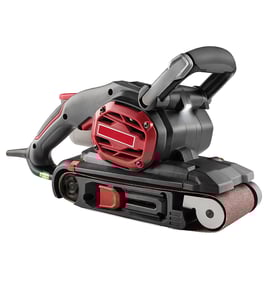

What size belt does a Craftsman belt sander take?
The Craftsman 3 x 21 inch belt sander model 900117220 uses a 3" x 21" sanding belt (about 76 x 533 mm). For best results and safe operation, match the belt size and install it in the correct direction as shown in the owner's manual.
Correct belt size for model 900117220
Use only belts that match these dimensions:
- Belt width: 3 inches (76 mm)
- Belt length: 21 inches (533 mm)
- Type: sanding belt for a 3 x 21 belt sander
- Grit: choose based on the job (coarse for fast removal, fine for finishing)
| What you’re choosing | Common options | Best for |
|---|---|---|
| Belt size | 3" x 21" | Required fit on the rollers |
| Grit range | 40 to 150 (typical) | Material removal to finishing |
| Abrasive type | Aluminum oxide, zirconia (typical) | General woodwork to heavier sanding |
How to confirm fit and install the belt
A 3" x 21" belt should slide over the front and rear rollers and tension correctly when you reset the tension lever.
- Unplug the sander before changing the belt
- Release belt tension using the tension lever
- Install the new 3" x 21" belt over both rollers
- Align the belt direction arrows with the sander’s arrow
- Re-tension the belt, then check tracking before sanding
Why it matters
Using the correct 3" x 21" belt size helps the belt track properly, reduces rubbing against the housing, and prevents premature belt wear or poor sanding performance. Correct size and tracking also help protect the motor from overload.
Last updated: February 2026
What are the main parts of a belt sander?
On the Craftsman 900117220 3 x 21 inch belt sander, the main parts are the sanding belt and rollers that move it, the belt tension and tracking controls that keep it running straight, and the handle, switch, and dust collection parts that let you control the tool safely and cleanly (see the owner's manual).
Main parts you will see on this model
- Sanding belt (3 inch x 21 inch): the abrasive belt that does the cutting
- Front and rear rollers (drums): the two rollers the belt rides on
- Belt tension release lever: releases and re-applies belt tension for belt changes
- Belt tracking adjustment: keeps the belt centered on the rollers during operation
- Belt cover (front belt cover): can be raised or lowered for access and certain sanding positions
- Handle with locking arm: adjusts position and locks for control
- On/off switch with lock-on button: starts the motor; lock-on supports continuous running
- Dust exhaust port and dust bag (or vacuum adaptor): collects sanding dust and grit
What each part does (quick reference)
| Part | What it does | Common symptom when it has an issue |
|---|---|---|
| Belt tension lever | Lets you remove/install the belt and re-tension it | Belt slips, won’t install easily, or won’t tension consistently |
| Tracking adjustment | Centers the belt on the rollers | Belt walks off to one side or rubs the housing |
| Rollers | Drive and support the belt | Belt chatters, tracks poorly, or shows uneven wear |
| Dust bag / exhaust port | Captures dust and helps keep airflow clear | Excess dust, clogged port, hotter running tool |
Why it matters
Knowing these parts helps you troubleshoot fast. For example, a belt that drifts is usually a tracking issue, while a belt that won’t stay tight points to the tension lever or belt installation.
Practical tips when inspecting or servicing
- Unplug the sander before changing the belt, adjusting the cover, or checking tracking.
- Match the belt size to this model: 3 inch x 21 inch (76 x 533 mm).
- Install the belt so the direction arrows on the belt match the tool’s arrow.
- Check tracking briefly with the tool supported and controlled; adjust until the belt runs centered.
- Use dust collection; empty the dust bag regularly and keep vents clear.
Last updated: February 2026
Why is my belt sander not tracking straight?
On the Craftsman 900117220 3 x 21" belt sander, belt tracking is corrected with the tracking adjustment knob. If the belt walks outward, turn the knob clockwise; if it walks inward, turn it counterclockwise. Proper tracking also prevents the belt from rubbing the housing.
Quick fix: set tracking the way the manual specifies
We recommend using the manual’s method so you can see the belt position while it runs briefly:
- Turn the sander upside down and hold it firmly with one hand.
- Start the motor and release the switch immediately after you observe belt movement.
- If the belt runs outward, turn the tracking knob clockwise.
- If the belt runs inward, turn the tracking knob counterclockwise.
- Recheck after each small adjustment.
- Keep the belt edge about 7/64" to 13/64" (2.7 to 5.1 mm) from the housing.
For the exact knob location and illustrations, use the owner's manual.
Common causes when tracking keeps drifting
If you have to constantly readjust, one of these is usually the reason:
- Belt installed backwards (arrows on the belt must match the sander’s direction arrow)
- Belt not fully tensioned after installation (tension lever not locked back)
- Worn, stretched, or low-quality sanding belt
- Dust buildup around rollers or inside the belt cover area
- Uneven pressure while sanding (pushing hard on one side)
Belt install checklist (fast verification)
| Check | What “right” looks like | What happens if it’s wrong |
|---|---|---|
| Belt size | 3" x 21" (76 x 533 mm) | Poor tracking, slipping, or stalling |
| Belt direction | Arrows match tool direction | Belt walks, grabs, or frays |
| Tension lever | Lever fully set to tension | Belt wanders and overheats |
| Tracking gap | 7/64" to 13/64" from housing | Belt rubs housing and wears fast |
Why it matters
Correct tracking extends belt life and protects the sander housing. A belt that rubs the housing can fray quickly, run hot, and leave uneven sanding marks on wood, veneer, or paint removal projects.
Last updated: February 2026
Why did my belt sander suddenly stop working?
If your Craftsman 900117220 3 x 21 inch belt sander suddenly stops, the most common causes are a jammed or mis-tracking sanding belt, an overloaded motor from pushing too hard, or restricted cooling vents. Unplug the tool first, then check belt tension, belt direction, and airflow per the owner's manual.
Quick checks (fastest fixes first)
- Unplug the sander; then inspect the cord and plug for cuts, loose prongs, or burn marks.
- Remove the sanding belt and confirm it is 3 inch x 21 inch (76 x 533 mm).
- Reinstall the belt so the arrows on the belt match the arrows on the sander.
- Use the tension lever to fully release and then re-tension the belt.
- Clear dust from cooling vents and internal ducts with a clean, dry paint brush.
- If the tool feels hot, run it without load for 2 minutes to cool the motor.
What typically causes a sudden stop
| Symptom | Likely cause | What to do |
|---|---|---|
| Stops when you apply pressure | Overload from excessive force | Let the tool do the work; use lighter pressure and a coarser grit if needed |
| Runs but belt does not move | Belt slipped, installed backward, or not tensioned | Reinstall belt, match arrow direction, re-tension with lever |
| Stops and feels very hot | Overheating from load or blocked vents | Clean vents, cool down by running no-load |
| Stops intermittently | Worn cord, switch issue, or internal wiring | Inspect cord; if damage is found, stop using and have it serviced |
Safe reset and belt reinstallation steps
- Turn the switch off and unplug the sander.
- Pull the tension lever to release the belt.
- Remove the belt from both rollers.
- Install a new belt on the front and rear rollers; match arrow direction.
- Push the lever back to tension the belt.
Why it matters
A belt sander that stalls is usually telling you the belt is binding or the motor is being overloaded. Correct belt tension and clear airflow prevent overheating, protect the motor, and improve sanding results.
Last updated: February 2026