Installation guide
 Owner’s manual

How to reset KitchenAid oven after power outage?
For the KitchenAid KEMC307KSS05 wall oven/microwave combo, a power outage typically triggers a power-failure message (such as “PF id = 27” or “PF id = 30”). To reset normal operation, press LOWER OVEN CANCEL to clear the display, then reset the clock if needed using the steps in the KEMC307KSS05 owner's manual.
What you should see after power is restored
When power is first supplied, the control display(s) usually:
- Light up for about 5 seconds
- Show “PF id = 27” or “PF id = 30” to indicate a power failure
- Return to normal once you clear the message
If you see “Err”, it usually means an invalid pad was pressed; press LOWER OVEN CANCEL and re-enter your selection.
Reset steps (control panel)
Use these steps to get the lower oven controls back to a ready state:
- Press LOWER OVEN CANCEL once to clear the PF message
- Wait a few seconds for the display to return to the time-of-day or blank (inactive) mode
- Reset the clock if the time is wrong
- Re-enter your cooking mode and press START within 5 seconds when prompted
Clock reset (time of day)
| Task | What to do |
|---|---|
| Set the clock | Touch CLOCK SET•START, enter time with number pads, then touch CLOCK SET•START (or START) |
| Hide time of day | Touch and hold CLOCK SET•START for 5 seconds |
| Show time of day again | Touch CLOCK SET•START |
Important notes that affect “reset” behavior
These situations can make it seem like the oven did not reset, even though it did:
- Cooling fan keeps running: the fan may continue after you press LOWER OVEN CANCEL depending on oven temperature
- Control Lock is on: when locked, only clock and timer pads work; unlock Control Lock before trying to bake
- Sabbath Mode was enabled: Sabbath Mode can remain on after a power failure if it was set before the outage; turn it off by pressing and holding the 6 pad for about 5 seconds
Why it matters
Clearing the PF message and resetting the clock restores normal control logic for timed cooking, delay start, and accurate temperature cycles. It also helps you avoid canceled settings if START is not pressed within the allowed time window.
Last updated: January 2026
What is the PF code on the KitchenAid Superba oven?
On the KitchenAid KEMC307KSS05 wall oven/microwave combo, the PF code means the control detected a power failure or the oven was powered up for the first time. Clear it by pressing LOWER OVEN CANCEL, then reset the clock if needed (see the KEMC307KSS05 owner's manual).
What you should do when PF appears
- Press LOWER OVEN CANCEL to clear the message.
- Check whether the time of day is correct; reset the clock if it is flashing or incorrect.
- If PF returns repeatedly, check for a loose power cord connection (if accessible) or a tripped breaker.
- If the oven was baking when power dropped, verify food safety and restart cooking as needed.
What you might see on the display
On this model, PF can appear with an ID number.
| Display message | What it means | What to do |
|---|---|---|
| PF | Power interruption or first power-up | Press LOWER OVEN CANCEL |
| PF ID = 27 | Power interruption or first power-up | Press LOWER OVEN CANCEL, reset clock |
| PF ID = 30 | Power interruption or first power-up | Press LOWER OVEN CANCEL, reset clock |
Why it matters
PF is a normal “power was interrupted” indicator, but it can also be a clue that the oven is losing power intermittently. Clearing the code and confirming stable power helps prevent interrupted cooking, incorrect timed cooking, and clock or timer issues.
Last updated: January 2026
What is the life expectancy of a KitchenAid oven?
A KitchenAid built-in oven typically lasts 15 years with normal household use and basic maintenance. For the KitchenAid KEMC307KSS05 wall oven and microwave combo, keeping vents clear, using correct cookware, and fixing heating or door issues early helps you reach that expected lifespan.
Typical lifespan and what affects it
Most electric wall ovens reach about 15 years; heavy use, high-heat cooking, and skipped maintenance can shorten that.
- Usage frequency: daily baking and broiling wears elements and controls faster
- Heat management: blocked cooling airflow increases stress on electronics
- Door seal and hinges: heat loss forces longer run times
- Power quality: surges can damage the touch control system
- Cleaning habits: harsh cleaners and moisture can damage finishes and wiring
Quick maintenance checklist (high impact)
Use these habits to get the full service life from your KEMC307KSS05:
- Keep the oven and microwave cooling vents unobstructed
- Avoid slamming the oven door; protect hinges and glass
- Wipe spills after the oven cools to reduce smoke and overheating
- If baking temps seem off, test and replace the temperature sensor if needed
- Replace failed lights and worn parts promptly to prevent secondary damage
Common “end-of-life” symptoms vs. fixable problems
Many issues that feel like “the oven is dying” are normal wear parts.
| Symptom | Common cause | Often fixable with |
|---|---|---|
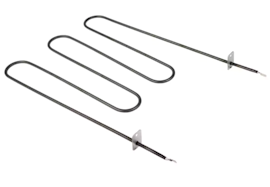
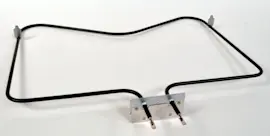
| Oven not heating or weak heat | Failed bake element | Bake element 4451175 |
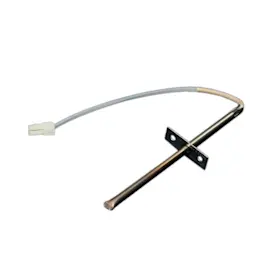
| Food overcooks or undercooks | Temperature sensor drifting | Wall oven temperature sensor WPW10131825 |
| Microwave runs then stops or will not start | Door interlock issue | Microwave door interlock switch W10211972 |
| Unit goes dead intermittently | Blown fuse or overheating | Fuse (black) WP4375321 |
Why it matters
Knowing the 15-year typical life expectancy helps you decide whether to repair or replace. If your KEMC307KSS05 is near that age, focusing on high-wear parts (elements, sensors, door components) usually restores performance at a reasonable cost.
For model-specific care and operating guidance, follow the KEMC307KSS05 owner's manual.
Last updated: January 2026