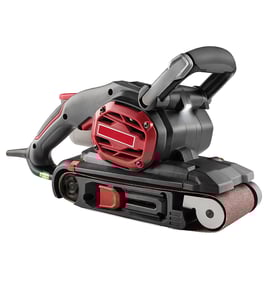

How to use a power sander?
To use a Craftsman disc sander model 113225933, we keep the workpiece flat on the table, start the sander, then guide the material into the sanding disc with light, steady pressure. Let the abrasive do the cutting; we control the angle and contact, not the force.
Safe setup before sanding
- Unplug the sander before changing discs, adjusting the table, or checking guards.
- Wear eye protection and a dust mask; sanding dust is fine and fast-moving.
- Use dust collection if your setup supports it; keep the area clear of sawdust piles.
- Confirm the sanding disc is firmly attached and not torn, bubbled, or loose.
- Set the table square (or to your target bevel) and tighten all knobs.
How we sand (step-by-step)
- Mark the surface with pencil lines so we can see progress.
- Start the sander and let it reach full speed.
- Hold the workpiece with both hands and keep it supported on the table.
- Feed the work into the disc gently, using smooth back-and-forth motion to avoid grooves.
- Lift off the disc to check fit often; stop when the marks disappear evenly.
Pressure, grit, and results
| Goal | Typical grit range | What we do |
|---|---|---|
| Fast stock removal | 60 to 80 | Light pressure, short passes, frequent checks |
| General smoothing | 100 to 150 | Longer passes, keep the piece moving |
| Finish prep | 180 to 220 | Very light pressure, avoid heat buildup |
Common mistakes to avoid
- Pushing hard (causes burning, glazing, and uneven sanding).
- Holding the work in one spot (creates dips and flat spots).
- Sanding tiny parts freehand (use a jig, clamp, or a larger carrier board).
- Ignoring heat (if it feels hot, back off and let it cool).
Why it matters
Disc sanders remove material quickly; good technique prevents out-of-square edges, gouges, and overheated wood or plastic. Light pressure and constant movement give the straightest, cleanest results.
For tool and safety basics that apply to most DIY repairs and setups, we recommend reviewing are diy appliance repairs safe.
Last updated: February 2026
What is the procedure to replace the belt on the belt sander?
To replace the sanding belt on your Craftsman 113225933 belt and disc sander, unplug the tool, loosen the belt tension using the two tension-adjusting screws (with 1/2-inch wrenches), slip the old belt off the drums, install the new belt, then re-tension evenly so the belt runs straight.
Safety and prep
- Unplug the sander before removing covers or touching the belt
- Remove workpieces and clear the table area
- Keep fingers clear of pinch points at the drums
- Do a short test run after reassembly
- Stop immediately if the belt tries to climb off a drum
Belt replacement steps (Craftsman 113225933)
- Disconnect power and place the sander on a stable surface.
- Access the belt area by removing any belt guard/cover that blocks the belt path.
- Loosen belt tension:
- Use two 1/2-inch wrenches on the tension-adjusting screws.
- Back the screws off evenly to relieve tension.
- Remove the old belt by sliding it off the front and rear drums.
- Install the new belt over both drums, keeping it centered by hand.
- Re-tension the belt:
- Pull the wrenches toward you (to stretch/tighten) and tighten both adjusting screws.
- Tighten evenly so the belt stays aligned.
- Test run briefly and recheck alignment and tension; adjust both screws in small, equal changes if the belt drifts.
Quick adjustment guide
| What you see | What to change | Result |
|---|---|---|
| Belt feels loose or slips | Increase tension evenly on both screws | Better grip, less stalling |
| Belt drifts to one side | Rebalance tension (small, equal changes) | Straighter belt run |
| Belt frays quickly | Check belt centering and drum edges | Longer belt life |
Why it matters
Correct, even tension keeps the belt running straight on the drums, reduces vibration, and prevents premature belt wear on your Craftsman 113225933.
For general electrical troubleshooting on power tools (if the motor will not run after reassembly), use our how to use a multimeter to test electrical parts video.
Last updated: February 2026
Is a 4x36 belt sander good for knife making?
Yes; a 4x36 belt sander works for knife making, but it is best for profiling, handle shaping, and light bevel work because belt speed, platen size, and power limit heavy stock removal compared with a 2x72 grinder. On Craftsman model 113225933, you are working with a larger belt-and-disc setup than a 4x36, so it removes material faster and tracks more steadily.
What to expect from a 4x36 vs. your Craftsman 113225933
A 4x36 is a common entry-level size; the 113225933 is a belt-and-disc sander with a larger belt, which changes performance.
- 4x36 belt sander: slower grinding, shorter belt heats up sooner, smaller platen area
- Craftsman 113225933: larger belt runs cooler and lasts longer per belt, better for flattening and controlled grinding
- 2x72 grinder: fastest stock removal, best control for long, even bevels, widest belt selection
| Tool type | Best for knife work | Main limitation |
|---|---|---|
| 4x36 belt sander | Profiles, handles, light bevels | Slow stock removal, heat buildup |
| Craftsman 113225933 belt-and-disc | Profiles, bevel shaping, flattening, handle work | Still slower and less precise than a 2x72 |
| 2x72 grinder | Bevels, plunge lines, fast shaping | Higher cost, more setup |
Belt choice and grit progression that works
Using the right abrasive matters more than pushing harder.
- Use ceramic or zirconia belts for steel; they cut faster and cooler than aluminum oxide
- Start coarse for shaping (36 to 60 grit), then refine (80 to 120), then prep for hand sanding (220 to 400)
- Change belts as soon as cutting slows; dull belts create heat and waste time
Technique and safety tips for better results
- Quench often in water to control heat, especially near the edge
- Use steady, moderate pressure; forcing the grind overheats steel and loads the belt
- Keep the platen and disc face clean and flat; grooves and buildup telegraph into the bevel
- Grind with good lighting and a consistent reference (scribe line or layout dye) for symmetry
Why it matters
Knife grinding is mostly heat control and repeatability. A 4x36 can make good knives, but a larger belt sander like the Craftsman 113225933 gives you more belt life, cooler grinding, and better control for shaping and bevel work.
For general power-tool repair safety practices, use are diy appliance repairs safe.
Last updated: February 2026
What is the best wattage for a sander?
For the Craftsman disc sander model 113225933, “best wattage” is the amount of input power your outlet and cord can supply without starving the motor. Most bench disc sanders in this class run about 700 to 1,200 watts input; size your setup based on the amps listed on your sander’s nameplate.
How to choose the right power level
Use the motor label first; it tells you what the tool actually draws under rated load.
- Check the nameplate amps (A) on your 113225933 sander
- Estimate input watts with watts = volts × amps (typical shop outlets are 120 V)
- Plan extra capacity for startup surge and heavy sanding pressure
- If the disc slows easily, use lighter pressure and a coarser grit instead of forcing the cut
- Avoid running the sander on the same circuit as a shop vac, heater, or compressor
Quick sizing table (typical 120 V circuit)
| Nameplate amps | Approx. input watts (120 V) | What it means in practice |
|---|---|---|
| 5 A | 600 W | Light-duty sanding, easier to bog down |
| 8 A | 960 W | Common for bench disc sanders; good all-around |
| 10 A | 1,200 W | More headroom for heavier stock removal |
Extension cord guidance (prevents power loss)
Voltage drop reduces torque, which makes a sander feel “weak” even when the motor is fine.
- Keep cords as short as possible
- Use 14 AWG for short runs; use 12 AWG for longer runs or higher amps
- If the cord or plug gets warm, switch to a heavier gauge
Why it matters
Supplying the wattage your 113225933 actually needs keeps disc speed steadier, improves sanding results, and reduces nuisance breaker trips and motor overheating.
For safely checking voltage and current, use how to use a multimeter to test electrical parts video.
Last updated: February 2026