






What is the average lifespan of a GE microwave?
Most GE microwaves, including the GE JVM1860SD001 microwave/hood combo, typically last 8 to 10 years with normal household use. Lifespan is driven most by door use, ventilation heat, and keeping the cavity and filters clean.
Typical lifespan and what affects it
- Daily use: multiple heat cycles per day shortens life faster than occasional use
- Door wear: slamming or a sagging door stresses interlock switches and latches
- Heat and grease (over-the-range models): cooking heat and grease load the vent system
- Power quality: frequent surges can damage electronic controls
- Cleaning habits: food splatter and arcing damage interior surfaces over time
Quick “is it worth fixing?” guide
A repair is usually worth considering when the unit is otherwise in good shape and the issue is a common wear item.
| Symptom | Common area to check | Example part for JVM1860SD001 |
|---|---|---|
| Won’t start, acts like door is open | Door interlock system | Micro-switch WB24X830 |
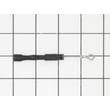
| Runs but does not heat | High-voltage circuit (service-level) | Microwave high-voltage capacitor WB27X10011 |
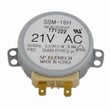
| Turntable not rotating | Turntable drive | Microwave turntable motor WB26X10038 |
Maintenance that helps you reach 8 to 10 years
- Wipe the cavity after splatters; avoid harsh abrasives that scratch the interior coating
- Use the vent fan when cooking on the range to reduce heat buildup under the microwave
- Replace charcoal filtration on recirculating setups when odors linger (common on over-the-range units)
- Close the door gently so the interlock system stays aligned
- Never run the microwave empty; it can overheat internal components
Why it matters
Microwave/hood combos like the GE JVM1860SD001 work in a hotter, greasier environment than countertop units. Simple upkeep and gentle door handling reduce stress on the door interlock switches, venting components, and internal electronics.
Last updated: January 2026
How can I tell what size my microwave is?
For your GE JVM1860SD001 microwave/hood combo, “size” usually means two things: the exterior dimensions (so it fits the cabinet space) and the interior capacity in cubic feet (so it fits your cooking needs). Measure the outside width, height, and depth first, then confirm the cavity size if you need capacity.
What to measure (and how)
Use a tape measure and record measurements in inches.
- Width: measure the front of the microwave from left edge to right edge.
- Height: measure from the bottom of the unit to the top.
- Depth: measure from the back to the front of the door (closed), including the handle if it sticks out.
- Clearance: leave space above and around the unit for airflow and door swing.
- Interior capacity (optional): measure the inside cavity (width x height x depth) and convert to cubic feet.
Typical sizes for microwave/hood combos
Most over-the-range microwave/hood combos are built to fit a standard range width.
| What you’re sizing | What it affects | Typical range |
|---|---|---|
| Exterior width | Fit over the range and between cabinets | About 30 inches |
| Exterior height/depth | Cabinet clearance, door swing, venting | Varies by model |
| Interior capacity (cu ft) | What dishes fit inside | About 1.6 to 2.2 cu ft |
Quick fit checks before you buy or replace
These checks prevent common “it doesn’t fit” surprises.
- Measure the space between cabinets and compare to your microwave width.
- Check the upper cabinet depth so the door can open fully.
- Confirm the power outlet location and cord reach.
- Verify your venting setup (recirculating vs ducted) and filter style.
Why it matters
Getting the right size helps your microwave mount securely, vent properly, and avoid door clearance issues. It also helps you choose the right interior capacity for common items like dinner plates and casserole dishes.
If you are also sizing for venting performance or recirculating use, the microwave charcoal filter WB02X10733 is one of the model-specific parts that can affect airflow and odor control.
Last updated: January 2026
What are common problems with GE Profile microwaves?
Common problems we see with GE Profile over-the-range microwaves (including GE model JVM1860SD001) are no heat, sparking/arcing, dead display or keypad issues, turntable problems, and door/latch faults. Many symptoms trace back to door interlock parts, the high-voltage circuit, or airflow and heat protection devices.
Most common symptoms and what they usually mean
- Runs but does not heat: high-voltage diode, capacitor, or other high-voltage components
- Sparks or arcing: food splatter/grease, damaged waveguide cover, or door alignment issues
- Dead or intermittent power: blown fuse, loose wiring, or overheating protection opening
- Starts then stops when the door moves: worn door switch or switch lever
- Turntable not rotating: failed turntable motor or tray/roller issues
Parts that commonly fix these issues on JVM1860SD001
If your symptom matches, these model-compatible parts are common repair starting points:
| Symptom | Likely area | Example part for this model |
|---|---|---|
| No heat | High-voltage circuit | Microwave high-voltage diode WB27X1160 |
| No heat or loud hum | High-voltage circuit | Microwave high-voltage capacitor WB27X10011 |
| Starts or stops unexpectedly | Door interlock system | Micro-switch WB24X830 |
| Door won’t “click” closed right | Door latch linkage | Microwave door interlock switch lever WB06X10128 |
| Turntable not turning | Drive system | Microwave turntable motor WB26X10038 |
Safe checks we recommend before replacing parts
- Confirm the outlet works and the breaker is not tripped.
- Make sure the door closes firmly and you hear a solid latch “click”.
- Clean the cavity and door area; remove grease and food debris that can cause arcing.
- Test with a cup of water; if it never warms, focus on heating circuit troubleshooting.
- If the unit is completely dead, focus on power supply and fuse-related checks.
Why it matters
Microwave symptoms often overlap, but the repair path changes a lot depending on whether the issue is door interlocks, airflow/overheating protection, or the high-voltage heating circuit. Matching the symptom to the most likely system helps you avoid replacing the wrong part.
For step-by-step diagnosis, we use why is my microwave not heating as a quick guide when the microwave runs but food stays cold.
Last updated: January 2026
How many watts is the GE JVM1860SD001?
The GE JVM1860SD001 is an over-the-range microwave/hood combo; most GE units in this class are 900 to 1100 cooking watts (output). To get the exact wattage for your specific JVM1860SD001, use the rating label on the oven, which lists the power information.
Where to find the exact wattage on your microwave
Check the product rating label first; it is the most reliable source for your exact unit.
- Open the door and look around the door frame and inner cabinet edge
- Check behind the control panel area (some models place the label there)
- Look for lines labeled Output power (W) or Microwave output (W)
- Also note Input power (W) or Amps (A), which is a different number
- Confirm the model number reads JVM1860SD001 exactly
Cooking watts vs. input watts (what the numbers mean)
Microwaves are described with two common power numbers.
| Spec on label | What it means | Typical for over-the-range units |
|---|---|---|
| Output (cooking) watts | Heating power delivered to food | 900 to 1100 W |
| Input watts or amps | Power drawn from the outlet | Higher than output |
If you are asking because heating seems weak
Low heating is usually a component issue, not a change in the microwave’s rated wattage.
- Verify you are not using a low power level setting
- Test with a cup of water for a consistent baseline
- If it runs but does not heat, the high-voltage circuit is a common area to diagnose
- For parts that can be involved in no-heat symptoms, see microwave high-voltage capacitor WB27X10011 and microwave high-voltage diode WB27X1160
Why it matters
Cooking wattage directly affects cook times and reheating performance. Packaged-food directions are usually written for a specific wattage, so knowing your exact output helps you adjust time and power for consistent results.
Last updated: January 2026


