


What engine is on a Craftsman edger?
For the Craftsman 536870452 9" edger/trimmer, the exact engine make and displacement depend on the specific engine installed on your unit; this model family was commonly paired with small 4-cycle gas engines in the 120cc to 150cc range. We recommend confirming the engine ID from the engine label before ordering tune-up or drive parts.
Check these spots on the engine (not the edger frame):
- Blower housing (recoil starter cover) label
- Valve cover area (often stamped)
- Emissions label near the muffler or fuel tank
- A stamped model-type-code format (common on Briggs & Stratton)
- A sticker on the shroud listing model and serial
Record the engine information exactly as shown:
- Engine brand (often Briggs & Stratton, Tecumseh, or similar)
- Engine model number
- Type and code (if shown)
- Spec number (if shown)
Engine parts (carburetor, air filter, spark plug, ignition coil) are matched to the engine model, not just the edger model number. The edger model number 536870452 is still essential for chassis and drive components like the belt and blade hardware.
If you are troubleshooting drive or cutting issues, these common wear items are tied to the edger itself:
| Symptom | Common edger-side check | Example part on this model |
|---|---|---|
| Blade won’t spin or slips | Inspect belt for glazing/cracks | V-belt 32668MA |
| Excess vibration at blade | Check blade washer and fasteners | Washer blade 22265MA |
| Hardware loosens repeatedly | Replace locking hardware | Special lock nut 703409 |
Last updated: February 2026
Why is my edger not starting?
If your Craftsman 536870452 9" edger/trimmer will not start, the most common causes are stale fuel, a fouled spark plug, a dirty carburetor, or a safety/control issue (like the stop switch). Start with fresh fuel and basic ignition checks before replacing parts.
- Confirm the stop switch is in the RUN/ON position.
- Use fresh gasoline (do not use old fuel from last season); add fuel stabilizer if the edger will sit.
- Check the spark plug: clean or replace if the tip is black, wet, or the insulator is cracked.
- Inspect the air filter (if equipped) and clean or replace if clogged.
- Make sure the primer bulb (if equipped) is pushing fuel and not cracked.
Old fuel and varnish in the carburetor are the top reasons small engines will not start.
- If it starts briefly on a small amount of fresh fuel but dies, the carburetor is likely restricted.
- If the primer will not fill or fuel lines look brittle, fuel delivery is compromised.
- If the plug is wet after repeated pulls, the engine may be flooded.
- Move to a ventilated area.
- Set choke to OFF (or RUN).
- Hold throttle open (if applicable) and pull the starter several times.
- Install a dry plug and try again with minimal choking.
On this model, a seized blade/shaft area or a jam can make the starter feel unusually hard to pull.
- Clear packed dirt around the blade and guard.
- Check that the blade hardware is tight and not binding.
- Inspect the drive belt for damage or slipping; replace if cracked or glazed using the v-belt 32668MA.
| Symptom | Likely area | What we do next |
|---|---|---|
| No pop at all | Ignition/fuel | Fresh fuel, spark plug check |
| Starts then dies | Carburetor/fuel delivery | Clean carburetor, check lines |
| Hard to pull starter | Jam/seized drive | Clear debris, inspect belt/shaft |
Repeated no-start attempts with old fuel can foul the spark plug and gum up the carburetor, turning a quick tune-up into a longer repair. Starting with fuel quality and basic checks saves time and prevents unnecessary parts replacement.
Last updated: February 2026
What does a Craftsman edger do?
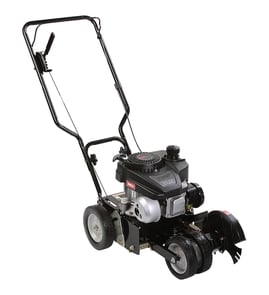
A Craftsman lawn edger like model 536870452 is designed to cut a clean, vertical edge along sidewalks, driveways, and garden borders. It uses a rotating blade to slice through turf so you get a crisp line and can also cut shallow trenches for edging or landscape work.
- Defining the edge between grass and concrete for a neat curb appeal line
- Cutting back overgrown turf that has crept onto sidewalks or patios
- Creating a shallow trench for installing edging material or laying a small wire/line
- Touching up after mowing so the lawn looks finished
- Cleaning up around flower beds and landscape borders
Most 9-inch edger/trimmer designs use a belt-driven blade system: the engine turns a drive system that spins the blade, and you guide the tool along the edge line.
Common wear items that affect performance on this model include:
- Drive belt: a worn belt can slip and reduce blade speed (see v-belt 32668MA)
- Blade hardware: loose or damaged fasteners can cause vibration or poor cutting (see washer blade 22265MA and special lock nut 703409)
- Ragged edge or tearing: check blade condition and make sure the blade hardware is tight
- Vibration: inspect for a bent blade, missing washer, or loose lock nut
- Blade slows in thick grass: inspect belt tension and belt wear
- Tool pulls to one side: check wheel/axle alignment and height setting
| Symptom | Likely area to check | Example part on this model |
|---|---|---|
| Blade speed seems weak | Belt drive | V-belt 32668MA |
| Blade wobbles or rattles | Blade mounting hardware | Special lock nut 703409 |
| Uneven tracking | Wheel/axle | Wheel axle (310716MA) |
A sharp, stable, properly driven blade makes the difference between a clean, professional-looking edge and a torn-up border. Keeping the belt and blade hardware in good shape helps your Craftsman edger cut straighter, faster, and with less vibration.
Last updated: February 2026
Is an edger blade reverse thread?
On the Craftsman 536870452 9" edger/trimmer, edger blade fasteners are commonly either standard (right-hand) or reverse (left-hand) thread depending on the drive design. Use the quick checks below to confirm the thread direction on your unit before you force the nut.
- Look for stamped markings like LH (left-hand) on the nut or blade hub.
- Check for an arrow showing loosen direction near the blade mount.
- Try a small, controlled turn both directions; stop if it binds hard.
- Note blade rotation direction; some designs use left-hand threads so rotation self-tightens.
- If the nut corners start to deform, stop and use a better-fitting wrench or socket.
- Disconnect the spark plug wire before working near the blade.
- Block the blade with a wood block to keep it from turning.
- Remove the nut and keep the hardware stacked in order.
- Reinstall the blade centered on the arbor; reinstall washers exactly as removed.
- Replace worn hardware that no longer locks securely, such as the washer blade 22265MA and the special lock nut 703409.
| Thread type | To loosen | To tighten |
|---|---|---|
| Standard (right-hand) | Counterclockwise | Clockwise |
| Reverse (left-hand) | Clockwise | Counterclockwise |
Turning the wrong direction can strip the shaft threads, round off the nut, or crack the blade washer stack. Confirming thread direction first protects the shaft and keeps the blade securely mounted.
Last updated: February 2026