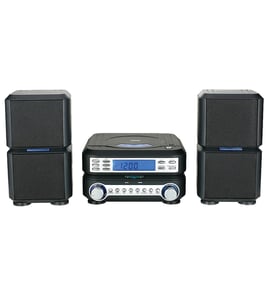

Is the Giga system good for home theater?
The Samsung MX-FS9000 Giga Sound tabletop stereo system can work for casual, high-volume TV and movie watching, but it is not a true home theater system. For surround sound, HDMI switching, and dialogue-focused center-channel clarity, a dedicated AV receiver and speaker package performs better.
- Very loud output for parties and big rooms
- Strong bass emphasis (great for music, less accurate for movie dialogue)
- Stereo playback (left/right) rather than discrete surround channels
- Limited “home theater” connectivity compared with an AV receiver
- Best results when the speakers are placed symmetrically and away from walls
| Feature | MX-FS9000 Giga Sound system | Typical home theater setup |
|---|---|---|
| Channels | 2-channel stereo | 5.1 / 7.1 (or more) |
| Dialogue clarity | Depends on EQ and placement | Strong (center channel) |
| Inputs for TV | Varies by connection type | Multiple HDMI inputs |
| Best use | Music, parties, loud playback | Movies, TV, immersive sound |
- Connect your TV using the best available audio output (optical or analog, depending on your TV and the stereo’s inputs).
- Reduce excessive bass and boost midrange slightly so voices sound clearer.
- Place the system at ear level when seated; avoid corners that can make bass boomy.
- Turn off extra sound effects if they make dialogue harder to understand.
- If you hear distortion at high volume, lower the level and check speaker wiring for damage.
Home theater sound is built around clear dialogue and surround effects. A Giga Sound system like the MX-FS9000 is built around high output and impactful bass, so it shines for music and gatherings but usually falls short of true cinematic surround performance.
For electrical troubleshooting that affects sound quality (intermittent audio, cutting out, no power), we use the same basic diagnostic approach as other audio equipment: inspect cords and connections, then test suspect components safely with a meter using how to use a multimeter to test electrical parts video.
Last updated: February 2026
What are the most common issues with MX-FS9000?
The most common problems we see with the Samsung MX-FS9000 tabletop stereo system are power issues, no sound or distorted sound, input/connection problems (Bluetooth or AUX), and disc/USB playback trouble. Many of these come down to simple checks like power, settings, and cable condition before any repair.
- Won’t power on: bad outlet/power strip, loose power cord connection, internal fuse or power supply fault
- Powers on but no sound: muted output, wrong source selected, speaker wiring issue, amplifier protection mode
- Distorted or cutting out: damaged speaker, loose speaker terminals, overheating, failing amplifier stage
- Bluetooth won’t pair or drops: device memory needs clearing, interference, distance/obstructions
- USB won’t play files: unsupported file type/format, corrupted drive, too-large/slow flash drive
- CD won’t read/eject: dirty lens, worn loading mechanism, warped disc
- Power-cycle: unplug for 2 minutes, then plug directly into a known-good wall outlet.
- Confirm the source/input matches what you are using (Bluetooth, AUX, USB, CD).
- Turn volume up and verify Mute is off.
- Reseat all connections: speaker wires fully inserted, no frayed strands touching.
- Try a known-good audio source and cable (swap AUX cable, try another phone).
| Symptom | Most likely area | What to test next |
|---|---|---|
| No lights, no display | Power path | Outlet, cord fit, internal fuse continuity |
| Lights on, no audio | Settings or output stage | Source selection, speaker wiring, protection/overheat |
| Audio cuts out at high volume | Overload/heat | Ventilation, speaker impedance match, reduce bass/volume |
Audio systems like the MX-FS9000 can shut down audio or distort when they detect overload, overheating, or a short in speaker wiring. Catching a frayed wire or wrong input early prevents repeat shutdowns and protects the amplifier.
If you need to test a fuse or trace a power problem safely, use our guides: how to tell if a fuse is blown and how to use a multimeter to test electrical parts video.
Last updated: March 2026
What is the average lifespan of MX-FS9000?
A Samsung tabletop stereo system like the MX-FS9000 typically lasts 8 to 12 years with normal home use. Lifespan depends most on heat buildup, speaker load (volume), power quality, and how often the unit is moved or transported.
Most compact stereo systems fail from power-supply wear, amplifier overheating, or mechanical wear in buttons and connectors.
- 8 to 12 years: typical service life for home audio systems
- 5 to 8 years: heavy use (high volume, long sessions, frequent parties)
- 12+ years: light use, good ventilation, stable power, careful handling
- Running at near-max volume for long periods (amplifier heat stress)
- Blocking vents or placing the unit in a tight cabinet
- Power surges or frequent plug/unplug cycles
- Loose speaker-wire strands causing shorts at the terminals
- Moving the system while connected (damages jacks and solder joints)
- Keep 2 to 4 inches of clearance around vents
- Use the correct speaker impedance and secure connections
- Turn the system off before connecting or disconnecting speakers
- Keep dust out of vents; vacuum gently with a brush attachment
- If sound distorts, lower volume immediately (distortion overheats speakers and amp)
| What you notice | Most common cause | What to do first |
|---|---|---|
| Random shutoffs | Overheating or power supply strain | Improve ventilation; reduce volume |
| No power | Blown fuse, failed power supply | Check outlet; inspect cord; test fuse |
| Crackling audio | Loose wire, dirty jack, failing speaker | Reseat cables; try another source |
| Buttons unresponsive | Worn keypad or control board issues | Power reset; check for stuck keys |
Knowing the expected lifespan helps you decide whether to troubleshoot, repair, or replace. If your MX-FS9000 is under 8 years old, basic electrical checks and connection cleanup often restore normal operation.
For safe electrical testing steps, use our guide: how to use a multimeter to test electrical parts video.
Last updated: March 2026