



Is it worth repairing a built-in microwave?
Yes, repairing a KitchenAid built-in microwave like model KMBD104GSS01 is usually worth it when the cabinet cutout and trim are in good shape and the repair targets a single failed part. Built-in replacements often cost more and can require fit and finish work, so a focused repair is typically the better value.
Quick decision checklist
- Choose repair if the unit powers on, the drawer/door closes correctly, and you have one clear symptom (no heat, no power, no response).
- Choose replacement if there is heavy interior cavity damage, repeated failures, or multiple major symptoms at once.
- Choose service if the issue involves high-voltage components (common in “runs but won’t heat” problems).
Typical repair costs vs. value (what we see most often)
| Scenario | Common cause | Typical next step |
|---|---|---|
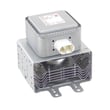
| Runs but does not heat | Failed magnetron or related high-voltage circuit | Professional diagnosis; consider magnetron W11590863 if confirmed |
| Dead, no display | Power supply issue, wiring, control problem | Check outlet and cord; test components; consider electronic control W11486781 |
| Drawer/door won’t latch or won’t start | Latch or switch alignment issue | Inspect latch area; consider microwave door latch W11610131 |
What to check before buying parts
- Power reset: Unplug for 2 minutes, then restore power.
- Verify the outlet: Plug in a lamp or small appliance to confirm steady power.
- Inspect the cord and connections: Look for pinched wiring or loose connectors (especially after cabinet work).
- Confirm the symptom: “No heat” points to high-voltage parts; “no response” points to controls, power, or interlocks.
Why it matters for built-in models
Built-in microwaves are tied to your cabinetry and trim. Repairing a single failed component often avoids extra costs like modifying the cutout, matching finishes, or dealing with fitment issues.
Helpful DIY guidance
If you plan to test electrical components (with power disconnected), use how to use a multimeter to test electrical parts video to get accurate readings before ordering parts.
Last updated: February 2026
What usually breaks in a microwave?
In a KitchenAid built-in microwave like model KMBD104GSS01, the parts that most often cause failures are the door-interlock system, high-voltage heating components, and the control electronics. These issues show up as no heat, no power, a dead keypad, or a drawer/door that will not latch.
Most common microwave failures (and what you notice)
- Door latch or interlock problem: unit will not start, stops when you close the drawer, or acts “dead” for safety.
- No heat but everything else runs: typically points to the high-voltage heating circuit.
- Random shutoff or overheating symptoms: can involve temperature protection.
- Dead display or unresponsive keypad: often tied to the control electronics.
- Loud buzzing, burning smell, or arcing: stop using the microwave immediately and have it serviced.
Parts that commonly fail on KMBD104GSS01
The exact failed part depends on the symptom, but these are frequent repair items for this model:
| Symptom | Likely area | Example part for this model |
|---|---|---|
| Runs but does not heat | High-voltage heating | Magnetron W11590863 |
| Will not start or stops when closing | Door/interlock | Microwave door latch W11610131 |
| Dead keypad, erratic operation | Controls | Electronic control W11486781 |
| Shuts off, heat-related issues | Safety temperature control | Thermostat W11199547 |
Quick checks we recommend before replacing parts
- Confirm the outlet has power (try a lamp or small appliance).
- If it is a drawer microwave, make sure the drawer closes fully and smoothly.
- Unplug for 2 minutes, then restore power to reset the control.
- Listen for normal fan and turntable/tray operation during a cook cycle.
- If you see sparks/arcing or smell burning, stop and schedule service.
Why it matters
Microwaves use a high-voltage circuit to generate heat. A small issue like a misaligned latch can prevent operation for safety, while a failed heating component (such as the magnetron) can leave the microwave “running” but not warming food.
Last updated: February 2026
Where is the microwave filter on a built-in microwave on a KitchenAid?
On the KitchenAid built-in microwave model KMBD104GSS01, the “filter” customers usually mean is the grease filter (bottom, near the vent intake) or a charcoal/odor filter (behind a grille or panel). The exact location depends on whether your unit vents outside or recirculates air.
Quick ways to find the filter
- Look under the microwave: many built-in and drawer-style units place the grease filter along the bottom edge near the air intake.
- Check behind a top or front grille/panel: recirculating setups often hide a charcoal filter behind a removable grille.
- If your microwave is a drawer style: the filter access is commonly behind an interior or lower access panel rather than a visible top grille.
- If you see a metal mesh screen: that is typically the grease filter.
- If you see a thin black pad or cartridge: that is typically the charcoal filter.
What to do once you locate it
- Unplug the microwave (or switch off the breaker) before removing any panels.
- Remove the retaining screws or clips on the access grille/panel.
- Slide the filter out and match it by size and mounting style.
If you are replacing a filter for KMBD104GSS01, we recommend matching it by the exact part listing for your model. If your unit uses a removable filter assembly, it may be listed as a filter W11199545.
Grease vs charcoal filter: what’s the difference?
| Filter type | What it does | Typical location | Maintenance |
|---|---|---|---|
| Grease filter | Traps cooking grease | Bottom intake area | Clean regularly (often washable) |
| Charcoal filter | Reduces odors in recirculating setups | Behind grille/panel | Replace periodically |
Why it matters
A clogged or missing filter can reduce airflow, increase odors, and make the cooling fan work harder. Keeping the correct filter in place helps your KitchenAid microwave vent properly and run cooler.
Last updated: February 2026


