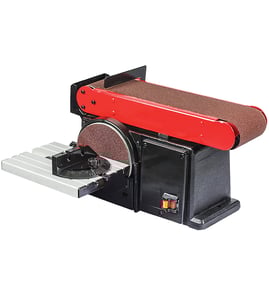

What are common belt sander problems?
Common problems on the Craftsman 17845-SHOP 7" & 9" industrial disc sander include sanding belt tracking off-center, poor sanding performance (burn marks or lines), excessive vibration, and weak dust collection that lets abrasive dust build up and wear parts faster. You can also use Sears PartsDirect to look up model-specific replacement parts by model number.
- Belt won’t track straight: platen/roller alignment is off, belt is installed incorrectly, or the belt is stretched.
- Burn marks or grooves on the workpiece: clogged abrasive, too much pressure, or dust buildup reducing cutting action.
- Belt slips or stalls: low belt tension, worn drive belt, or a glazed drive surface.
- Excessive vibration: damaged sanding belt/disc, debris on rollers, or loose mounting hardware.
- Dust everywhere: restricted airflow, clogged port, or a weak/incorrect dust extraction setup.
- Unplug the sander and remove the belt.
- Clean dust from the tracking area, rollers, and platen.
- Reinstall a known-good belt; confirm the arrow direction (if marked) matches rotation.
- Adjust tracking in small increments and run briefly between adjustments.
- Verify the workpiece is supported and you are not forcing the cut.
| Symptom | Most likely cause | What to do first |
|---|---|---|
| Belt walks off | Tracking misadjusted | Reset tracking, then fine-tune |
| Burning | Dust/clogged abrasive | Clean belt, reduce pressure |
| Slipping | Low tension/wear | Check tension and drive surfaces |
| Vibration | Damaged belt/disc | Replace belt/disc, tighten fasteners |
A belt sander that tracks poorly or runs dusty overheats the abrasive and the workpiece, shortens belt life, and can damage rollers and bearings. Keeping airflow and tracking correct improves finish quality and reduces wear.
Last updated: February 2026
Why does my belt sander keep ripping belts?
Your Craftsman 17845-SHOP 7" and 9" industrial disc sander typically rips sanding belts when the belt is installed backward, tracking is off so the belt rubs a side edge, tension is incorrect, or heat and heavy pressure weaken the belt seam. We also see belt failures from old or poorly stored belts.
- Tracking is misaligned: the belt rides hard against one side and frays, then snaps.
- Belt installed in the wrong direction: many belts have an arrow; running it backward stresses the seam.
- Too much tension: over-tightening stretches the backing and pops the splice.
- Too much pressure or dwell time: pressing hard or holding in one spot overheats the belt and glue.
- Wrong belt type for the job: light-duty paper-backed belts fail faster than cloth-backed belts.
- Workpiece hazards: staples, nails, knots, or sharp edges cut the belt.
- Unplug the sander.
- Install a fresh belt in the arrow direction (if marked).
- Center the belt on the rollers, then adjust tracking so it runs midway and does not touch guards.
- Set tension so the belt is snug but not “banjo-string” tight.
- Make a light test pass; let the abrasive do the work.
| Situation | Belt backing to use | Why it helps |
|---|---|---|
| Heavy stock removal | Cloth-backed | Resists tearing and heat better |
| Fine finishing | Cloth-backed or heavier paper-backed | Smoother finish with less risk of seam failure |
| Humid shop or long storage | Cloth-backed, stored sealed | Reduces moisture-related seam issues |
A belt that tracks against an edge or runs hot can fail suddenly, which can damage the workpiece and increase the chance of losing control of the tool. Correct tracking, correct tension, and lighter pressure extend belt life and improve sanding results.
For replacement belts and other Craftsman 17845-SHOP parts, start with the parts list for this model, or search by model number on Sears PartsDirect.
Last updated: February 2026
What can I use instead of a belt sander?
If you do not have a belt sander, you can still remove material and smooth wood effectively using other tools; for Craftsman model 17845-SHOP (a 7" and 9" industrial disc sander), a disc sander, random orbit sander, hand plane, or even a scraper often covers the same jobs with better control.
- Random orbit sander: Best all-around substitute for smoothing and finish sanding; leaves fewer directional scratches.
- Disc sander (like your 17845-SHOP): Great for fast stock removal on small parts and for squaring edges; use a miter gauge or jig for repeatability.
- Hand plane (jack or block plane): Fast, clean material removal on flat faces and edges; ideal before sanding.
- Card scraper: Excellent for flattening small areas and removing glue squeeze-out without rounding edges.
- Angle grinder with flap disc (metalwork): Aggressive shaping on metal; not a finish tool.
- Files and rasps: Controlled shaping for curves, joinery tweaks, and small parts.
| Task | Best substitute | Why it works |
|---|---|---|
| Flatten a board face | Hand plane, card scraper | Removes material quickly without heat buildup |
| Smooth for finish | Random orbit sander | Blends scratches and reduces swirl marks |
| Square an edge/end | Disc sander with jig | Stable platen helps keep edges true |
| Shape curves | Rasp, file, sanding block | More control than a moving belt |
- Start with coarser grit (60 to 80) for shaping, then step to 120 and 180.
- Keep work moving to avoid burn marks (especially on a disc sander).
- Use a straightedge to check flatness; do not rely on “looks smooth.”
- For edges, use a sanding block or jig to prevent rounding.
- Wear eye protection and manage dust; sanding dust builds fast on power tools.
A belt sander is fast, but it is also easy to gouge, round edges, or over-remove material. Using a disc sander, random orbit sander, or hand tools often gives better accuracy and surface quality, especially on smaller parts.
For replacement parts and diagrams for Craftsman 17845-SHOP, start with the parts list for your model, or search by model number on Sears PartsDirect.
Last updated: February 2026
What is the difference between the belt sander and disk sander?
A belt sander removes material with a continuous abrasive belt, so it excels at fast stock removal and smoothing larger areas. A disc sander removes material with a rotating disc, so it’s usually better for controlled shaping, squaring ends, and sanding to a line on your Craftsman 17845-SHOP sander.
- Belt sander: Long contact area; great for flattening, leveling, and blending curves.
- Disc sander: Firm platen and smaller contact area; great for squaring, bevels, and precise edge work.
- Material removal: Belt is typically faster; disc is typically more controlled.
- Finish quality: Both can leave a clean finish with the right grit and light pressure.
- Common mistakes: Belt sanding can round edges quickly; disc sanding can burn wood if held in one spot.
Both tools can grab a workpiece, but the belt’s moving direction and larger “bite” make sudden pull more common during aggressive sanding.
- Use the downward-moving side of the disc (the side where the abrasive moves toward the table).
- Keep the workpiece flat on the table or against the miter gauge; avoid freehanding small parts.
- Use light, even pressure; forcing the cut increases heat and grabbing.
- Keep abrasives clean and fresh; dull grit increases burning and reduces control.
| Feature | Belt sander | Disc sander |
|---|---|---|
| Best use | Fast shaping, flattening | Squaring, angles, fine control |
| Control on small parts | Lower | Higher (with proper support) |
| Typical risk | Workpiece pull/grab | Burning, edge catch |
| Technique focus | Keep moving, avoid rounding | Use correct disc side, steady support |
Choosing the right sanding surface improves accuracy and safety. We typically use the belt for speed and surface leveling, and the disc for precision tasks like squaring ends, refining miters, and sanding to layout lines.
To look up sanding accessories and replacement parts by model number, start with the Craftsman 17845-SHOP parts list, or search by model on Sears PartsDirect.
Last updated: February 2026
How to tighten belt on belt sander?
On the Craftsman 17845-SHOP belt and disc sander, you “tighten” the sanding belt by setting the belt tension so it does not slip, then adjusting belt tracking so it runs centered on the rollers during a short test run.
- Unplug the sander before touching the belt, rollers, or guards.
- Let the belt stop completely before making adjustments.
- Keep fingers clear of pinch points at the idler roller and tracking mechanism.
- Reinstall guards/covers before powering back on.
- Install the belt correctly: seat it fully on both rollers; align any direction arrows on the belt with the sander’s rotation.
- Set belt tension: use the tension lever/knob (design varies) to increase tension until the belt feels snug and does not slip when you press lightly on the belt surface.
- Short test run: plug in, stand to the side, and run 2 to 3 seconds.
- Adjust tracking: turn the tracking knob in small increments until the belt runs centered on both rollers.
- Recheck under light load: if the belt stalls or slips during normal sanding pressure, increase tension slightly and repeat the short test run.
| What you notice | Most likely cause | What to do |
|---|---|---|
| Belt slips or stops under load | Tension too loose, belt worn/glazed | Increase tension; replace belt if worn |
| Belt walks to one side | Tracking out of adjustment | Adjust tracking knob in small turns |
| Belt will not track even after adjustment | Dirty/worn rollers, damaged belt seam | Clean rollers; inspect and replace belt |
| Vibration or chatter | Debris on rollers, belt seam issue | Clean rollers; try a different belt |
Correct tension and tracking improve sanding accuracy, reduce wear on rollers and bearings, and help prevent the belt from tearing or jumping off during use.
If you need a replacement sanding belt or other parts, search by model number on Sears PartsDirect.
Last updated: February 2026