- Kenmore refrigerator water filters
- Whirlpool refrigerator water filters
- Samsung refrigerator water filters
- GE refrigerator water filters
- LG refrigerator water filters
- Frigidaire refrigerator water filters
- KitchenAid refrigerator water filters
- Maytag refrigerator water filters
- Kenmore Elite refrigerator water filters
- Estate refrigerator water filters
- GE Profile refrigerator water filters
- Amana refrigerator water filters
- Bosch refrigerator water filters
- Dacor refrigerator water filters
- Electrolux refrigerator water filters
Top DIY repair help
View All Repair Categories
Appliances
Lawn & Garden
Power Tools
Home Improvement
Sports & Leisure
Heating & Cooling
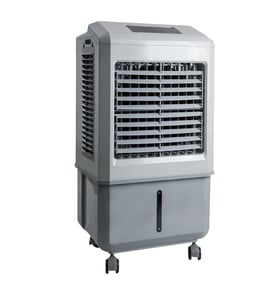
Wards Evaporative cooler Parts — Browse All Models
Wards evaporative coolers can economically cool any space in your home. Wards evaporative coolers are eco-friendly and low-maintenance units that typically provide years of dependable cooling. When parts wear out or break on your Wards evaporative cooler, find the replacement parts you need to fix the cooler at Sears PartsDirect.


Wards WW4002 phoenix window cooler
 Error Codes
Wards WW4403 phoenix window cooler
Wards WW4803 phoenix window cooler
Wards 77100 seely brothers cooler
Wards 800 seely brothers cooler
Wards CT4600 phoenix evaporative air cooler
Popular maintenance items for Evaporative Coolers

Room Air Conditioner Electronic Control Board
In Stock
$296.00

Qty

Terminal Cover
In Stock
$40.16
Qty
Damper Hood
Part #WJ5X10014
Replaced by #WJ05X10014
Manufacturer substitution
This part replaces WJ5X10014. Substitute parts can look different from the original.
In Stock
$29.28
Qty
Magnet Se
Part #WP1X10002
Replaced by #WP01X10002
Manufacturer substitution
This part replaces WP1X10002. Substitute parts can look different from the original.
In Stock
$31.50
Qty
Aux Cover K
In Stock
$35.43
Qty
Room Air Conditioner Wire Screen
In Stock
$125.00
Qty
Maintenance tips for your Wards evaporative cooler
- Follow all maintenance guidelines covered in the owner's manual for your evaporative cooler. Use the media pads and filters listed in the owner's manual when replacing those parts.
- Drain and clean the evaporative cooler weekly or as recommended in your owner's manual and clean the cooler with antimicrobial spray to prevent fungus growth.
- Clean or replace the media pads in your evaporative cooler once per season or more frequently if needed.
- Clean or replace the air filters monthly to keep clean air flowing through the evaporative cooler.
- Blow dust and lint off the blower fan motor periodically to keep the fan running smoothly.
Cleaning the media pads in your Wards evaporative cooler
- Shut off the house circuit breaker to disconnect electrical power for the evaporative cooler.
- Remove the front cover mounting screws then pull off the front cover panel.
- Remove the top panel mounting screws and remove the top panel.
- Remove the distribution tube assembly and slide the media pads out of the evaporative cooler.
- Wash the media pads thoroughly using a sprayer.
- Reinstall the media pads and reassemble the evaporative cooler. Restore electrical power to the evaporative cooler.
Parts & More
Bottom-Mount Refrigerator
Cooktop
Lawn Edger
Microwave
Parts
Rear-Engine Riding Mower
Riding Mowers & Tractors
Wet/Dry Vacuum