- Kenmore refrigerator water filters
- Whirlpool refrigerator water filters
- Samsung refrigerator water filters
- GE refrigerator water filters
- LG refrigerator water filters
- Frigidaire refrigerator water filters
- KitchenAid refrigerator water filters
- Maytag refrigerator water filters
- Kenmore Elite refrigerator water filters
- Estate refrigerator water filters
- GE Profile refrigerator water filters
- Amana refrigerator water filters
- Bosch refrigerator water filters
- Dacor refrigerator water filters
- Electrolux refrigerator water filters
Top DIY repair help
View All Repair Categories
Appliances
Lawn & Garden
Power Tools
Home Improvement
Sports & Leisure
Heating & Cooling
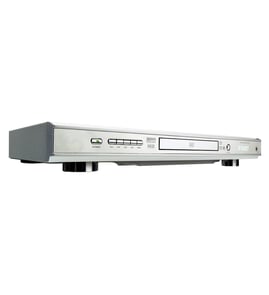
Memorex Dvd player Parts — Browse All Models
You rely on your Memorex DVD player to provide the clear video playback you expect from digital media. Memorex DVD players include the features you look for in video electronics. When your Memorex DVD player isn't working properly, you can find the repair parts you need to fix the player at Sears PartsDirect.
Browse by Category
DVD Players

 Owner’s manual
Popular maintenance items for DVD Players

Filter
In Stock
$12.61

Qty

Cable Assembly
In Stock
$27.38
Qty
Sw Transf
In Stock
$33.23
Qty
Transformer
In Stock
$51.55
Qty
Tray Cover
In Stock
$14.54
Qty
Screw
In Stock
$27.13
Qty
Top replacement parts for Memorex DVD players
- DVD deck assembly. The DVD deck assembly contains the main components of the DVD player, including the tray, disc drive motor and gears.
- Main electronic control board. The main electronic control board governs the settings and functions of the DVD player and powers the components inside the DVD player.
- Audio control board. The DVD audio control board receives digital audio signals from the DVD disc as it plays and processes the audio signals to produce audio playback output.
- Optical pick-up. The optical pick-up receives the digital image from the DVD and sends the signal back to the control board.
- Wi-Fi module. The Wi-Fi module allows you to connect the DVD player with your wireless network to get DVD player updates and perform other advanced DVD player functions.
Troubleshooting your Memorex DVD player when the remote control doesn't work
- Check the batteries in the remote control. Weak or dead batteries won't power up the remote device. Replace the remote control batteries if they're weak or dead.
- The remote control has an effective range of about 20-feet. Make sure that you're within range of the DVD player when attempting to use the remote.
- Check for items blocking the RF sensor on the DVD player and move any items out of the way to allow the DVD player to receive remote control RF signals.
- The microprocessor inside the remote can fill up its internal memory or the microprocessor can get the memory scrambled at times. Reset the microprocessor and drain the memory in the remote by removing the remote control batteries and holding down one or more buttons on the remote device for several minutes. Reinstall the batteries and the remote may work normally again.
- You may need to replace the remote if it won't work after resetting the microprocessor and it has good batteries.
Parts & More
Carpet Cleaner
Cooktop
Cycling
Dishwasher
Dryer
Electric Line Trimmer
Electric Range
Exercise Cycle
Gas Line Trimmer
Heating & Cooling Combined Unit
Parts
Power Rake