- Kenmore refrigerator water filters
- Whirlpool refrigerator water filters
- Samsung refrigerator water filters
- GE refrigerator water filters
- LG refrigerator water filters
- Frigidaire refrigerator water filters
- KitchenAid refrigerator water filters
- Maytag refrigerator water filters
- Kenmore Elite refrigerator water filters
- Estate refrigerator water filters
- GE Profile refrigerator water filters
- Amana refrigerator water filters
- Bosch refrigerator water filters
- Dacor refrigerator water filters
- Electrolux refrigerator water filters
Top DIY repair help
View All Repair Categories
Appliances
Lawn & Garden
Power Tools
Home Improvement
Sports & Leisure
Heating & Cooling
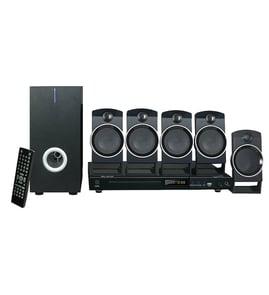
Aiwa Home theater system Parts — Browse All Models
Aiwa home theater systems provide you with the awesome sound reproduction that you expect from high-quality stereo components. Aiwa home theater systems match up well with any type of television. When your Aiwa home theater system needs repair, find the replacement parts you need at Sears PartsDirect.

Popular maintenance items for Home Theater Systems

Speaker-rt
In Stock
$206.04

Qty

Holder
In Stock
$29.10
Qty
Fuse
Part #152306751
This item is not returnable
In Stock
$2.65
Qty
Ffc Cable
In Stock
$29.13
Qty
Ac Cord
In Stock
$13.49
Qty
Window-vfd
In Stock
$44.02
Qty
Common repair parts for Aiwa home theater systems
- Remote control. The remote control allows you to operate the home theater system controls and make setting selections from a remote location. The remote control communicates selections to the home theater system through RF (radio frequency) signals.
- Power control board. The power control board in the home theater system amplifier provides electrical current to the component devices inside the component.
- Power cord. The power cord provides the amplifier in the home theater system with electrical current from the electrical wall outlet.
- Control panel. The control panel allows you to select sound reproduction modes and volume level. The control panel also displays settings selected on the home theater amplifier.
Troubleshooting your Aiwa home theater system when it won't power up
- If you're using the remote control to attempt to power up the home theater system, try using the power button on the amplifier cabinet to power it up.
- If the home theater system won't power up when you press the power button on, check the power cord. Plug the home theater system power cord securely into the electrical wall outlet if the outlet cord plug is loose.
- If the home theater system power cord is properly plugged into the electrical wall outlet, check the electrical outlet for power by plugging a different item into the wall outlet. If the wall outlet is dead, reset the house circuit breaker for the wall outlet. Have an electrician repair the wall outlet if it remains dead after resetting the house circuit breaker.
- If you have the home theater system plugged into a surge protector, check for a tripped circuit breaker on the surge protector. Reset the surge protector circuit breaker if it's tripped.
- If the home theater system is getting power through the power cord but won't power up, you may need to replace the power supply board in the amplifier.
Parts & More
Bottom-Mount Refrigerator
Dishwasher
Downdraft Ventilation System
Dvd Player
Electric Line Trimmer
Electric Range
Evaporative Cooler
Front-Engine Lawn Tractor
Gas Pressure Washer
Gas Walk-Behind Mower
Material Handling
Parts
Riding Mowers & Tractors
Side-By-Side Refrigerator
Upright Freezer