- Kenmore refrigerator water filters
- Whirlpool refrigerator water filters
- Samsung refrigerator water filters
- GE refrigerator water filters
- LG refrigerator water filters
- Frigidaire refrigerator water filters
- KitchenAid refrigerator water filters
- Maytag refrigerator water filters
- Kenmore Elite refrigerator water filters
- Estate refrigerator water filters
- GE Profile refrigerator water filters
- Amana refrigerator water filters
- Bosch refrigerator water filters
- Dacor refrigerator water filters
- Electrolux refrigerator water filters
Top DIY repair help
View All Repair Categories
Appliances
Lawn & Garden
Power Tools
Home Improvement
Sports & Leisure
Heating & Cooling
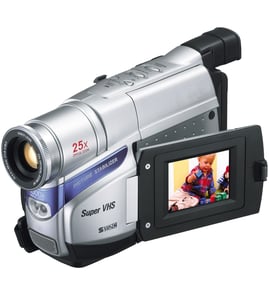
NEC Vhs camcorder Parts — Browse All Models
NEC is a leading manufacturer of VHS camcorders used in the United States. NEC VHS camcorders offer convenient features and accurate video recording so you can easily capture the memories that you want to preserve forever. When your NEC VHS camcorder isn't working as it should, find the replacement parts you need to fix the problem at Sears PartsDirect.


NEC V50U camcorder
Shop Parts
7 Parts
NEC V30U camcorder
Shop Parts
5 Parts
NEC V20U camcorder
Shop Parts
3 Parts
Frequently bought NEC parts

Belt
Part #483539517856
This item is not returnable
In Stock
$3.65

Qty

Nec Cathode Ray Tube
Part #49005021
This item is not returnable
In Stock
$5.49
Qty
Nec Owner's Manual
Part #IB53240001
This item is not returnable
In Stock
$4.99
Qty
Nec Idler Tire
In Stock
$10.16
Qty
Popular maintenance items for VHS Camcorders
Sylvania Service Manual
In Stock
$86.49
Qty
C-ceramic,
In Stock
$26.75
Qty
Hitachi Cathode Ray Tube Assembly
In Stock
$131.49
Qty
Transistor
In Stock
$26.75
Qty
NEC VHS camcorder common replacement parts
- Video cassette tape. The video cassette tape records and stores video images in the VHS camcorder.
- Power cord. The power cord provides AC electric power to the VHS camcorder when using a wall electrical outlet for the power source for the camcorder. The power cord also provides electrical current needed to charge the camcorder battery.
- Battery. The battery provides electrical power to the camcorder so you can use the camcorder when it isn't plugged into a wall electrical outlet.
- Audio/video cable. The audio/video cable connects the camcorder to a television or home theater system so you can watch recorded video.
Playing NEC VHS camcorder video using the audio/video cable
- Connect the audio/video cable to audio/video out jacks on your camcorder. Connect the other end of the audio/video cable to audio/video in jacks on your television.
- Turn on your television and select line input to play video from the camcorder.
- Connect your VHS camcorder to a power source such as a battery pack, AC adapter or car battery cord.
- Turn on the camcorder power button and select the VCR or Camera playback mode on the camcorder.
- Start playback or begin recording to send the video signal to the television.
Parts & More
Central Air Conditioner
Electric Cooktop
Freestanding Freezer
Front-Engine Lawn Tractor
Gas Leaf Blower
Gas Line Trimmer
Parts
Side-By-Side Refrigerator
Television
Top-Mount Refrigerator