- Kenmore refrigerator water filters
- Whirlpool refrigerator water filters
- Samsung refrigerator water filters
- GE refrigerator water filters
- LG refrigerator water filters
- Frigidaire refrigerator water filters
- KitchenAid refrigerator water filters
- Maytag refrigerator water filters
- Kenmore Elite refrigerator water filters
- Estate refrigerator water filters
- GE Profile refrigerator water filters
- Amana refrigerator water filters
- Bosch refrigerator water filters
- Dacor refrigerator water filters
- Electrolux refrigerator water filters
Top DIY repair help
View All Repair Categories
Appliances
Lawn & Garden
Power Tools
Home Improvement
Sports & Leisure
Heating & Cooling
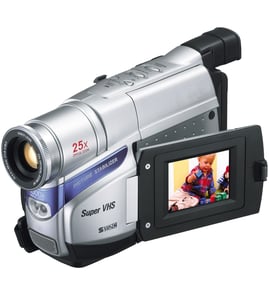
Hitachi Vhs camcorder Parts — Browse All Models
Hitachi is a leading manufacturer of VHS camcorders used in the United States. Hitachi VHS camcorders offer convenient features and accurate video recording so you can easily capture the memories that you want to preserve forever. When your Hitachi VHS camcorder isn't working as it should, find the replacement parts you need to fix the problem at Sears PartsDirect.
Browse by Category
VHS Camcorders

Frequently bought Hitachi parts

Hitachi Home Electronics Transistor
In Stock
$10.36

Qty

Hitachi Sq Cut Bel
In Stock
$10.26
Qty
Picture Tube
Part #510HJB22NEW
Replaced by #510HJB22R
Manufacturer substitution
This part replaces 510HJB22NEW. Substitute parts can look different from the original.
In Stock
$128.00
Qty
Hitachi Home Electronics Integrated Circuit
In Stock
$10.74
Qty
Hitachi Cathode Ray Tube Assembly
In Stock
$131.49
Qty
Symphonic Transistor
Part #483513047911
This item is not returnable
In Stock
$3.27
Qty
Popular maintenance items for VHS Camcorders
Sylvania Service Manual
In Stock
$86.49
Qty
C-ceramic,
In Stock
$26.75
Qty
Hitachi Cathode Ray Tube Assembly
In Stock
$131.49
Qty
Transistor
In Stock
$26.75
Qty
Top replacement parts for Hitachi VHS camcorders
- Len cover. The lens cover protects the camcorder lens from scratches, spills, dirt and debris when you're not using the device.
- Carrying strap. The carrying strap attaches to the camcorder and allows you keep control of the camcorder so you don't drop it when filming video.
- Battery. The battery provides electrical current to operate the camcorder control board and video capture components.
- USB cable. The camcorder USB cable connects the camcorder to a computer, television or home theater system so you can store or watch recorded video.
Playing Hitachi VHS camcorder video using the audio/video cable
- Connect the audio/video cable to audio/video out jacks on your camcorder. Connect the other end of the audio/video cable to audio/video in jacks on your television.
- Turn on your television and select line input to play video from the camcorder.
- Connect your VHS camcorder to a power source such as a battery pack, AC adapter or car battery cord.
- Turn on the camcorder power button and select the VCR or Camera playback mode on the camcorder.
- Start playback or begin recording to send the video signal to the television.
Parts & More
Dishwasher
Electric Range
Elliptical Machine
Floor Scrubber
Gas Walk-Behind Mower
Lawn Sweeper
Miter Saw
Parts
Dishwasher Control Panel 5304475578Refrigerator Ice Maker Kit AEQ36756901Washer Water Inlet Valve WH13X10058Lawn Tractor Sun Shade Attachment Vinyl Canopy 49609Lawn Mower Drive Pinion Gear 137054Dishwasher Pump and Motor Assembly W10805015Refrigerator Water Inlet Valve Assembly WP12956105Range Main Top Assembly (Black) 5304490176
Side-By-Side Refrigerator
Top-Mount Refrigerator