- Kenmore refrigerator water filters
- Whirlpool refrigerator water filters
- Samsung refrigerator water filters
- GE refrigerator water filters
- LG refrigerator water filters
- Frigidaire refrigerator water filters
- KitchenAid refrigerator water filters
- Maytag refrigerator water filters
- Kenmore Elite refrigerator water filters
- Estate refrigerator water filters
- GE Profile refrigerator water filters
- Amana refrigerator water filters
- Bosch refrigerator water filters
- Dacor refrigerator water filters
- Electrolux refrigerator water filters
Top DIY repair help
View All Repair Categories
Appliances
Lawn & Garden
Power Tools
Home Improvement
Sports & Leisure
Heating & Cooling
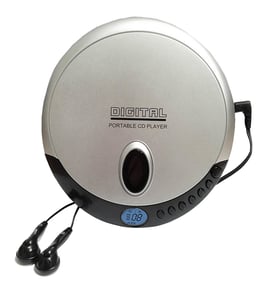
Akai Cd player Parts — Browse All Models
Akai makes CD players that are known for dependable sound reproduction. Playback of digital media through Akai CD players is always crisp and clear. When your Akai CD player breaks down, get the repair parts you need to fix the CD player at Sears PartsDirect.


Akai AAV201 cd player
Popular maintenance items for CD Players

Ic
In Stock
$12.67

Qty

Led
In Stock
$12.25
Qty
Cord Bushing
Part #491678301
This item is not returnable
In Stock
$4.20
Qty
Magnavox Cd875x
In Stock
$10.32
Qty
Tr Pt483f1
Part #872992631
This item is not returnable
In Stock
$9.83
Qty
Shuttle
In Stock
$21.90
Qty
Troubleshooting your Akai CD player when it won't power up
- If you're using the remote control to attempt to power up the CD player, try using the power button on the CD player to power it up.
- If the CD player won't power up when you press the power button on the player, check the power cord. Plug the CD player power cord securely into the electrical wall outlet if the outlet cord plug is loose.
- If the CD player power cord is properly plugged into the electrical wall outlet, check the electrical outlet for power by plugging a different item into the wall outlet. If the wall outlet is dead, reset the house circuit breaker for the wall outlet. Have an electrician repair the wall outlet if it remains dead after resetting the house circuit breaker.
- If you have the CD player plugged into a surge protector, check for a tripped circuit breaker on the surge protector. Reset the surge protector circuit breaker if it's tripped.
- If the CD player is getting power through the power cord but won't power up, you may need to replace the power supply board in the CD player.
Troubleshooting your Akai CD player when the remote control doesn't work
- Check the batteries in the remote control. Weak or dead batteries won't power up the remote device. Replace the remote control batteries if they're weak or dead.
- The remote control has an effective range of about 20-feet. Make sure that you're within range of the CD player when attempting to use the remote.
- Check for items blocking the RF sensor on the CD player and move any items out of the way to allow the CD player to receive remote control RF signals.
- The microprocessor inside the remote can fill up its internal memory or the microprocessor can get the memory scrambled at times. Reset the microprocessor and drain the memory in the remote by removing the remote control batteries and holding down one or more buttons on the remote device for several minutes. Reinstall the batteries and the remote may work normally again.
- You may need to replace the remote if it won't work after resetting the microprocessor and it has good batteries.
Parts & More
Bottom-Mount Refrigerator
Dishwasher
Electric Leaf Blower
Freestanding Freezer
Front-Engine Lawn Tractor
Gas Walk-Behind Mower
Line Trimmer
Rear-Engine Riding Mower
Refrigerator
Table Saw
Washer
Wine & Beverage Cooler