 Owner’s manual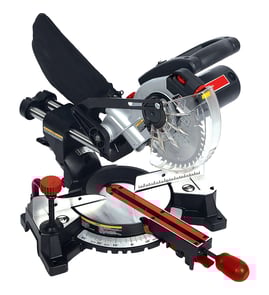

Can you cut a 4x4 with a 12-inch miter saw?
Yes. A 12-inch miter saw typically cuts a 4x4 in one pass, but the Craftsman 137212000 is designed for 10-inch blades and, per the 137212000 owner's manual, it can cut a dimensional 4x4 (about 3-1/2 in. x 3-1/2 in.) in one cut when you install an auxiliary wood fence.
What matters for the Craftsman 137212000
This model’s manual calls out a specific method for a one-cut 4x4: add an auxiliary wood fence (straight wood about 3/4 in. thick) attached to the saw fence, then make a full-depth cut to create a blade slot before cutting your workpiece.
Key points to follow:
- Use only 10-inch saw blades that meet the tool’s requirements (this saw is not a 12-inch model).
- Build the auxiliary fence from straight wood; secure it firmly to the fence.
- Make a full-depth cut in the auxiliary fence first to create the blade slot.
- Check for interference with the lower blade guard; adjust if needed.
- Remove the auxiliary fence for bevel cutting (it’s intended for 0° bevel use).
Quick capacity guide (with auxiliary fence)
| Cut type | Typical max capacity noted for this saw | What that means for a 4x4 |
|---|---|---|
| Crosscut at 0° | 3-1/2 in. x 3-1/2 in. | One-cut 4x4 crosscut is supported |
| Miter 45° | 3-1/2 in. x 2 in. | A 4x4 may not fit in one pass at 45° |
| Bevel 45° | 2 in. x 3-1/2 in. | Not a one-pass 4x4 cut |
| Compound 45° | 2 in. x 2 in. | Not a one-pass 4x4 cut |
Safe setup tips before you cut
- Keep your hands at least 6-1/2 inches from the blade path.
- Hold the workpiece firmly against the fence to prevent shifting.
- Support long stock so it lays flat on the table during the cut.
- With the saw OFF, lower the blade to “preview” the cut line before powering on.
- If the saw binds, stops, or vibrates, turn it OFF and unplug it before correcting the issue.
Why it matters
A 4x4 is thick enough that small setup issues (bowed lumber, poor support, fence misalignment, or guard interference) can cause binding and kickback. Using the auxiliary fence method gives this Craftsman miter saw the clearance and stability needed for a clean, controlled one-pass cut.
Last updated: February 2026
What should you never cut with a miter saw?
You should never cut ferrous metals (iron or steel), masonry, or small pieces with the Craftsman 137212000 miter saw; these materials and setups greatly increase the risk of binding, kickback, and loss of control. Follow the safety rules in the 137212000 owner's manual.
Materials and cuts to avoid
- Ferrous metals (steel, iron, rebar, nails embedded in wood)
- Masonry products (brick, concrete, tile, stone)
- Small workpieces that put your hands too close to the blade
- Freehand cuts (work not held firmly against the fence)
- Round stock (dowels, tubing) unless it is fully supported and clamped so it cannot roll
What you can cut instead (and how to do it safely)
The 137212000 is designed primarily for controlled crosscuts and miter/bevel cuts in wood and wood composites.
- Keep your hands at least 6-1/2 inches from the blade path
- Clamp the workpiece when it is short, narrow, or likely to shift
- Support long boards on both sides of the saw table
- After the cut, release the switch and wait for the blade to stop before raising the cutting head
Non-ferrous metal: allowed only with the right setup
The manual allows non-ferrous metal cutting only under strict conditions.
| Material | OK on a miter saw? | Key requirement |
|---|---|---|
| Aluminum (non-ferrous) | Sometimes | Use a blade specifically rated for non-ferrous metal; clamp the workpiece |
| Steel/iron (ferrous) | Never | Do not cut ferrous metals |
| Brick/concrete/tile | Never | Do not cut masonry |
Why it matters
Ferrous metal and masonry can overload the blade and tool, throw debris, and cause sudden grabbing. Small pieces are dangerous because they pull your hands into the cutting zone and are hard to control.
Last updated: February 2026
Where can I buy Craftsman replacement parts?
For your Craftsman miter saw model 137212000, we recommend buying replacement parts through the model’s parts listing on Sears PartsDirect so you can match the correct part number from the official parts list in the 137212000 owner's manual.
Best way to get the right part for model 137212000
Use the parts list in the manual and order by part number (not by diagram key number). This is the fastest way to avoid ordering the wrong item.
- Find the exact model number on the saw’s ID label: 137212000
- Look up the part in the manual parts list (example items include screws, washers, handles, and assemblies)
- Order by the part number shown in the list
- If you are replacing an electrical component, use a qualified service technician
- Keep your blade specs consistent with the tool (this model uses a 10-inch blade)
What “replacement parts” means for this saw
The manual calls out using Craftsman replacement parts for servicing. It also notes that repairing or replacing electrical parts can create a hazard unless the repair is done by a qualified technician.
Common part categories you may be shopping for
| Part category | Examples you might see in the parts list | When you typically replace it |
|---|---|---|
| Fasteners and hardware | Screws, washers | Missing, stripped, or damaged hardware |
| Adjustment and lock parts | Locking handle assembly, pointer | Won’t hold miter/bevel settings |
| Motor service items | Brush cover (and related items) | Motor runs poorly or intermittently |
| Cutting consumables | 10-inch blade | Dull, warped, or damaged blade |
Why it matters
Ordering by the correct model number (137212000) and part number helps ensure proper fit and safe operation. Using the wrong blade size or incorrect parts can lead to poor cuts, vibration, or unsafe conditions.
Last updated: February 2026
Why is 31.6 on a miter saw?
On the Craftsman 137212000 miter saw, 31.6° is a built-in positive stop on the miter scale. We use it because it is one of the most common preset angles, and it is especially useful for fast, repeatable compound cuts such as standard crown molding setups.
What the 31.6° stop does on this saw
The owner's manual explains that the miter scale includes positive stops at 0°, 15°, 22.5°, 31.6°, and 45°. Positive stops let the table “click” into a common angle quickly and accurately.
Common reasons we use 31.6°:
- Speed: it is faster than dialing in an angle from scratch
- Repeatability: helps keep multiple pieces consistent
- Accuracy: reduces small setup errors when the stop is engaged
- Crown molding: pairs with a bevel setting for compound cuts
Crown molding: why 31.6° is so common
For “standard” crown molding laid flat on the table, the manual shows a typical compound setup of:
- Bevel: 33.9°
- Miter: 31.6°
That combination is used to form tight 90° inside and outside corners when the molding is positioned correctly against the fence.
| Task | Miter setting | Bevel setting | Notes |
|---|---|---|---|
| Quick common-angle crosscuts | 31.6° stop | 0° | Uses the positive stop for speed |
| Standard crown molding (laid flat) | 31.6° | 33.9° | Test on scrap first |
How to set the 31.6° positive stop (quick steps)
We recommend following the manual’s positive-stop method:
- Unplug the saw and confirm the switch is OFF
- Press and hold the positive stop locking lever
- Rotate the miter table until it engages at 31.6°
- Release the lever and confirm it fully seats in the stop
- Make a test cut on scrap before cutting finish material
Why it matters
Using the 31.6° positive stop helps you get cleaner-fitting joints with less measuring and fewer do-overs, especially on trim work where small angle errors show up as gaps.
Last updated: February 2026