


What are the parts of an electric oven?
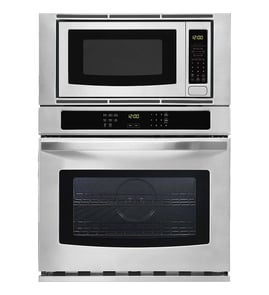
An electric oven uses heating elements and temperature controls to create and regulate heat, plus airflow and safety components to cook evenly. In your Electrolux ECWM3011ASA wall oven/microwave combo, common oven-related parts include the temperature sensor, convection fan components, door parts, and wiring connections.
Core electric oven parts (what they do)
- Bake heating system: provides the main heat for most cooking modes (often a lower bake element, sometimes hidden).
- Broil heating system: provides high, top-down heat for browning and broiling.
- Oven temperature sensor: tells the control board the actual oven temperature; a failed sensor can cause underheating, overheating, or error codes.
- Electronic control board and user interface: manages bake, broil, convection, timers, and safety logic.
- Convection fan system: circulates hot air for more even baking and faster roasting.
- Door and latch system: helps seal heat in; includes hinges, glass, and frame components.
Model-relevant examples for ECWM3011ASA
These are examples of parts on this model that map to the functions above:
| Oven function | Example part on this model | What you might notice when it fails |
|---|---|---|
| Temperature sensing | Cooking appliance oven temperature sensor 5304504897 | Temps swing, food cooks unevenly, long preheat |
| Convection airflow | Wall oven convection fan motor 139008504 | No fan noise, uneven browning, longer cook times |
| Convection airflow | Range convection fan blade 318398302 | Rattling, vibration, weak airflow |
| Power connection | Terminal block 5304409888 | Intermittent power, burning smell at junction box |
Why it matters
Knowing the major oven components helps you troubleshoot faster. For example, temperature problems often point to the sensor or control, while uneven baking often points to the convection fan motor or fan blade.
Quick troubleshooting tips before ordering parts
- Confirm the cooking mode (bake vs. convection vs. broil) and test each mode separately.
- If preheat is slow or temps seem off, suspect the sensor first.
- If convection is selected but airflow is weak or noisy, check the fan motor and fan blade.
- If the unit loses power or trips a breaker, inspect wiring connections and the terminal block.
- Always shut off power at the breaker before accessing panels or testing components.
Last updated: February 2026
Why is my Electrolux microwave screen not working?
If the display on your Electrolux ECWM3011ASA wall oven-microwave combo is blank or unresponsive, the most common causes are a temporary control glitch, a power supply issue to the control, or a failed control component. Start with a hard reset and then check for a blown fuse or loose wiring.
Quick checks (in order)
- Turn off power at the breaker for 5 minutes, then restore power and test the display.
- Confirm the outlet and breaker are supplying power (a partial power loss can leave the unit “on” but the screen dark).
- If the unit has a control lock feature, try toggling it off and on (a locked control can look like a dead screen).
- If the interior light, fan, and keypad are also dead, suspect a blown microwave fuse or power connection issue.
- If the keypad beeps but the screen stays dark, suspect the display/control electronics.
Parts that commonly fix a dead or blank screen
A blank screen is usually caused by loss of power to the microwave controls or a failed control board. These model-matched parts are common fixes:
| Symptom | Most likely area | Model-matched part to consider |
|---|---|---|
| Completely dead (no lights, no response) | Fuse/power feed | Wall oven microwave fuse and holder 318647300 |
| Screen blank or erratic, buttons act up | Control electronics | Wall oven microwave electronic control board A18493801 |
| Intermittent operation when opening/closing door | Door interlock circuit | Interlock l A23242801 |
Why it matters
A blank microwave display can be a simple reset issue, but it can also point to a failing fuse, door interlock, or electronic control. Addressing it early helps prevent repeated shutdowns and protects sensitive components like the control board.
Safety notes before you troubleshoot
- Shut off power at the breaker before removing any panels.
- Microwaves contain high-voltage components that can store energy even when unplugged; if testing goes beyond basic checks, we recommend using a qualified technician.
Last updated: February 2026
How to reset Electrolux microwave?
To reset the microwave portion of your Electrolux ECWM3011ASA wall oven-microwave combo, turn off power to the unit (unplug it or switch the circuit breaker off) for about 30 seconds, then restore power. This clears many temporary control glitches and restores normal operation.
Quick reset steps (safe and effective)
- Press Stop/Cancel once to end any active cycle.
- Turn OFF power at the breaker (preferred for built-in units) or unplug if accessible.
- Wait 30 seconds.
- Turn power ON.
- Set the clock if prompted.
- Test with a short heat cycle (for example, 30 seconds with a cup of water).
If it still will not run after a reset
A reset fixes software-like lockups; it will not fix a failed safety device or power component. Check these common causes:
- Door not fully latching (interlock issue)
- Blown microwave fuse
- Control board not powering correctly
- High-voltage component fault (magnetron, diode, capacitor)
Parts that commonly relate to “no power” or “won’t start”
| Symptom | What it often points to | Example part for ECWM3011ASA |
|---|---|---|
| Dead display, no response | Fuse or power connection | Wall oven microwave fuse and holder 318647300 |
| Runs but does not heat | High-voltage circuit | Magnetron 555030400 |
| Random resets, erratic keypad | Control issue | Wall oven microwave electronic control board A18493801 |
Why it matters
Resetting by removing power is the fastest way to clear a stuck relay state or control logic error. If the problem returns quickly, focusing on the door interlock and fuse circuit helps prevent repeated shutdowns and protects the high-voltage system.
Last updated: February 2026