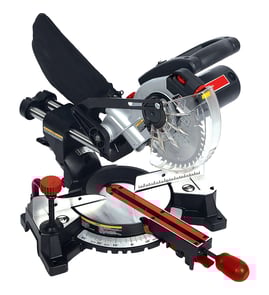

What is the 31.6 degree on a miter saw?
The 31.6° mark on a miter saw (including the Makita LS1030) is a common detent used for cutting crown molding while the molding is laid flat on the saw table. It pairs with a 33.9° bevel setting to create tight inside and outside corner joints.
What the 31.6° setting is used for
When you “cut crown flat,” you’re using compound angles instead of holding the crown at its installed spring angle.
- 31.6° miter is the left or right rotation of the saw table
- 33.9° bevel is the tilt of the blade
- Together, they produce the typical corner cuts for standard crown molding spring angles
- The detent helps you hit the angle quickly and repeatably
- It reduces setup errors compared to balancing crown against the fence
Quick reference: miter vs. bevel
| Setting | What you adjust | What it changes |
|---|---|---|
| Miter (31.6°) | Turntable rotation | Left or right “corner” angle |
| Bevel (33.9°) | Blade tilt | Top or bottom edge angle |
Tips for accurate crown molding cuts
- Mark the molding orientation (ceiling edge vs. wall edge) before cutting.
- Use a stop block or clamp so the piece cannot creep during the cut.
- Make test cuts on scrap first, then fine-tune if your walls are not perfectly square.
- Keep the fence and table clean so the molding sits flat.
- Use a sharp blade; dull teeth can deflect and open up the joint.
Why it matters
Crown molding corners are very sensitive to small angle errors. The 31.6° detent exists because it speeds up repeatable compound cuts that fit better, especially when you are doing multiple corners in a room.
For help finding the correct replacement parts for your Makita LS1030 (like a switch, carbon brushes, or a blade guard component), search by model on Sears PartsDirect.
Last updated: February 2026
What should you never cut with a miter saw?
You should never cut anything you cannot hold firmly and control throughout the cut on your Makita LS1030 miter saw, especially tiny offcuts, loose round stock, or warped material that will not sit flat to the fence and table. These situations commonly lead to binding, kickback, and thrown workpieces.
Never cut these materials or setups
- Very small pieces that cannot be clamped or held with a safe hand distance from the blade
- Freehand cuts where the workpiece is not tight to the fence and flat on the base
- Metal unless you are using the correct blade and the saw is set up for that material (most wood miter saw setups are not)
- Bowed, twisted, or cupped boards that rock or lift during the cut
- Round stock (dowel, pipe) unless it is secured in a V-block or jig and clamped
- Stacked pieces unless they are clamped so nothing can shift
Safer alternatives that work on most miter saw jobs
- Clamp the workpiece and use a stop block for repeat cuts.
- Use a longer sacrificial backer board against the fence to support short trim.
- For tiny parts, cut a longer piece first, then trim to final length using a jig.
- For questionable material control, switch to a different tool (for example, a band saw or hand saw) that better supports the work.
Quick safety check before you pull the trigger
| Check | What you want | Why it matters |
|---|---|---|
| Workpiece contact | Flat on the table and tight to the fence | Prevents lifting and binding |
| Stability | No rocking, rolling, or shifting | Reduces kickback risk |
| Control | Hands stay well away from the blade path | Prevents hand injuries |
| Guard function | Blade guard moves freely and returns | Keeps the blade covered when possible |
Why it matters
A miter saw is designed for controlled crosscuts and miters with the work supported by the fence and base. When the material is too small, unstable, or the wrong type, the blade can grab and launch the workpiece or pull the cut off-line.
For general DIY safety basics that also apply to power tools like a miter saw, review are diy appliance repairs safe.
Last updated: February 2026
How do I find the model number on my LS1030?
The model number for your Makita miter saw is typically printed on the saw’s rating label (nameplate). On the LS1030, check the motor housing and the rear or side of the base near the pivot area; the label usually lists the model and electrical specs.
Where to look on a Makita LS1030 miter saw
Check these common nameplate locations:
- Side of the motor housing (near the handle or brush caps)
- Rear of the motor housing (facing away from the blade)
- On the base casting near the turntable or fence
- Under the saw, on the underside of the base (tip the saw safely to view)
- Near the power cord entry point or switch housing
What the label looks like and what to write down
The label usually includes more than just the model. Record these items for accurate parts lookup:
- Model number (LS1030)
- Type or spec code (if shown)
- Voltage and amperage (for example, 120V and an amp rating)
- Serial number (helps match production variations)
| Label item | Why it matters |
|---|---|
| Model number | Matches you to the correct diagrams and parts list |
| Serial number | Helps identify version changes across production runs |
| Voltage/amps | Confirms motor and switch compatibility |
Why it matters
Makita power tools can have small design changes over time. Using the exact model number and any serial or type code helps us match the correct carbon brushes, switch, cord, or blade guard components.
If the label is missing or unreadable
- Clean dust off the housing and base; labels are often covered by pitch and sawdust
- Use a flashlight at an angle to read faint printing
- If the label is damaged, use our model-number tips in [how to find your appliance model number (and what it means for parts)]
Last updated: March 2026