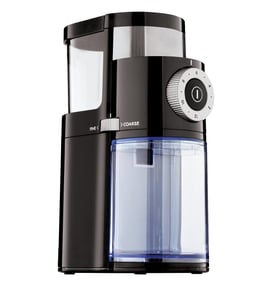



How to fix a coffee grinder that won't grind?
If your KitchenAid coffee grinder model BCG111OB0 won’t grind, the most common fix is clearing a bean jam and reseating the bowl and lid so the safety interlock can engage. Unplug the grinder first, clean out compacted grounds, then reassemble and test.
Quick checks (most common causes)
- Unplug the grinder for 1 minute, then plug it back in.
- Empty the bean jar and remove the bowl; look for a hard “plug” of oily grounds.
- Make sure the bowl and lid are fully seated and locked (many grinders will not run unless the lid is on correctly).
- Try a small test batch (1 to 2 tablespoons) to confirm beans are feeding.
- If the grinder stopped mid-use, let it cool 20 to 30 minutes (thermal protection can trip after heavy grinding).
Clean-out steps that usually restore grinding
- Unplug the unit.
- Remove the bean jar and bowl; dump beans and loose grounds.
- Brush out the grinding area and the chute where grounds exit.
- Wipe the bowl and lid sealing surfaces so they sit flat.
- Reinstall the bowl and lid, then test.
Parts that commonly affect fit and feeding
If the grinder runs intermittently or only when you press on the lid, a worn or cracked container part can prevent proper seating.
| Symptom | What it points to | Part to check |
|---|---|---|
| Grinder won’t start unless lid is pressed | Lid not seating or interlock not engaging | Plastic lid W10919443 |
| Beans not feeding consistently | Bean jar not fitting or cracked | Coffee grinder bean jar W10919442 |
| Grounds leak, bowl feels loose | Bowl not sealing or worn | Bowl assembly W10919446 |
Why it matters
A jam or poor lid/bowl fit makes the motor work harder and can trigger overheating protection. Keeping the bowl, lid, and chute clean helps the grinder maintain consistent burr/blade speed and grind size.
Last updated: February 2026
What are the main parts of a coffee grinder?
Most coffee grinders, including the KitchenAid BCG111OB0, are built around a bean container, a grinding area, and a grounds container, plus lids and seals that keep everything aligned and reduce mess. On this model, the jar, bowl, and lids are common service parts.
Main parts you will typically see
- Bean jar (hopper): holds whole beans before grinding
- Grinding mechanism: burrs or blades that break down the beans
- Grounds bowl (catch cup): collects the ground coffee
- Lids and caps: help contain beans and grounds, and keep parts seated
- Housing and controls: motor body, switch, and any grind settings
BCG111OB0 parts that match those functions
Here are examples of model-specific parts we commonly see replaced when lids crack or containers wear:
| Grinder function | Example part on BCG111OB0 | What it does |
|---|---|---|
| Holds beans | Coffee grinder bean jar W10919442 | Stores beans and feeds them into the grinder |
| Collects grounds | Bowl assembly W10919446 | Catches ground coffee and helps keep the work area clean |
| Covers/contains | Plastic lid W10919443 | Helps keep contents contained and parts properly seated |
Why it matters
Knowing the main parts helps you troubleshoot faster. For example, inconsistent grinding often points to the grinding mechanism or alignment, while spills and stale grounds usually trace back to a worn jar, bowl, or lid fit.
Quick care tips that prevent common part failures
- Keep the bean jar and bowl dry; moisture can cause clumping and extra strain
- Avoid overtightening lids; cracked lids are a common replacement item
- Brush out old grounds regularly to reduce buildup and odors
- Do not wash parts in very hot water unless your product instructions allow it
Last updated: February 2026
Why did my KitchenAid coffee grinder stop working?
If your KitchenAid coffee grinder model BCG111OB0 stopped working, the most common causes are a jam (bean fragment or foreign object), a lid or bowl not seated/locked correctly, or heavy coffee-oil buildup that prevents the burrs from turning. Start with a full clean-out and a fit check of the jar, bowl, and lid.
Quick checks (fastest fixes first)
- Unplug the grinder and remove the bean jar and bowl.
- Look for a jam: stones, hard bean fragments, or compacted grounds around the burr area.
- Re-seat the bowl and lid firmly; many grinders will not run if the bowl/lid is not aligned.
- Try a different outlet (avoid a switched outlet or power strip).
- Let the motor cool 20 to 30 minutes if it stopped mid-grind (overload protection can trip).
Clean and reset steps
Coffee oils and fine grounds can bind moving parts over time.
- Empty the bean jar and bowl completely.
- Brush out the burr area and chute; do not use water on internal grinding components unless your specific removable parts are designed for washing.
- Wipe the bowl and lid sealing surfaces so they sit flat.
- Reassemble and test with a small amount of beans.
Parts to inspect for fit and sealing
If the grinder runs intermittently or will not start, check for cracks, warping, or a loose fit.
| What to check | What you may notice | Related replacement part |
|---|---|---|
| Lid seating and lock | Grinder will not start or stops when touched | Plastic lid W10919443 |
| Bowl engagement | Rattling, poor alignment, inconsistent grinding | Bowl assembly W10919446 |
| Bean jar fit | Jar wobbles or does not sit fully | Coffee grinder bean jar W10919442 |
If the motor runs but it will not grind
That pattern usually points to a mechanical bind or worn grinding components. Do a deep clean first; if the burrs still do not turn freely by hand (with the unit unplugged), the grinder may need service-level repair.
Why it matters
A jammed burr set or mis-seated bowl/lid can make the grinder appear “dead,” and forcing it can overheat the motor or damage plastic interfaces. Cleaning and correct assembly restore normal operation in many cases.
Last updated: February 2026