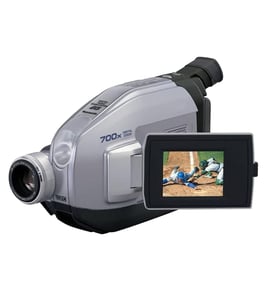

What is a VHS-C camcorder?
A VHS-C camcorder is an analog camcorder that records video onto a compact VHS-C cassette (a smaller version of a full-size VHS tape). For a Panasonic PV-330, you can typically play or transfer those recordings by using a VHS-C to VHS adapter in a standard VHS VCR.
How VHS-C works (in plain terms)
VHS-C uses the same type of magnetic tape as VHS, but the cassette shell is smaller so it fits in compact camcorders.
- The camcorder records analog video and audio to a VHS-C cassette
- The cassette is physically smaller than a standard VHS tape
- A VHS-C adapter lets the small cassette be used in many full-size VHS VCRs
- Playback quality depends on tape condition, recording mode, and the camcorder’s heads
- Old tapes often need gentle handling and clean equipment for best results
VHS-C vs VHS: quick comparison
| Feature | VHS-C | VHS |
|---|---|---|
| Cassette size | Compact | Full-size |
| Typical use | Camcorders | VCRs |
| Playback method | Camcorder or adapter in VCR | VCR |
| Best for today | Capturing old home videos | Playback and transfer workflows |
Common VHS-C camcorder issues that affect playback
If your PV-330 powers on but playback is poor, these are the most common causes:
- Dirty or worn video heads
- Creased, stretched, or moldy tape
- Weak battery or unstable power supply
- Tape transport issues (loading mechanism, pinch roller, capstan)
- Mis-tracking during playback in a VCR (especially with older recordings)
Why it matters
Knowing that VHS-C is an analog tape format helps set expectations: video quality is limited by the original recording and tape condition, and successful playback often depends on using the right adapter and keeping the tape path clean.
For general repair and electrical testing basics that also apply to camcorder wiring and power issues, see how to use a multimeter to test electrical parts video.
Last updated: February 2026
What type of SD card works with a Panasonic camcorder?
SD card compatibility depends on the exact Panasonic camcorder model; for the Panasonic PV-330 (a compact VHS-C camcorder), SD cards typically are not the recording media because this model records to VHS-C tapes. If your Panasonic camcorder does use memory cards, it usually requires an SD family card (SD, SDHC, or SDXC) within the capacity and speed class listed for that specific model.
What to check first (fast, reliable)
- Confirm whether your camcorder records to tape (VHS-C) or to a memory card.
- Look for a card slot labeled SD or SD/SDHC/SDXC.
- Check the camcorder’s on-screen media menu for “Card” or “SD” options.
- Verify the exact model number on the camcorder label; PV-330 is a tape-based model.
- If you are transferring footage, you may need a VHS-C adapter or capture setup rather than an SD card.
Typical SD card types Panasonic camcorders use (for card-based models)
Most Panasonic camcorders that support removable flash media use one of these SD formats:
| Card type | Typical capacity range | Common use case |
|---|---|---|
| SD | Up to 2 GB | Older SD-only devices |
| SDHC | 4 to 32 GB | Many HD-era camcorders |
| SDXC | 64 GB and up | Newer HD/4K camcorders |
Why it matters
Using the wrong SD type, capacity, or speed class can cause recording to stop, files to corrupt, or the camcorder to not recognize the card at all. For PV-330 specifically, focusing on the correct VHS-C tape and playback/transfer method solves the real problem faster than trying different SD cards.
Helpful related DIY content
If you are troubleshooting power or connection issues during playback or transfer, our general electrical testing guides help:
Last updated: February 2026
When was VHS-C discontinued?
VHS-C was effectively discontinued as a mainstream consumer format in the 2000s, and the last major production of new VHS-C tapes ended around 2016. For a Panasonic PV-330 compact VHS-C camcorder, that means you typically rely on existing new old stock, used tapes, or tape transfer options rather than newly manufactured media.
What “discontinued” usually means for VHS-C
VHS-C did not stop on one single day worldwide. In practice, discontinuation happened in stages:
- Camcorders using VHS-C largely stopped being sold as digital formats took over
- Retail availability of blank VHS-C tapes steadily declined
- Manufacturing continued longer for niche demand, then ended
- Support shifted from recording to playback and conversion (VHS-C adapter use, digitizing)
Quick timeline (practical milestones)
| Milestone | What you would notice | Typical timeframe |
|---|---|---|
| Format starts fading from mainstream | Fewer new camcorder models, more MiniDV/DVD | Late 1990s to early 2000s |
| Blank tape availability drops | Harder to find new tapes in stores | 2000s |
| New tape production ends | Mostly leftover inventory only | Around 2016 |
Why it matters for a Panasonic PV-330 owner
When new tape production ends, the biggest issues are media quality and reliability. Older tapes can have dropouts, sticky shedding, or physical damage that causes playback problems, tape jams, or poor picture and audio.
Tips if you are still using VHS-C today
- Use the best-condition tapes you can find; avoid tapes with visible wrinkles or mold
- Store tapes upright in cases, in a cool, dry place
- If playback is unstable, stop and inspect the tape to prevent damage to the camcorder
- Consider transferring important recordings sooner rather than later
- If you are troubleshooting power or intermittent operation, use a basic electrical check approach like in how to tell if a fuse is blown
Last updated: February 2026