


How do I find the right GE part number?
For your GE GCST16S1W1SS built-in microwave, the right part number comes from matching the exact model number to the correct parts diagram, then confirming the part name and identifier before ordering. This prevents fit and wiring mismatches, especially on turntable and drive components.
Step-by-step: the fastest way to get the correct part
- Confirm the model number is GCST16S1W1SS (use the rating label on the microwave).
- Use the model number to pull up the parts list and diagram for this exact GE microwave.
- Identify the failed component by name (for example: coupler, rotating ring, glass tray).
- Match the diagram callout to the exact part ID and description.
- Double-check symptoms so you replace the right item the first time.
Common GCST16S1W1SS turntable parts (examples)
If your issue is the tray not turning, these are the most commonly referenced parts for this model:
| Symptom | Part to check first | What it does |
|---|---|---|
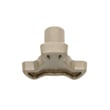
| Tray wobbles, slips, or does not rotate | Coupler WB06X10861 | Connects the turntable motor drive to the tray support |
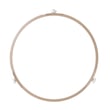
| Grinding noise or tray binds | Rotating ring WB06X10862 | Supports the tray and lets it roll smoothly |
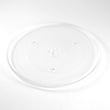
| Tray is broken, chipped, or missing | Microwave glass turntable tray WB39X10032 | The glass cooking surface that rotates |
Quick checks before ordering
- Make sure the tray is seated correctly on the coupler.
- Clean spills and debris under the rotating ring and on the oven floor.
- Inspect the coupler for cracks or a rounded-out drive socket.
- Confirm the rotating ring wheels roll freely and are not flat-spotted.
Why it matters
GE microwaves can look similar across model families, but small differences in mounting tabs, coupler shape, and tray diameter change compatibility. Using the exact GCST16S1W1SS model match keeps the part number accurate and avoids returns.
Last updated: February 2026
How to order GE appliance parts?
To order parts for your GE GCST16S1W1SS built-in microwave, confirm the full model number and then match the exact replacement part you need (for example, a turntable component) by part name and part ID. If you need help identifying the correct part, contact Sears PartsDirect support.
What we recommend before you order
- Confirm the model number is exactly GCST16S1W1SS (check the rating label on the microwave).
- Identify the failed part by symptom (no turntable rotation, noisy rotation, broken glass tray, etc.).
- Compare your part to the listing name and ID to avoid look-alikes.
- Check the part listing details to confirm it matches your microwave configuration.
- Keep your model number handy when ordering.
Common turntable-related parts for this model
If your microwave runs but the tray does not rotate, these are the most common order choices:
| Symptom | Part to check | What it does |
|---|---|---|
| Tray not turning | Coupler WB06X10861 | Connects the turntable motor drive to the tray system |
| Grinding or wobble | Rotating ring WB06X10862 | Supports the tray and helps it roll smoothly |
| Tray is cracked or missing | Microwave glass turntable tray WB39X10032 | The glass cooking tray that rotates |
Ordering when you are unsure about the part
Use the model number GCST16S1W1SS to match parts by diagram and description. If multiple similar parts appear, match by part ID and how your original part mounts or connects.
Why it matters
Ordering by the exact model number (GCST16S1W1SS) and matching the correct GE part ID helps prevent fit issues, repeat repairs, and return delays, especially with turntable parts that can look similar across microwave models.
Last updated: March 2026
How to replace microwave light bulb GE?
For the GE GCST16S1W1SS microwave, light-bulb replacement depends on whether your unit has an interior lamp that’s user-serviceable. Start by disconnecting power, then check for a small lamp cover inside the cavity; if there is no access cover, the lamp is serviced from inside the cabinet and we recommend a technician.
Safety steps we follow first
- Unplug the microwave or switch off the breaker
- Let the cavity and lamp area cool completely
- Wear cut-resistant gloves (sheet-metal edges are sharp)
- Never operate the microwave with the cabinet removed
- Use only appliance-rated replacement parts
How to check which light setup you have
- Open the door and look for a lens or small cover inside the cooking cavity (often held by a screw).
- If you see a cover: remove it, remove the bulb, and install the same base style and wattage.
- If you do not see a cover: the lamp is typically behind the outer cabinet; cabinet removal exposes high-voltage components, so schedule service.
Buying the correct replacement bulb
Use the old bulb as your match reference.
| What to match | Common options | Why it matters |
|---|---|---|
| Base type | Screw base or pin base | Determines fit in the socket |
| Wattage | Often 20W to 40W appliance bulb | Higher wattage overheats the lens/housing |
| Rating | Microwave/appliance-rated | Handles heat and vibration better |
If the light still does not work
- Confirm the light is supposed to come on with the door open (some are cook-cycle only)
- Check for a blown fuse or power interruption symptoms
- Look for a heat-damaged socket or loose connector (service-level check)
For fuse-related troubleshooting steps, use our guide: how to replace a microwave fuse.
Why it matters
Using the correct bulb type and keeping all covers installed protects airflow and shielding, and it prevents heat damage to the lamp lens and surrounding wiring.
Last updated: February 2026
What are common problems with GE profile microwaves?
Common problems we see with GE Profile microwaves (including GE built-in models like GCST16S1W1SS) are no heat, a dead display, a door that will not start the cook cycle, a turntable that will not rotate, and sparking or arcing. Many symptoms trace back to power supply issues, door interlock problems, or worn turntable-drive parts.
Most common symptoms and likely causes
- Microwave runs but does not heat: failed high-voltage components (magnetron, diode, capacitor) or a control issue.
- No power or blank display: blown fuse, tripped breaker, loose power cord connection, or failed control board.
- Starts then stops when the door moves: worn or misaligned door latches or failing interlock switches.
- Turntable not spinning: broken coupler, damaged rotating ring, or a seized turntable motor.
- Sparking/arcing: food splatter or metal in the cavity; damaged waveguide cover or rack support area.
Quick checks we recommend first (safe, no disassembly)
- Unplug the microwave (or switch off the breaker) for 2 minutes, then restore power to clear a control glitch.
- Confirm the outlet has power by testing a small appliance.
- Remove the glass tray and rotating ring; clean crumbs and grease, then reinstall.
- Verify the tray sits correctly on the coupler WB06X10861 and rolls smoothly on the rotating ring WB06X10862.
- If you see arcing, stop using the microwave until the cause is corrected.
Turntable drive parts: what each one does
| Part | What it does | Common failure sign |
|---|---|---|
| Coupler | Connects the motor shaft to the tray drive | Tray wobbles, slips, or does not move |
| Rotating ring | Supports the tray and helps it roll | Grinding noise, jerky rotation |
| Microwave glass turntable tray | Cooking surface that rotates | Cracked, rocking, or not seated |
Why it matters
Door-switch and heating-circuit problems can create inconsistent cooking and repeated shutdowns. Turntable issues can cause hot spots and poor results, and arcing can damage interior surfaces.
For deeper troubleshooting on heating failures, use our guide: why is my microwave not heating.
Last updated: February 2026
What model GE microwave do I have?
If you’re on the GE GCST16S1W1SS built-in microwave parts page, your microwave model is GCST16S1W1SS. To confirm on the appliance itself, open the door and look for the model and serial tag on the oven frame (often along the door opening).
Where to find the model number on a GE microwave
On most GE microwaves, the model number is printed on a label in one of these spots:
- Along the front frame behind the door (most common)
- On the left or right side of the door opening
- On the back of the microwave cabinet (less common)
- On the inside edge of the door (some designs)
- On the upper lip of the opening where the door closes
What the model number looks like (and what to write down)
Use the full model number exactly as shown on the tag.
| What to capture | Example for this model | Why it matters |
|---|---|---|
| Model number | GCST16S1W1SS | Ensures correct GE parts fit |
| Serial number | (varies) | Helps match production version |
| Brand | GE | Confirms parts catalog |
Why it matters
GE microwaves can use different turntable parts, couplers, and rotating rings depending on the exact model and production run. Matching the model number first prevents ordering the wrong part.
Parts that commonly depend on the exact model
If your turntable is not turning or the tray does not sit correctly, these model-matched parts are common checks:
Last updated: February 2026
What's the average lifespan of a GE microwave?
A GE microwave typically lasts about 8 years. For a built-in model like GE GCST16S1W1SS, most owners see 5 to 10 years depending on daily run time, ventilation, and how well the cavity and door seals are kept clean.
Typical lifespan ranges
Most household microwaves fall into these practical ranges:
- Light use (reheating only): 9 to 12 years
- Average use (daily cooking + reheating): 5 to 10 years
- Heavy use (multiple long cycles daily): 3 to 7 years
- Built-in installs: often similar to countertop units, but heat buildup from tight cabinetry can shorten life
| Use pattern | What wears fastest | What you notice first |
|---|---|---|
| Light | Turntable drive parts | Noisy rotation, occasional slipping |
| Average | Door switches, internal protection devices | Intermittent start, stops mid-cycle |
| Heavy | High-voltage components | Runs but doesn’t heat, burning smell, loud hum |
What helps a GE microwave last longer
These habits reduce stress on the magnetron, cooling system, and turntable system:
- Keep the air vents clear and don’t block airflow with oversized dishes
- Wipe up grease and splatters so they don’t carbonize and cause arcing
- Avoid running the microwave empty
- Use microwave-safe covers to reduce moisture and grease buildup
- If the turntable binds or chatters, replace worn drive parts early (for example, the coupler WB06X10861)
Why it matters
Microwaves often fail from heat stress, door-switch wear, or turntable drive strain. Fixing small issues early (noise, wobble, slipping tray) can prevent bigger problems and helps the GCST16S1W1SS cook evenly and quietly.
Last updated: February 2026