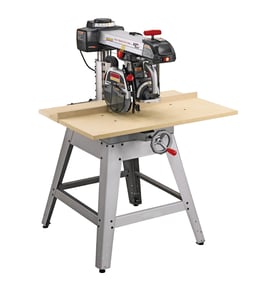

Can I use a dado blade on a radial arm saw?
Yes, a dado blade can be used on many radial arm saw setups, but we only recommend doing it if your specific saw and guarding can safely support dadoing. With a Craftsman pin router attachment model 32765-PIN, confirm your radial arm saw’s arbor size, maximum blade stack width, and guard compatibility before installing any dado set.
Safety checks before you try dadoing
- Unplug the saw before changing blades or adjusting the yoke, carriage, or guard.
- Verify the arbor diameter matches the dado set (commonly 5/8 inch) and that the arbor has enough threaded length for the full stack plus washers and nut.
- Use the correct guard and anti-kickback features for the operation; never run a dado stack with an incompatible or removed guard.
- Set the saw to a stable, square crosscut configuration; avoid freehand or awkward compound setups.
- Use a sacrificial fence and table surface to support the wider cut.
- Make shallow passes and feed smoothly; aggressive pulls increase climb and kickback risk.
What to confirm on your saw (quick fit checklist)
Because this page is for the Craftsman 32765-PIN pin router attachment (not the saw itself), we treat the radial arm saw as the controlling factor for dado compatibility.
| Item to verify | What “good” looks like | Why it matters |
|---|---|---|
| Arbor size | Matches dado bore (often 5/8 inch) | Prevents wobble and runout |
| Arbor length | Enough threads for full stack + nut | Prevents nut bottoming out |
| Max dado width | Saw rating supports your stack | Avoids overload and binding |
| Guarding | Guard fully covers and clears stack | Reduces exposure and kickback |
Setup tips that reduce kickback
Use the right technique
- Prefer cross-grain dadoes with the work firmly against the fence.
- Clamp the work when practical; keep hands out of the line of cut.
- Stand slightly to the side of the blade path.
Use the right tooling
- Use a sharp, balanced dado set; avoid mixed, damaged, or warped chippers.
- Tighten the arbor nut firmly and recheck after the first few cuts.
Why it matters
A dado stack removes more material than a standard blade, which increases cutting forces. On a radial arm saw, that extra load can amplify self-feeding and kickback if the setup, guarding, or technique is not correct.
Parts and diagrams
If you need to identify hardware, guards, or mounting components for your Craftsman setup, use the model diagrams and parts lookup on Sears PartsDirect.
Last updated: February 2026
How do I find the model number on my 32765-PIN?
For the Craftsman pin router attachment model 32765-PIN, the model number is usually printed on an ID label or stamped into the metal on the attachment body. We use that exact model number to match the correct diagrams and replacement parts.
Where to look on a pin router attachment
Check these common spots first:
- The main attachment housing (side or back surface)
- Near the mounting bracket that connects to the radial arm saw
- Around the depth adjustment area or clamp assembly
- On the underside of the base plate
- On a small foil or printed label near the router mount
What the model number label can look like
Model information on Craftsman power tool attachments is commonly shown in one of these formats:
| What you see | What it means | What to do |
|---|---|---|
| 32765-PIN | Full model number | Use it exactly as shown |
| 32765 | Base model family | Keep looking for the suffix |
| A longer string with letters/numbers | Production code plus model | Record the model number portion |
Tips to make the label readable
- Wipe dust and pitch off with a dry rag first.
- Use a flashlight at a low angle to read stamped numbers.
- Take a close-up photo and zoom in.
- If the label is damaged, check for a second stamp on the mounting bracket.
Why it matters
Small differences in a Craftsman attachment model number can change hardware, clamps, or mounting components; using 32765-PIN helps ensure the right fit and safe operation.
For a quick walkthrough on locating model numbers, use [how to find your appliance model number (and what it means for parts)].
Last updated: March 2026
What is the average lifespan of 32765-PIN?
The average lifespan of a Craftsman pin router attachment like model 32765-PIN is 15 to 25 years with normal hobby or light shop use. Lifespan depends most on bearing wear, mounting hardware condition, and how clean and tight the attachment stays.
What affects lifespan the most
- Dust control (fine sawdust accelerates wear in moving joints)
- How often it is used (daily production use shortens life)
- Storage conditions (humidity can cause corrosion)
- Vibration and loosened fasteners (can oval mounting holes over time)
- Proper bit/router setup (reduces stress on the attachment)
Signs it is nearing end of service life
- Excess play in the pin or guide mechanism
- Mounting bracket no longer tightens securely
- Cracks in cast or machined components
- Persistent chatter or vibration even after tightening and alignment
- Stripped threads or hardware that will not hold torque
Maintenance schedule we recommend
| Interval | What to do | Goal |
|---|---|---|
| Every use | Brush off dust, check fasteners | Prevent loosening and wear |
| Monthly | Inspect for play, clean contact surfaces | Keep routing accurate |
| Yearly | Check for corrosion, replace worn hardware | Extend service life |
Why it matters
A worn pin router attachment can reduce cut accuracy and increase kickback risk on a radial arm saw setup; keeping the attachment tight, clean, and aligned protects both the workpiece and the tool.
For general DIY safety guidance before servicing or adjusting power tool accessories, see [are diy appliance repairs safe].
Last updated: March 2026