Installation guide
 Owner’s manual



Does a GE over the range microwave need to be vented?
No. Your GE over-the-range microwave (model JVM6172DF1BB) does not have to vent outdoors; it can be installed to vent outside (top or back exhaust) or set up to recirculate air back into the kitchen (non-vented/ductless). Confirm the correct setup in the installation guide.
Venting options for JVM6172DF1BB
GE installation instructions describe three ventilation types; you choose the one that matches your kitchen layout:
- Outside top exhaust (vertical duct): vents up through the cabinet above.
- Outside back exhaust (horizontal duct): vents straight out through the wall behind.
- Recirculating (non-vented/ductless): filters and returns air to the room (typically uses a charcoal filter).
Quick comparison
| Venting type | Ductwork needed | Best when | Ongoing maintenance |
|---|---|---|---|
| Outside top exhaust | Yes | There is a cabinet above and a vertical duct path | Clean/replace grease filter; keep vent path clear |
| Outside back exhaust | Yes | There is an exterior wall directly behind the microwave | Clean/replace grease filter; keep damper/duct clear |
| Recirculating (ductless) | No | You cannot run ductwork | Clean grease filter; replace charcoal filter as needed |
What to check before you decide
Use these practical checks to avoid rework during installation:
- Verify whether you already have a wall or ceiling duct in the right location.
- Make sure the microwave will be mounted to both the top cabinet and the wall (not an island or peninsula setup).
- Plan for two-person lifting; these units are heavy.
- Confirm the mounting height and clearances over the cooktop.
- If you choose ductless recirculation, plan on using a charcoal filter; for this model, a common replacement is the microwave charcoal filter WB02X11536.
Why it matters
Choosing the right venting method affects smoke and odor removal, cabinet moisture, and how well the hood fan performs. Ducted venting usually moves heat and odors out of the home; recirculating setups rely more on filters and regular maintenance.
Last updated: February 2026
What's the average lifespan of a GE microwave?
A GE microwave typically lasts 8 years. For an over-the-range microwave/hood combo like GE JVM6172DF1BB, most owners see about 5 to 10 years depending on daily run time, ventilation/grease buildup, and whether the door and interlock system stay properly aligned (see the owner's manual).
Typical lifespan ranges (what we see most often)
- Light to moderate use (1 to 5 short cycles/day): 8 to 10 years
- Heavy use (many cycles/day, frequent reheating): 5 to 8 years
- Best-case with good airflow and cleaning: 10+ years
What shortens the life of an over-the-range microwave
- Running the microwave empty (can stress internal components)
- Grease buildup that restricts airflow through the hood and cabinet area
- Slamming the door or pulling it open by the handle aggressively
- Repeated overheating from blocked vents or poor installation clearances
- Power surges or frequent breaker trips
Parts that commonly affect “end of life” symptoms
If your JVM6172DF1BB still powers on but has performance issues, these parts are often involved:
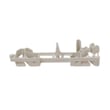
- Micro-switch WB24X830 (door interlock; can prevent starting or cause intermittent operation)
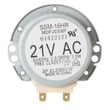
- Microwave turntable motor WB26X10233 (tray not turning)
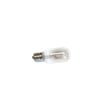
- Microwave light bulb WB36X10003 (no cooktop light)
- Microwave charcoal filter WB02X11536 (recirculating setups; helps with odors and airflow)
Quick symptom-to-likely-cause guide
| Symptom | What it usually points to | What to check first |
|---|---|---|
| Runs but does not heat | High-voltage circuit issue | Heating performance and unusual noises |
| Dead, no display | Power supply or internal protection | Outlet power, breaker, then internal fuse (service) |
| Starts then stops | Overheating or door interlock issue | Venting, filters, door closing feel |
| Turntable not rotating | Drive/motor issue | Tray seated correctly, coupler/motor |
Why it matters
Knowing the typical lifespan helps you decide whether a repair makes sense. If your microwave is near the 8-year mark and needs a major heating repair, comparing part cost and downtime against replacement is usually the fastest way to choose the best path.
Last updated: February 2026
How to replace microwave light bulb GE?
To replace the light bulb in your GE JVM6172DF1BB microwave/hood combo, we unplug the microwave (or switch off the breaker), remove the vent grille, then access and swap the bulb with the correct replacement. Use the JVM6172DF1BB owner's manual for the exact access steps for your configuration.
Before you start (safety and prep)
Microwaves contain high-voltage components; a light-bulb change is usually a simple access job, but we still treat it like an electrical repair.
- Unplug the microwave, or turn off the circuit breaker.
- Let the bulb cool completely before touching it.
- Use a step stool and have a second person steady you if needed.
- Protect the cooktop with a towel so screws do not scratch it.
- Do not remove the outer cabinet unless the manual specifically directs it.
Basic replacement steps (typical over-the-range GE layout)
These steps match how most over-the-range microwave/hood combos are built; your manual shows the exact screw locations.
- Remove the vent grille (usually a few screws across the top front).
- Locate the light housing or bulb cover behind the grille.
- Remove the cover screw(s) and open the cover.
- Unscrew the old bulb and install the new bulb (do not overtighten).
- Reinstall the cover and vent grille.
- Restore power and test the cooktop light.
Which bulb do I need?
For JVM6172DF1BB, the correct bulb type and wattage depend on the exact light assembly used in your unit. We recommend matching these details before ordering:
- Base type (for example, intermediate vs. candelabra)
- Wattage rating
- Voltage rating
- Clear vs. appliance-rated bulb
| What to match | Why it matters |
|---|---|
| Base type | Prevents a loose fit or damaged socket |
| Wattage | Avoids overheating the lens or housing |
| Appliance rating | Handles heat and vibration better |
If your light is out but the bulb tests good, the issue is often the socket, wiring connection, or a door/interlock related power interruption; the microwave light bulb WB36X10003 is the common replacement part listed for this model.
Why it matters
A correct, appliance-rated bulb helps prevent heat damage to the lens and keeps the hood light working reliably for cooking visibility and ventilation use.
Last updated: February 2026
Why is the exhaust fan not working on my GE microwave?
On your GE JVM6172DF1BB microwave/hood combo, an exhaust fan that will not run is usually caused by a power issue, a door or control problem, or a venting setup issue that prevents the blower and damper from operating correctly. We start by confirming the venting configuration and filters, then move to electrical checks.
Quick checks we do first (no tools)
- Confirm the fan is turned on at the control panel (try each fan speed).
- Make sure the vent grille is not blocked and the grease filter is installed correctly.
- If your unit is set up for outside venting, check that the damper can swing freely and is not stuck.
- If your unit is set up for recirculating, confirm a charcoal filter is installed and not packed with grease.
- Power-cycle the microwave: unplug for 2 minutes, then plug back in and retest.
Venting and installation issues that stop airflow
The installation instructions call out checking damper operation and adjusting the exhaust adaptor to connect to the house duct. If the adaptor is misaligned or the damper is installed incorrectly, the blower can sound strained, move little air, or appear to not work.
What to verify
- Ductwork is connected and sealed; loose joints can reduce airflow.
- Exhaust adaptor is aligned to the house duct.
- Damper hinge is at the top and the damper swings freely.
| Installation type | What you should see | Common problem |
|---|---|---|
| Outside top exhaust | Damper opens when fan runs | Damper stuck or adaptor misaligned |
| Outside back exhaust | Air exits rear duct | Blower not rotated correctly during install |
| Recirculating | Air exits front/top vents | Missing or clogged charcoal filter |
When it is likely a failed part
If the fan does not run at any speed and you have confirmed power and settings, the issue is commonly in the fan circuit or door interlock system.
Parts that commonly relate to fan and interlock symptoms
- Door interlock switch: micro-switch WB24X830
- Door latch alignment: microwave latch body WB06X10676
Why it matters
The exhaust fan protects the microwave and surrounding cabinetry by removing heat, steam, and grease. Poor venting can also trigger overheating protection and cause intermittent operation.
For model-specific venting setup and damper orientation details, follow the steps in the installation guide.
Last updated: February 2026
How to read GE microwave model number?
On your GE JVM6172DF1BB over-the-range microwave, the model number is printed on the rating label inside the door opening. Open the door and look along the frame (often on the left or right side) for the model and serial number.
Where to find the model number label
Check these common spots on a microwave/hood combo like JVM6172DF1BB:
- Inside the door opening on the front frame
- Along the left side wall of the opening (near the latch area)
- Along the right side wall of the opening
- On the upper lip of the opening (less common)
If the label is greasy or hard to read, wipe it gently with a damp cloth and a drop of dish soap, then dry it.
How to “read” the model number (what it’s used for)
For parts and service information, the most important thing is to match the model number exactly, character for character (including any letters at the end).
Use the model number to:
- Look up the correct replacement parts list for your microwave
- Match installation requirements and venting options
- Confirm fit for items like filters, bulbs, and door switches
Model number vs. serial number
| Label item | What it tells you | When you need it |
|---|---|---|
| Model number (JVM6172DF1BB) | The exact product design and parts match | Always, for parts lookup |
| Serial number | Production details (varies by unit) | Sometimes, for service history |
Why it matters
Microwave/hood combos often have multiple versions that look identical but use different door interlock parts, filters, or wiring. Using the exact model number helps prevent ordering the wrong component.
For model-specific installation details (mounting space, venting types, and electrical requirements), use the installation guide.
Last updated: February 2026