


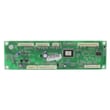
Is GE Profile considered high end?
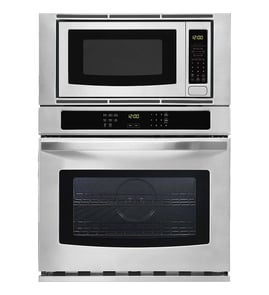
Yes. GE Profile is generally considered GE’s step-up (mid-to-high-end) line: you typically get more cooking features, upgraded finishes, and more electronic controls than basic GE models. For a GE electric oven/microwave combo like model PT7800SHASS, that often means more convenience features and more control boards and sensors supporting them.
GE Profile usually sits above standard GE appliances and below GE’s true luxury lines. In practical terms, you can expect a stronger feature set (convection options, more precise temperature management, and more advanced user interfaces) than entry-level models.
- More electronic controls and display features
- More sensors managing oven temperature and cooling
- More premium exterior styling (often stainless)
- More specialized parts supporting safety and performance
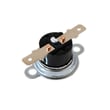
More features usually means more components that can affect performance. If your PT7800SHASS shows temperature swings, long preheat times, or inconsistent baking, a common first check is the oven temperature sensing circuit, including the wall oven temperature sensor WB21X10165.
If you see overheating symptoms, fan running issues, or heat-related shutdown behavior, the cooling system controls are also important, such as the wall oven cooling fan sensor board WB27T11463 and the wall oven cooling fan assembly WB26X31060.
| Symptom | Common area to check | Example part on this model page |
|---|---|---|
| Oven temp seems off | Temperature sensing | Wall oven temperature sensor |
| Oven runs hot, fan issues | Cooling fan control | Cooling fan sensor board |
| Loud or failing fan | Cooling airflow | Cooling fan assembly |
When a “high end” appliance has more automation and electronics, it can deliver better cooking results, but it also means accurate diagnosis matters. Replacing the right sensor, fan component, or board first helps restore performance and avoids repeat repairs.
We recommend matching parts by the full model number PT7800SHASS and confirming the part ID before ordering. You can order replacement parts from the parts list for this model, or search by model number on Sears PartsDirect.
Last updated: February 2026
What are common problems with GE Profile microwaves?
Common problems with GE Profile microwaves include running but not heating, a dead display or no power, loud buzzing or humming, a turntable that will not rotate, and keypad or door issues. On the GE PT7800SHASS wall oven/microwave combo, these symptoms often trace back to door interlock switches, high-voltage components, or control and power boards.
- Runs but does not heat: door interlock problem, high-voltage transformer issue, or control failure
- No power or intermittent power: power board issue, loose wiring, or a blown internal fuse (often triggered by a failing component)
- Loud buzzing/humming: high-voltage transformer or related high-voltage circuit problem
- Turntable not turning: tray/drive issue or a control problem (some modes intentionally disable rotation)
- Buttons not responding: control panel or control board problem
- Door will not start the microwave: misaligned latch or failed interlock switch
If your symptom matches, these are model-specific parts we commonly see involved on PT7800SHASS:
| Symptom | Commonly related part | What it does |
|---|---|---|
| Will not start when door closes | Microwave door interlock switch WB24X10047 | Confirms the door is closed and safe to run |
| Starts then stops, or acts like door is open | Microwave door interlock switch WB24X25397 | Secondary interlock used in the door safety circuit |
| Dead unit, resets, or erratic operation | Power board WB27X32626 | Distributes and conditions power to key circuits |
| Loud electrical hum, no heat | Microwave high-voltage transformer WB17X10030 | Supplies high voltage needed for heating |
Microwaves contain high voltage even when unplugged, so we keep troubleshooting to safe, external checks:
- Confirm the outlet works (test with a lamp or small appliance).
- Power-cycle the unit (turn breaker off for 1 minute, then on).
- Inspect the door for sagging, a loose latch, or debris on the latch hooks.
- Try a different cook mode (some settings change fan and turntable behavior).
- If the unit is completely dead, stop using it and focus on power and control diagnostics.
A microwave that runs but does not heat, or that behaves like the door is open, is often a door-safety or high-voltage issue. Fixing the correct root cause prevents repeat failures and helps keep the combo unit operating safely and consistently.
For ordering, you can choose PT7800SHASS replacement parts from the parts list for this model, or search by model number on Sears PartsDirect.
Last updated: February 2026
How do I reset my GE oven control board?
To reset the control on your GE PT7800SHASS electric oven/microwave combo, we recommend a hard power reset at the breaker first; it clears many lockups and nuisance error conditions. If the display comes back but problems continue, the issue is usually a keypad, wiring, sensor, or a failing control board.
- Press Clear/Off (or Cancel) once to stop any cooking cycle.
- If the control is unresponsive, turn OFF the oven’s circuit breaker.
- Leave power OFF for 60 seconds.
- Turn the breaker ON and let the control reboot.
- Set the clock (if prompted) and test Bake for 5 to 10 minutes.
A reset restores power, but it does not correct a part that is failing. These checks narrow down what is actually causing the problem:
- Temperature-related errors or bad baking results: test/inspect the wall oven temperature sensor WB21X10165.
- Random beeping, blank display, or dead keypad response: inspect wiring connections; if symptoms persist, the wall oven control board WB27X33487 is a common suspect.
- Overheating cabinet, fan running constantly, or fan not running: check the cooling fan system, including the wall oven cooling fan assembly WB26X31060.
- Microwave side not starting or stops when the door moves: door switch issues are common; check the microwave door interlock switch WB24X25397.
| Symptom after reset | Most common cause | What to check next |
|---|---|---|
| Oven heats wrong or throws temp error | Temperature sensing problem | Sensor and harness |
| Display works but buttons act “stuck” | Keypad/control issue | Control board and connectors |
| Unit seems too hot, fan behavior abnormal | Cooling circuit problem | Fan, sensor board, airflow |
| Microwave won’t run, door must be slammed | Door interlock problem | Interlock switches and mounts |
Repeated resets can get you cooking again temporarily, but they also mask intermittent electrical faults. Pinpointing whether the problem is a sensor, cooling fan circuit, door interlock, or the main control helps you replace the right part the first time.
You can order replacement parts for your PT7800SHASS from the parts list for this model, or search by model number on Sears PartsDirect.
Last updated: February 2026
How long do GE wall ovens last?
GE wall ovens, including the GE PT7800SHASS wall oven and microwave combo, last 12 years. With normal cooking habits, good airflow around the unit, and timely replacement of wear parts, 12 to 15 years is a realistic service life.
A wall oven’s life is driven by heat cycling, ventilation, and the condition of electronics and door components.
- Keep vents clear so the cooling fan can move air
- Avoid frequent self-clean cycles (they run at extreme temperatures)
- Fix temperature drift early to prevent overheating damage
- Replace worn door seals to reduce heat loss and longer run times
- Address fan noise promptly to protect control boards
When performance changes, these model-matched parts are common fixes we stock for PT7800SHASS:
- Wall oven temperature sensor WB21X10165 (helps correct inaccurate temperatures)
- Wall oven cooling fan assembly WB26X31060 (prevents overheating of controls)
- Wall oven door seal WB35X32825 (improves heat retention and efficiency)
- Wall oven control board WB27X33487 (restores operation when controls fail)
| Oven age | Best next step | What usually shows up |
|---|---|---|
| 0 to 7 years | Repair most issues | sensors, switches, minor electronics |
| 8 to 12 years | Repair if the cavity and door are solid | cooling fan parts, boards, seals |
| 13 to 15 years | Repair only cost-effective failures | multiple wear items at once |
As a wall oven ages, small issues like a weak temperature sensor or failing cooling fan can cause overheating, uneven baking, and repeated shutdowns. Replacing the right part early often prevents more expensive control damage.
Use the full model number PT7800SHASS when selecting replacements from the parts list for this unit. If you need to search by model number across more appliances, use Sears PartsDirect.
Last updated: February 2026