 Owner’s manual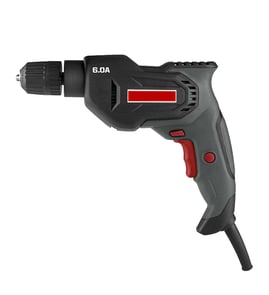

How to change drill bit in Craftsman 315105050 Drill?
To change the drill bit on your Craftsman 315105050 1/2 inch electric drill, unplug the drill first, then use the chuck key to loosen the chuck jaws, remove the old bit, insert the new bit fully, and tighten the jaws securely with the chuck key. See the owner's manual for the exact steps and safety notes.
Step-by-step: remove the old bit and install the new one
- Unplug the drill before touching the chuck or bit.
- Insert the chuck key into the chuck and turn it to loosen the chuck jaws.
- Pull the old drill bit straight out of the jaws.
- Insert the new drill bit the full length into the chuck jaws (center it as you push it in).
- Tighten the chuck jaws securely using the chuck key.
- Remove the chuck key before plugging the drill back in.
Quick checks that prevent slipping and wobble
- Make sure the bit is inserted straight and centered in the chuck.
- Tighten the chuck in multiple key positions (if your chuck has more than one keyhole) for a more even grip.
- Confirm the chuck jaws clamp on the smooth shank correctly (not on the flutes).
- Do not use a wrench on the chuck; use only the chuck key.
Common symptoms and what they usually mean
| What you notice | Most common cause | What to do |
|---|---|---|
| Bit slips while drilling | Chuck not tightened enough | Re-tighten firmly with the chuck key |
| Bit wobbles | Bit not centered or not fully inserted | Re-seat the bit fully, then tighten evenly |
| Chuck key keeps popping out | Key not fully seated in the gear teeth | Push key in firmly, then turn |
Why it matters
A properly installed bit helps your Craftsman drill cut cleanly, reduces vibration, and lowers the chance of the bit loosening during use. It also protects the chuck jaws from uneven wear.
Last updated: February 2026
Where can I buy Craftsman replacement parts?
You can buy replacement parts for your Craftsman 315105050 1/2-inch electric drill directly through our Craftsman 315105050 parts listing, using the drill’s parts diagram and parts list to match the exact component you need. For part identification details, use the owner's manual.
Best way to find the right replacement part
We recommend matching parts by diagram location and description first, then confirming the part number.
- Find your drill’s model number: 315105050
- Use the parts diagram to identify the assembly (handle, gear housing, switch area)
- Match the key number on the diagram to the part number in the parts list
- Confirm quantity needed (some screws and washers use multiples)
- Order the exact replacement; the manual specifies using identical Craftsman replacement parts
Common parts you may need (examples)
These are typical items shown in the 315105050 parts list and diagram; your exact need depends on the symptom.
| Symptom | Common area to check | Example part types listed for this model |
|---|---|---|
| Drill will not start or stops intermittently | Switch and cord area | Switch-related components, wiring connections, screws/handles |
| Grinding noise or poor power transfer | Gear case | Gear with pinion, washers |
| Loose grip or vibration | Handle/aux handle | “D” handle, auxiliary handle, handle screw, washers |
Why it matters
Power tools are safety-critical. Using the correct Craftsman 315105050 replacement part helps the drill run smoothly, keeps the double-insulated design intact, and reduces the risk of electrical shock or mechanical failure.
Last updated: February 2026
What are the parts of a drill called?
On the Craftsman 315105050 1/2-inch electric drill, the main parts are the chuck (holds the bit), the switch/trigger and lock-on button (controls power), the forward/reverse lever (direction), and the auxiliary or “D” handle (control and balance). For the full diagram and names, use the owner's manual.
Common drill parts and what they do
- Chuck and jaws: Clamp the drill bit; tightened with a chuck key on this model.
- Chuck key: Tightens and loosens the chuck jaws (remove it before running the drill).
- Switch trigger: Starts and stops the drill.
- Lock-on button: Holds the trigger “on” for continuous running (best for steady drilling in softer materials).
- Variable speed control selector: Adjusts speed and torque.
- Direction of rotation lever: Sets forward or reverse.
- Auxiliary handle: Helps prevent loss of control; should be kept tight.
- “D” shaped handle: Multi-position handle for balance and control.
Quick reference: names you’ll see in the manual
| Part name | Where it is | Why it matters |
|---|---|---|
| Auxiliary handle | Gear housing area | Better control, less wrist strain |
| “D” handle | End of the drill | Balance and leverage |
| Lock-on button | Side of handle | Continuous run without holding trigger |
| Variable speed selector | Near the trigger area | Matches speed/torque to the job |
| Chuck (with jaws) | Front of drill | Securely holds the bit |
Why it matters
Using the correct part names makes it easier to follow repair and operation steps, especially for safety items like the lock-on feature, direction lever, and keeping the auxiliary handle tight to prevent loss of control.
Last updated: February 2026