 Owner’s manual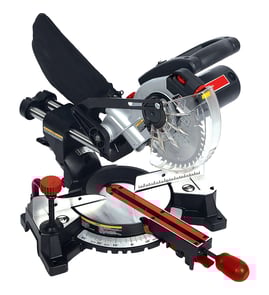

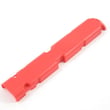
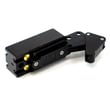
Where can I buy Craftsman replacement parts?
You can buy replacement parts for your Craftsman miter saw model 137212920 by using the model-specific parts list and diagrams on Sears PartsDirect, then ordering by the exact part number shown in the 137212920 owner's manual. This helps ensure the part matches your saw’s configuration.
We recommend using the parts list approach shown in the manual: identify the part in the schematic, then order by part number (not key number).
- Confirm the tool’s model number is 137212920 on the saw’s ID label
- Use the schematic and parts list to find the exact component name and part number
- Match the part to the correct section (for example: base/fence parts vs. motor parts)
- Order the replacement using the exact part number listed
- For electrical items (cord, switch, motor), follow the manual’s safety guidance and use identical replacement parts
The manual’s parts lists show many serviceable components. These are some of the most commonly searched categories for a 12-inch sliding compound miter saw:
| Part category | Examples from the manual parts lists | When you’d shop for it |
|---|---|---|
| Blade and arbor hardware | Blade, arbor collar | Dull cuts, wobble, blade change parts missing |
| Guards and dust collection | Lower blade guard assembly, dust bag assembly, dust collector | Guard sticking, broken plastic, poor dust capture |
| Power and cord components | Power cord assembly, cord guard | Cord damage, intermittent power |
| Motor components | Motor, bearings, armature assembly | No-start, burning smell, excessive sparking |
Miter saw parts are highly model-specific. Using the exact model number (137212920) and ordering by the listed part number prevents fit issues and helps keep safety features (like guards and double insulation) working as designed.
Last updated: February 2026
Will any miter saw stand work with any miter saw?
No. A miter saw stand is not automatically a perfect fit for every saw; you need to match the stand’s mounting method and capacity to your Craftsman 137212920 miter saw base and bolt-hole spacing. A “universal” stand usually works once the brackets are adjusted or an adapter plate is used.
Most compatibility issues come down to how the saw attaches and whether the stand can support the saw safely.
- Mounting hole pattern: the saw base holes must line up with the stand’s brackets or mounting rails.
- Base size and shape: some saw bases overhang or interfere with certain quick-release brackets.
- Weight rating: the stand must be rated for the saw plus typical workpiece loads.
- Stability: wide stance, solid locks, and minimal flex matter more than brand matching.
- Support extensions: roller or extension supports must reach your workpiece without tipping.
Use this quick checklist for the Craftsman 137212920:
- Measure the center-to-center distance between mounting holes on the saw base.
- Confirm the stand’s brackets can adjust to that spacing.
- Verify the stand’s maximum load exceeds the saw weight with margin.
- Check that the saw can sit flat without rocking on the brackets.
- Plan for long stock support; the manual stresses using extra supports for large or awkward workpieces.
| Stand type | Typical compatibility | What you may need |
|---|---|---|
| Universal stand with adjustable brackets | Works with many saws | Bracket adjustment; correct bolts/washers |
| Stand with quick-release mounting plates | Often works well | Matching plate position; occasional adapter plate |
| Brand-specific stand | Best “bolt-on” fit | Usually none, but still verify hole spacing |
A stand that does not mount solidly can shift during a cut. Our Craftsman manual emphasizes stable mounting and securing the workpiece; movement increases the risk of binding, vibration, and thrown pieces. Use the stand only when the saw is firmly attached and the work is properly supported.
- Unplug the saw before mounting or adjusting.
- Confirm the saw is stably mounted and all locks are tight.
- Keep the work area clear; brace the workpiece against the fence and table.
- Use clamps when practical.
- Stop immediately if the saw vibrates excessively or makes unfamiliar noise.
For setup guidance and safety checks specific to the Craftsman 137212920, use the owner's manual.
Last updated: February 2026
What are the parts of a miter saw?
On the Craftsman miter saw model 137212920, the main parts include the cutting head (motor and blade), the guard system, the miter and bevel controls, and the base/turntable that supports and positions your workpiece. For the full labeled diagram, use the 137212920 owner's manual.
These are the most common components called out in the manual’s parts illustration:
- ON/OFF trigger switch and lock-off switch (controls power and helps prevent accidental starts)
- Motor and handle (drives the blade and gives you control during the cut)
- Blade and arbor lock (blade does the cutting; arbor lock helps with blade changes)
- Upper blade guard and lower blade guard (covers the blade; lower guard should close fully after a cut)
- Miter scale and miter lock handle (sets and locks left/right angle cuts)
- Bevel scale and bevel lock handle with 45° and 90° bevel stops (sets and locks tilt cuts)
- Fence and auxiliary fence (supports the workpiece and helps keep it square)
- Turntable (rotating base for miter cuts)
- Slide assembly and carriage lock (lets the head slide for wider cuts; locks it for carrying)
- Dust collection chute/elbow and dust bag (helps capture sawdust)
| Part | What it’s for | When you use it |
|---|---|---|
| Miter lock handle + miter scale | Sets left/right angle | Trim, framing angles, picture frames |
| Bevel lock handle + bevel scale | Tilts blade for bevel cuts | Crown molding, compound cuts |
| Lower blade guard + return spring | Covers blade when not cutting | Every cut; safety check item |
| Carriage lock | Prevents slide movement | Transporting, repeat cuts |
We recommend checking these before you cut, especially if the saw has been stored or moved:
- Confirm the power cord is not damaged and the cord is routed safely.
- Push the arm down and let it rise; the arm return spring should bring it up smoothly.
- Verify the lower blade guard closes fully when the arm returns.
- Make sure the saw is stably mounted on a secure work surface.
- Remove any adjusting keys/wrenches before turning the saw on.
Knowing the names and functions of the miter, bevel, guard, and slide components helps you set accurate angles, prevent binding, and spot worn or broken parts early so the saw stays safe and cuts cleanly.
Last updated: February 2026
How to get a miter saw to lift up?
To lift the cutting head on your Craftsman 137212920 miter saw, slightly push the head down first, then pull the lock pin knob out; once the pin is released, let the head rise to the up position in a controlled way (with the saw unplugged).
- Unplug the saw before you touch the cutting head or lock mechanism.
- Push the cutting head down slightly to take pressure off the lock.
- Pull the lock pin knob out to release the cutting head.
- Slowly allow the cutting head to rise to the upright position.
- If you are moving the saw afterward, lock the cutting head down again for transport.
A cutting head that will not raise is usually being held by tension on the lock pin, a binding pivot, or a mis-positioned transport lock.
- Confirm you are pushing down slightly before pulling the lock pin.
- Check for sawdust buildup around the lock pin area and pivot points; clean and try again.
- Make sure nothing is pressing on the handle or guard that could keep the head from moving.
- If the head feels stuck (not just locked), stop and inspect for bent hardware or damage before forcing it.
| Situation | What it feels like | What to do |
|---|---|---|
| Head is locked down for storage/transport | Head will not rise | Push down slightly, pull lock pin knob out, then raise head slowly |
| Head is free but stiff | Head rises slowly or binds | Clean pivot area, check for debris, verify nothing is rubbing |
| Head is being used for cutting | Head should move smoothly | Do not use the lock pin to hold the head down while cutting |
Releasing the lock pin correctly prevents sudden movement and helps avoid damage to the lock mechanism. It also keeps your hands away from the blade path while you are setting up for a cut.
For diagrams and the exact lock pin location on this model, use the 137212920 owner's manual.
Last updated: February 2026