Owner’s manual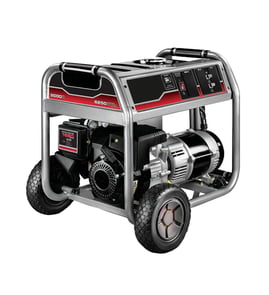



Where to check generator model number?
On the Briggs 030552-01 generator, we check the identification label on the generator frame or housing for the generator model and serial number. The engine has a separate identification area that lists the engine model, type, and code. See the 030552-01 operator’s manual for label locations and what each number means.
Where to look on the generator
Most portable Briggs & Stratton units place the generator identification label in an easy-to-see spot on the frame or near the control panel area.
- Look on the frame rails near the control panel end
- Check the side of the generator cradle or base
- Look near the fuel tank area on the frame
- Check for a sticker or metal tag labeled Model, Revision, and Serial
- If the label is dirty, wipe it gently so the numbers are readable
Generator numbers vs. engine numbers (what to record)
When ordering parts or calling for service, we use the generator label first.
| What you need | Where it’s found | Why it matters |
|---|---|---|
| Generator model number | Generator identification label | Ensures parts diagrams match your exact unit |
| Generator revision | Generator identification label | Helps match design changes within the same model |
| Generator serial number | Generator identification label | Useful for support and correct part selection |
| Engine model/type/code | Engine identification area | Used for engine-specific parts and specs |
Why it matters
The model, revision, and serial number identify the exact build of your 030552-01 generator. That prevents ordering the wrong electrical parts, fuel system components, or hardware that may vary by revision.
Last updated: February 2026
Where is the serial number on a Briggs and Stratton generator?
On the Briggs 030552-01 portable generator, the serial number is typically on the generator’s data label on the frame near the engine area. Use the model and serial from that label when ordering parts or checking the correct operator information in the 030552-01 operator’s manual.
Where to look on the generator
Check these common label locations first (use a flashlight and wipe dust off the frame):
- Inner side of the tubular frame near the engine
- Frame rail close to the recoil starter or muffler side
- Near the control panel area on the frame (not on the receptacle face)
- On a label that lists generator model/serial and sometimes engine model/type/code
What you should write down
The operator’s manual shows spaces for generator and engine identification. Record these so we can match the right diagrams and parts.
- Generator model number (for this unit: 030552-01)
- Generator serial number
- Engine model number
- Engine type number
- Engine code number
Why it matters
Briggs & Stratton generators often share similar frames and control panels across multiple versions. The serial number helps confirm the exact build so you get the correct items like a switch key, outlet, or hardware that fits your specific configuration.
Quick ID guide
| Item | What it’s used for | Example from this model |
|---|---|---|
| Model number | Identifies the generator version | 030552-01 |
| Serial number | Identifies the production unit | From the frame label |
| Engine model/type/code | Identifies the engine build | From the engine label |
Last updated: February 2026
What is the 20/20/20 rule for generators?
The 20/20/20 rule is a simple generator safety checklist: run your portable generator at least 20 feet from the home, let it cool about 20 minutes before refueling, and use a CO alarm (often around $20) to help warn you about carbon monoxide.
How to apply it with a Briggs 030552-01 generator
- 20 feet away: Place the generator outdoors, well away from doors, windows, and vents; keep exhaust pointed away from occupied spaces.
- 20 minutes to cool: Turn the engine OFF and wait before adding fuel; hot engine parts and exhaust can ignite fuel vapors.
- $20 CO alarm: Use a battery-powered carbon monoxide alarm in the home (and test it) so you get an early warning if CO enters living areas.
Quick safety checklist (what we recommend every time)
- Keep at least 5 feet of clearance on all sides of the generator (including overhead) for cooling and fire safety.
- Never refuel while the engine is running; wipe up spills and let vapors dissipate before restarting.
- Avoid overloading; use the correct receptacle for the load and reset breakers only after reducing load.
- Use heavy-duty outdoor-rated extension cords sized for the amperage.
- If anyone feels sick, dizzy, or weak, shut the generator off and get to fresh air immediately.
Common outlets and what they are typically used for
| Outlet type | Typical use | What to watch for |
|---|---|---|
| 120V, 20A GFCI duplex | Tools, lights, small appliances | Trips if overloaded or if a ground fault is detected |
| 120/240V, 30A locking | Larger 240V loads or split 120V loads | Do not exceed generator capacity; use proper cord/plug |
Why it matters
Carbon monoxide is odorless and can build up quickly if exhaust drifts toward the house. Cooling before refueling reduces fire risk, and proper placement plus correct loading helps protect your generator’s breakers, receptacles, and wiring.
For model-specific operating and safety details, follow the 030552-01 owner’s manual.
Last updated: February 2026
Will a 5500 generator run a whole house?
A 5,500-watt generator can power many whole-house essentials, but it will not run an entire home with all loads on at once. With the Briggs 030552-01 generator, the key is adding loads sequentially and keeping total running watts plus the largest starting (surge) load within the generator’s capacity (see the 030552-01 owner’s manual).
What it can usually run (with load management)
Plan around a mix of smaller loads plus one or two motor loads at a time:
- Refrigerator or freezer (surge when the compressor starts)
- Sump pump or well pump (high starting watts)
- Furnace blower fan
- Lights, TV, router, phone chargers
- Microwave (often OK if other loads are limited)
What typically pushes it over the limit
These loads often exceed a 5,500-watt class generator, especially if they start while other loads are running:
- Central air conditioning or heat pump
- Electric water heater
- Electric range/oven
- Electric dryer
- Multiple large motor loads starting together (well pump + fridge + A/C)
How to size it correctly (running watts vs. starting watts)
The generator must cover:
- Running watts: what items need continuously
- Starting watts: the short burst needed to start the largest motor load
| Load type | What to watch | What to do |
|---|---|---|
| Motor loads (pumps, fridge, A/C) | Starting surge | Start one at a time |
| Heating elements (water heater, dryer) | Very high steady draw | Avoid or use a larger generator |
| Electronics | Sensitive to voltage swings | Add after the generator stabilizes |
Safe power management steps (recommended)
To reduce overload trips and protect appliances, we follow the same sequence described for power management in the manual:
- Start the generator with nothing plugged in
- Plug in and turn on the largest load first
- Wait for the engine to run smoothly and voltage to stabilize
- Add the next load one at a time
- If the engine bogs down or breakers trip, remove a load immediately
Why it matters
Overloading can damage connected devices and the generator. The manual specifically warns not to exceed wattage/amperage capacity and to account for surge loads, which is why a “whole house” plan needs a load list, not just a watt number.
Last updated: February 2026
What kind of oil does my Briggs and Stratton generator use?
For the Briggs 030552-01 portable generator, we recommend a high-quality detergent engine oil rated SF, SG, SH, SJ, or higher. Choose viscosity by temperature: SAE 30 for warm weather, 10W-30 for broader temperature swings, and SAE 5W-30 for cold weather operation (below 40°F). See the 030552-01 operator’s manual for the exact viscosity chart and oil-check procedure.
Recommended oil viscosity by temperature
Use outdoor temperature to pick viscosity; it affects starting, protection, and oil consumption.
- Below 40°F (4°C): SAE 5W-30 (helps reduce hard starting)
- Around 40°F to 80°F: 10W-30 works well for variable conditions
- Above 40°F (4°C) and steady warm temps: SAE 30 is commonly used
- Hot weather note: Above 80°F (27°C), 10W-30 can increase oil consumption; check level more often
| Outdoor temperature | Best choice | What to watch for |
|---|---|---|
| Below 40°F (4°C) | SAE 5W-30 | Better cold starts, less icing-related issues |
| 40°F to 80°F | 10W-30 | Good all-around viscosity |
| Above 40°F and mostly warm | SAE 30 | Can be harder to start if temps drop |
How to check oil (and why it matters)
Your generator has low-oil shutdown; if oil drops below a preset level, an oil switch can stop the engine. Keeping oil at the proper level prevents nuisance shutdowns and reduces engine wear.
- Check oil before each use or at least every 8 hours of operation
- Keep oil at the FULL mark on the dipstick
- If the engine stops and oil is low, add oil to the FULL mark before restarting
- If it stops again right away, stop and inspect for an underlying issue (leak, incorrect fill, severe tilt)
Helpful tips for reliable operation
- Use clean, fresh fuel and follow the maintenance schedule in the manual
- In cold, humid weather, sheltering the unit can help reduce carburetor or breather icing
- If you are troubleshooting electrical output issues, use safe test practices and reference how to use a multimeter to test electrical parts video
Last updated: February 2026
How to reset briggs and stratton generator?
To reset a Briggs & Stratton 030552-01 portable generator, we shut off and unplug all loads, correct the cause (overload, low oil, or a tripped breaker), then restart the engine. Most “reset” situations are simply clearing an overload or low-oil shutdown described in the 030552-01 operator’s manual.
Quick reset steps (portable generator)
- Turn OFF and unplug everything from the outlets.
- Let the generator sit 2 to 5 minutes so the breaker and engine can stabilize.
- Check the oil level; low oil can trigger an automatic shutdown.
- Check and reset the circuit breaker on the control panel (press to reset if it popped).
- Restart the generator, then plug loads back in one at a time.
- If it shuts down again, reduce the load and recheck oil.
If it shut down for low oil
The manual notes a low oil shutdown: when oil drops below a preset level, an oil switch stops the engine. Fixing the oil level is the reset.
- Place the unit level and check the dipstick.
- Add the correct oil until it reaches the FULL mark.
- Restart; if it stops again, stop troubleshooting and have the engine checked.
What “reset” usually means (common causes)
| Symptom | Most likely cause | What we do first |
|---|---|---|
| Engine stops and won’t stay running | Low oil shutdown | Check oil level and fill to FULL |
| Power cuts out but engine runs | Overload or breaker tripped | Unplug loads; reset breaker |
| Runs rough in cold, damp weather | Carburetor or breather icing | Use fresh fuel, correct oil, shelter unit |
Why it matters
Resetting without fixing the root cause can lead to repeated shutdowns, no output power, or engine damage. On the 030552-01, oil level and load management are the two fastest checks that prevent most repeat trips.
Last updated: February 2026