 Owner’s manual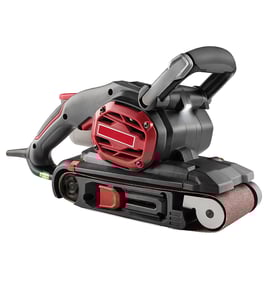

Why did my belt sander suddenly stop working?
If your Craftsman belt sander model 315117271 suddenly stops, the most common causes are a belt that is installed or tensioned incorrectly, belt tracking that has shifted and is rubbing internal parts, or the tool being overloaded by excessive sanding pressure. Use the owner's manual steps to reset belt tension and tracking safely.
Quick checks that fix most sudden stops
- Unplug the sander and confirm the sanding belt is seated on both rollers.
- Make sure the tension release lever is lowered to fully secure the belt.
- If the belt is unidirectional, install it so the arrow inside the belt points in the direction of rotation (clockwise when looking into the open side).
- Adjust the tracking knob so the belt runs even with the outer edge of the base.
- Reduce downward force; this sander is designed to sand using its own weight.
Belt tracking and pressure: the two biggest culprits
The manual notes that if the belt wears excessively on the inner edge, it is likely adjusted too far inward and rubbing internal parts. That extra friction can make the sander bog down or stop. Also, applying too much pressure can cause belt slip, poor tracking, clogged belts, and possible motor burnout.
Tracking knob direction (what to turn)
| What the belt is doing | What to do |
|---|---|
| Belt runs outward | Turn the tracking knob counterclockwise slowly |
| Belt runs inward | Turn the tracking knob clockwise slowly |
Safety and control items to verify
- Before plugging in, make sure the switch is not in a locked-on condition.
- Keep hands and fingers away from the moving belt while making tracking adjustments.
- Do not wear loose clothing or jewelry that can catch in moving parts.
- If the sander was accidentally unplugged while locked on, disengage lock-on immediately.
Why it matters
Correct belt direction, tension, and tracking prevent the belt from contacting internal parts and reduce load on the drive roller and motor. Using lighter pressure also improves finish quality and extends sanding belt life.
Last updated: February 2026
Do you push down on a belt sander?
No. On the Craftsman belt sander model 315117271, we let the tool’s own weight provide the sanding pressure and keep it moving steadily; pushing down causes belt slip, uneven sanding, clogged belts, faster belt wear, and can overheat the motor. See the pressure guidance in the owner's manual.
How to apply the right pressure
- Hold the sander with two hands (front handle to guide, rear handle to control).
- Keep the sanding area level on the workpiece.
- Move at a slow, even pace; do not pause in one spot.
- If the belt slips or wanders while sanding, reduce pressure immediately.
- For faster stock removal, switch to a coarser grit instead of pressing harder.
Quick pressure check
| What you notice | What it usually means | What to do |
|---|---|---|
| Belt slips or stops cutting | Too much downward pressure | Ease up; let the tool weight work |
| Deep grooves or waves | Staying in one place or pressing | Keep moving; lighten pressure |
| Belt clogs quickly | Too much pressure or wrong grit | Use lighter pressure; choose a better grit |
| Belt tracks poorly | Pressure plus tracking out of adjustment | Lighten pressure; adjust tracking per manual |
Why it matters
This sander is designed to run with its built-in weight providing adequate pressure. Extra force reduces control and shortens sanding belt life, and it can contribute to motor overheating and irregular belt tracking.
Last updated: February 2026
What are the main parts of a belt sander?
On the Craftsman belt sander model 315117271, the main parts are the sanding belt (abrasive belt), the drive system that moves the belt, the front idler roller that supports and tensions the belt, and the controls and handles that let you run the tool safely and keep the belt tracking correctly. For the full exploded view and parts list, use the 315117271 owner's manual.
Main components you will see on this model
These are the key assemblies that make a belt sander work:
- Sanding belt: The abrasive belt that removes material.
- Drive roller assembly: The powered roller that moves the belt.
- Front idler roller: The front roller the belt rides on; it helps guide the belt.
- Belt tracking knob: Adjusts belt position so it runs centered and does not rub internal parts.
- Dust exhaust and dust bag: Collects sanding dust during wood sanding (do not use the dust bag when sanding metal).
- Front and rear handles: Designed for two-handed control and to keep hands clear of the moving belt.
What each part does (quick reference)
| Part or feature | What it does | Why you care |
|---|---|---|
| Sanding belt | Abrades the work surface | Belt grit and condition control finish quality |
| Drive roller | Powers belt movement | Worn drive parts can cause slipping or poor sanding |
| Front idler roller | Supports and guides belt | Misalignment can lead to belt wandering |
| Tracking knob | Centers the belt | Prevents belt edge wear and internal rubbing |
| Dust bag system | Captures dust | Helps visibility and cleanup during sanding |
Why it matters
Knowing the main parts helps you troubleshoot common belt sander problems like belt wandering, excessive belt edge wear, weak sanding performance, and poor dust collection. On model 315117271, belt tracking is especially important because an off-center belt can rub internal parts and wear quickly.
Practical tips when identifying parts
- Unplug the sander before inspecting the belt, rollers, or dust bag.
- If the belt wears heavily on one edge, adjust the tracking knob and recheck belt stability.
- Use two-handed operation (front handle and rear handle) to keep the sanding area level.
- Remove the dust bag before sanding metal to reduce fire risk.
Last updated: February 2026