Owner’s manual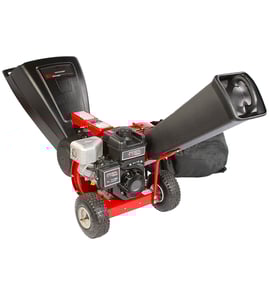
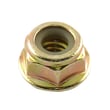



What are the common problems with chipper machines?
Common problems on the Craftsman chipper/shredder model 247776051 are poor chipping from dull blades, clogs in the feed or discharge area, and excessive vibration or unusual noise after the impeller hits debris. Most issues improve with safe shutdown, cleaning, tightening hardware, and keeping cutting parts sharp per the 247776051 owner's manual.
- Poor performance or stringy chips: chipper blades are dull or damaged.
- Frequent clogs or kickback: discharge area is packed with processed material, or material is too wet or oversized.
- Engine bogs or stalls while chipping: feeding too aggressively, especially on larger branches.
- Unusual vibration or noise: impeller struck a foreign object, or fasteners loosened.
- Safety hazards during feeding: hands too close to rotating parts, or pushing material by hand instead of using a stick.
- Shut the engine off and wait for all moving parts to stop.
- Disconnect the spark plug wire and ground it against the engine before clearing jams or inspecting.
- Confirm the chipper chute, feed intake, and cutting chamber are empty and free of debris before restarting.
- Check bolts and screws for tightness; vibration often loosens hardware over time.
| Symptom | Most likely cause | What to do first |
|---|---|---|
| Won’t discharge well | Discharge area packed | Clear buildup; keep discharge area open |
| Bogging on branches | Feeding too hard or branch too large | Use intermittent pressure; do not exceed 3-inch branches |
| Loud vibration | Foreign object impact or loose parts | Stop, inspect for damage, tighten fasteners |
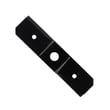
| Poor chipping | Dull blade | Replace the blade (for example, mtd chipper/shredder blade 942-0571) |
Clogs and vibration are not just performance problems; they increase kickback risk and can damage the impeller, chipper blades, and flails. Following the shutdown and inspection steps protects the machine and helps prevent injury.
Last updated: January 2026
How long do chipper blades last?
On the Craftsman 247776051 chipper/shredder, chipper blades last until cutting performance drops; in typical homeowner use, that is often 25 to 100 operating hours before sharpening or replacement is needed. Running sharp blades protects the impeller and keeps chipping consistent (see the 247776051 owner's manual).
Blade life changes a lot based on what you feed and how you run the machine.
- Dirty, sandy, or muddy branches dull blades fast
- Chipping near the 3-inch maximum diameter increases load and wear
- Feeding too aggressively can bog the engine and nick blades
- Hitting hidden debris (nails, rocks) can chip the cutting edge
- Regular cleaning and correct storage reduces corrosion on cutting edges
If you notice any of these, service the blades before continuing heavy use.
- Noticeable loss of chipping performance
- More vibration than normal while chipping
- Engine bogs or stalls more easily on branches it used to handle
- Discharge rate slows and material looks stringy or uneven
- You need to force branches instead of letting the chipper pull them in
The manual allows sharpening or replacing; replacement is the fastest way to restore like-new cutting.
| Condition you see | Best next step | Why |
|---|---|---|
| Edge is dull but not chipped | Sharpen both blades evenly | Restores bite without changing balance |
| Nicks, cracks, or heavy rounding | Replace the blades | Prevents vibration and poor cutting |
| Uneven wear between blades | Replace as a set | Keeps the impeller balanced |
- Never chip branches over 3 inches in diameter
- Feed one branch at a time and use intermittent pressure on larger branches
- Keep both hands on the branch while feeding; do not push with loose debris
- Run the engine at full throttle for proper discharge
- After use, clear packed material from the chute and screen area
Sharp chipper blades reduce strain on the engine and help prevent damage to internal components like the impeller, flails, and screen. Dull blades also change discharge quality and can make the unit feel underpowered.
Last updated: January 2026
Are homeowner wood chippers worth it?
Yes, a homeowner wood chipper can be worth it when you regularly deal with branches and yard debris and want to turn that material into mulch while reducing trips for disposal. With the Craftsman chipper/shredder model 247776051, value comes from using it within its limits (up to 3-inch branches) and keeping blades sharp per the 247776051 owner's manual.
- You process brush and branches several times per season (storm cleanup, pruning, fall yard work).
- You want mulch for landscaping, garden paths, or erosion control.
- You have space to store the machine and a safe work area.
- You are comfortable with routine maintenance (fastener checks, blade care, spark plug service).
- You prefer owning versus renting and scheduling pickups.
- You only chip once a year or less.
- Your debris is mostly leaves and soft material (a mower and bags may be enough).
- You commonly have branches over 3 inches in diameter (this model is not designed for that).
- You do not want to maintain a small engine or sharpen/replace cutting parts.
For model 247776051, the manual calls out key operating practices that directly impact performance and downtime:
- Feed reasonable amounts into the hopper; overloading can clog the hopper or chute and stall the engine.
- Feed one branch at a time into the chipper chute.
- Use intermittent pressure on larger (3-inch) branches to avoid bogging.
- Keep cutting parts sharp; a noticeable performance drop is a sign the chipper blades should be replaced.
| Factor | Owning a chipper/shredder | Renting/hauling |
|---|---|---|
| Convenience | High (use anytime) | Medium to low (schedule dependent) |
| Cost over time | Best with frequent use | Best with occasional use |
| Maintenance | Required (blades, fasteners, spark plug) | Minimal |
Using the chipper within its 3-inch limit and keeping blades sharp helps prevent clogs, stalling, and damage to the chipper blades, flails, or impeller. That is what keeps ownership cost-effective over the long run.
Last updated: January 2026
Can you replace shredder blades?
Yes. On Craftsman chipper/shredder model 247776051, the shredder blade is serviceable and can be sharpened or replaced to restore shredding performance. Use the safety steps, blade orientation notes, and tightening specs in the 247776051 manual so the impeller runs smoothly and safely.
The manual procedure has you open the housing to access the impeller and shredder blade hardware.
- Stop the engine and wait for all moving parts to stop completely
- Disconnect the spark plug wire and ground it against the engine
- Lower the hopper assembly and support it (block under the flail housing)
- Remove the hopper-to-housing fasteners, then separate the hopper assembly
- Remove the shredder plate, then raise the chute deflector as needed
- Prevent the impeller from turning (pipe through the shredder screen, or wood in the chute opening)
- Remove the blade fasteners, install the replacement blade, then reassemble
For model 247776051, the replacement shredder blade listed for this unit is chipper/shredder blade 942-0544B. Tighten the hardware to the torque ranges shown in the manual.
| What you’re tightening | Spec | Why it matters |
|---|---|---|
| Center bolt | 550 to 700 in-lbs | Keeps the blade clamped securely to the impeller |
| Two outside bolts | 250 to 350 in-lbs | Prevents shifting, loosening, and vibration |
Sharpening works when the blade is simply dull; replacement is the right fix when damage affects balance or strength.
- Sharpen using the original grind angle
- Remove an equal amount of metal from each cutting edge
- Balance the blade after sharpening to prevent excessive vibration
- Replace if the blade is bent, cracked, heavily nicked, or will not balance
A sharp, balanced shredder blade improves shredding output and reduces vibration that can damage the impeller assembly, fasteners, and housing during high-speed operation.
Last updated: January 2026