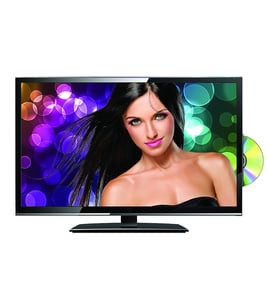



Is a Magnavox TV a smart TV?
A Magnavox TV can be a smart TV, but it depends on the exact model. The Magnavox 42MF438B LCD television is an older-style TV and is typically not a built-in smart TV; you usually add streaming with an external device (Roku, Fire TV, Apple TV, or a game console).
How to tell if your Magnavox 42MF438B is “smart”
Check for these common signs:
- A built-in app store (Netflix, YouTube, etc.) in the TV menu
- Wi-Fi setup screens (network name/password)
- An Ethernet (LAN) port labeled for internet features
- A “Smart” or “Network” button on the remote
- On-screen prompts to sign in to streaming services
If you do not see network setup or apps in the menu, the TV is functioning as a standard HDTV and needs an external streamer.
Best ways to add streaming to a non-smart TV
Most customers use one of these options:
- Streaming stick/box (Roku, Fire TV, Apple TV)
- Game console (PlayStation, Xbox)
- Cable/satellite box with apps
- Laptop connected by HDMI
Quick compatibility check
| What you have | What you need | What you get |
|---|---|---|
| HDMI port on the TV | Streaming stick/box + HDMI input | Streaming apps on your TV |
| No HDMI available | HDMI adapter solution (device-dependent) | Streaming, but setup varies |
Why it matters
Knowing whether 42MF438B is a smart TV helps you choose the right setup. If streaming is your goal, an external streamer is usually the fastest, lowest-cost fix and avoids internal TV board repairs.
If your TV will not power on, has no picture, or has intermittent operation, a control or internal electronics issue can also prevent normal input switching. In that case, matching parts to your exact model is key; for example, the integrated circuit 932220624668 is one of the electronic components used in this Magnavox TV.
Last updated: February 2026
Is there a reset button on a Magnavox TV?
Most Magnavox TVs, including model 42MF438B, do not have a single dedicated “reset” button. We reset the TV by power-cycling it or by using the on-TV Menu and control buttons to run a factory reset (this clears settings and returns the TV to default setup).
Quick reset options (try these in order)
- Soft reset (power cycle): Turn the TV off, unplug it for 60 seconds, then plug it back in and turn it on.
- Hard reset (factory reset from the TV): Use the TV’s Menu button and arrow/volume/channel buttons to find a reset option (often under Setup, TV settings, or Installation).
- Input reset: If the TV seems “stuck,” switch inputs (TV, HDMI, etc.) and reselect the correct source.
- Remote alternative: If you do not have the remote, use the front/side control panel buttons.
Factory reset: what it does (and what it does not)
A factory reset is the closest thing to a “reset button.” It’s useful for menu glitches, wrong picture mode, or audio settings issues.
| Reset type | What it fixes | What you lose |
|---|---|---|
| Power cycle | Temporary freezes, minor glitches | Nothing (settings usually stay) |
| Factory reset | Persistent software/settings problems | Picture/audio settings, channel setup, parental controls |
If the TV buttons do not respond
If the Menu or control buttons are physically damaged or stuck, the TV may not let you navigate to the reset option.
- Check for a jammed or missing button on the control panel
- Inspect for debris around the button area
- If a button is broken, replacing the control button assembly is a common fix: Magnavox control button 313913870091
Why it matters
Resetting is a fast way to rule out settings and software issues before replacing bigger parts like the LCD panel or internal circuit boards.
Last updated: February 2026
Can an LCD TV panel be repaired?
Yes, an LCD TV panel can sometimes be repaired, but for the Magnavox 42MF438B it is rarely practical. A cracked or internally damaged LCD panel typically requires full panel replacement, and the cost plus labor often exceeds the value of the TV.
What “repair” usually means for an LCD panel
In most cases, the glass and bonded layers of an LCD panel are not repairable once cracked. What can be repaired instead are issues that look like a bad panel but are caused by other parts.
Common symptoms and likely causes:
- Spiderweb cracks, ink-like blotches: panel is physically damaged (replace the panel)
- Vertical lines, half screen, flicker: panel, T-con board, or ribbon cable connection issue
- Backlight but no picture: T-con board, main board, or panel drive issue
- No backlight, dim image with flashlight test: backlight or power supply issue
When replacing the panel makes sense
If the TV is in excellent condition and you can do the work safely, replacing the panel can restore the set.
A quick cost check:
| Option | Typical outcome | Best for |
|---|---|---|
| Panel replacement | Restores picture if other boards are good | Rare cases where parts cost is low |
| Board-level repair | Fixes “no picture” or lines caused by electronics | Intermittent or non-cracked screen issues |
| Replace the TV | Lowest total cost in many cases | Cracked screen or multiple failures |
For this model, the replacement part to look at is the Magnavox lcd panel 932225839682.
Before you buy a panel: quick checks that can save money
These steps help confirm whether you truly need the LCD panel.
- Unplug the TV for 5 minutes, then power back on (resets some faults)
- Inspect the screen closely under light for hairline cracks
- Try different inputs (HDMI, antenna) to rule out a source issue
- Reseat accessible ribbon cables only if you are trained and the TV is unplugged
- Use a flashlight test to check for a faint image (backlight vs. picture problem)
Why it matters
Panels are the most expensive and fragile component in an LCD television. Confirming whether the failure is a cracked panel or an electronics issue helps you avoid buying a high-cost part when a smaller repair (or a different part) would solve the problem.
Last updated: February 2026