- Kenmore refrigerator water filters
- Whirlpool refrigerator water filters
- Samsung refrigerator water filters
- GE refrigerator water filters
- LG refrigerator water filters
- Frigidaire refrigerator water filters
- KitchenAid refrigerator water filters
- Maytag refrigerator water filters
- Kenmore Elite refrigerator water filters
- Estate refrigerator water filters
- GE Profile refrigerator water filters
- Amana refrigerator water filters
- Bosch refrigerator water filters
- Dacor refrigerator water filters
- Electrolux refrigerator water filters
Top DIY repair help
View All Repair Categories
Appliances
Lawn & Garden
Power Tools
Home Improvement
Sports & Leisure
Heating & Cooling
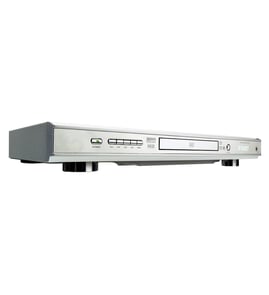
Aiwa Dvd player Parts — Browse All Models
Aiwa DVD players provide the outstanding video and sound playback that you expect from digital recordings. Aiwa DVD players use the latest innovations in video and sound reproduction so your entertainment experience is always awesome. When your Aiwa DVD player breaks down, get the repair parts you need to fix the player at Sears PartsDirect.


Popular maintenance items for DVD Players

Woofer Speaker
In Stock
$264.86

Qty

Cap
Part #265308801
This item is not returnable
In Stock
$3.51
Qty
Cable
In Stock
$27.13
Qty
Motor Load
In Stock
$33.33
Qty
Cvr Volume
In Stock
$66.49
Qty
Door
In Stock
$52.87
Qty
Connecting your Aiwa DVD player to the television
- Refer to the user's manual of the television for information on connecting the DVD player to the television. Follow the user's manuals instructions on selecting the type of cable and television connection jack or jacks to use when connecting the DVD player to the television.
- Turn off the DVD player and the television before connecting the DVD player to the television.
- To connect the DVD player to the television using the HDMI cable, plug the HDMI cable into the HDMI Out jack on the DVD player. Plug the other end of the HDMI cable into the HDMI In jack of the television.
- To connect the DVD player to the television using an HDMI-DVI cable and audio cable, plug the HDMI plug into the HDMI Out jack on the DVD player. Plug the DVI connector into the DVI In jack on the television. Connect the audio cable to the Audio Out jacks on the DVD player and the Audio In jacks on the television.
Playing a disc on your Aiwa DVD player
- Turn on your television and select the video input mode that your DVD player is connected to on your television (HDMI In).
- If you connected the DVD player to an external audio system, turn on your audio system receiver and select the correct audio input on the receiver to play the DVD audio.
- Press the Open/Close button on the DVD player to open the disc tray.
- Position the DVD disc gently into the tray with the disc's label facing upward.
- Press the Open/Close button to close the disc tray.
- Press the Play button to play the DVD disc.
Parts & More
Aerator Attachment
Chest Freezer
Electric Walk-Behind Mower
Front-Engine Lawn Tractor
Gas Walk-Behind Mower
Lawn & Garden Engine
Parts
Range
Rear-Engine Riding Mower
Upright Vacuum
Wet/Dry Vacuum