
Can you replace the microwave on a wall oven microwave combo?
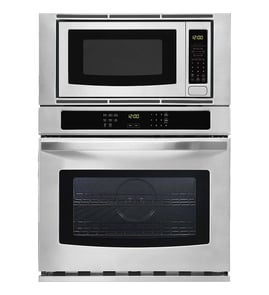
On most wall oven/microwave combo units, including KitchenAid model KOCE507EBS22, the microwave is built into the combo frame and is not designed to be swapped as a separate “drop-in” appliance. In practice, you either repair the microwave section or replace the entire combo unit.
If the microwave side is failing, we recommend deciding between repair and full replacement based on the symptom and cost.
- Repair the microwave section by replacing the failed component (common for no-heat, no-power, or arcing issues)
- Check for simple, serviceable items first (fuse, waveguide cover, turntable)
- If multiple major components are failing, replacing the full combo is usually the better long-term fix
- If the oven side is working well, targeted microwave repair often makes sense
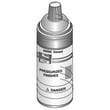
These KOCE507EBS22 parts are often involved when the microwave will not heat, blows a fuse, or makes unusual noises.
- Fuse mda 20a W11188752
- Magnetron 2m W11578959
- Inverter W11578579
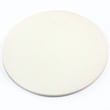
- O mica plate W10915651
- Turntable, glass W11373838
| Symptom | Most likely area | Example part on this model |
|---|---|---|
| Runs but does not heat | High-voltage heating circuit | Magnetron, inverter |
| Completely dead (no display) | Power protection | Fuse |
| Sparks or burning smell inside cavity | Waveguide cover or food splatter damage | Mica plate |
| Loud humming or abnormal fan noise | Cooling/ventilation | Blower |
Combo units share a cabinet, wiring, and mounting system; that integrated design is why the microwave is typically serviced with internal parts rather than replaced as a separate countertop-style unit. Repairing the specific failed component can restore safe operation without replacing the whole appliance.
Last updated: February 2026
How to remove KitchenAid superba oven door?
To remove the oven door on your KitchenAid KOCE507EBS22 wall oven/microwave combo, we partially close the door to the broil-stop position, flip the hinge locks (if equipped), then lift straight up and pull the door toward you. Set it handle-side down on a padded surface.
- Turn the oven off and let it cool completely.
- Remove oven racks so they do not interfere with lifting the door.
- Use gloves; door edges and hinges can be sharp.
- Have a clear landing spot ready (blanket or thick towel on a flat surface).
- Get a second person to help if the door feels heavy.
- Open the door fully.
- Locate the hinge locks at the bottom left and right hinges (near the frame).
- Flip each hinge lock forward and down toward the door (unlocked position).
- Slowly close the door until it stops partway open (about 4 to 6 inches).
- With both hands, lift the door up and out of the hinge slots, then pull it toward you.
- Place the door handle-side down on a padded surface.
- Align both hinge arms into the hinge slots evenly.
- Open the door fully to seat the hinges.
- Flip the hinge locks back to the locked position.
- Close the door and check for smooth movement and an even seal.
| What you see | What it usually means | What to do |
|---|---|---|
| Door will not lift out | Hinge locks still engaged | Reopen fully and flip both locks down |
| Door feels “stuck” | Not at the broil-stop angle | Close slightly more until it stops, then lift |
| Door sits crooked after reinstall | One hinge not seated | Remove and reinstall, inserting both hinges evenly |
Removing the door correctly prevents bent hinge arms, damaged hinge receivers, and poor door sealing that can cause heat loss and uneven baking.
Related repair skill: are diy appliance repairs safe
Last updated: February 2026
How to reset KitchenAid microwave oven combo?
To reset your KitchenAid KOCE507EBS22 wall oven/microwave combo, we recommend doing a full power reset at the breaker for 1 minute, then restoring power and starting a bake cycle to confirm the control has recovered and the error does not return.
- Turn OFF the circuit breaker(s) supplying the unit.
- Wait 1 full minute.
- Turn ON the circuit breaker(s).
- Start a Bake cycle.
- Watch the display for about 1 minute to confirm normal operation.
A reset clears many temporary control glitches, but repeated errors usually point to a heat-sensing, cooling, or control issue.
- If the unit is dead/no display after reset, check for a blown internal fuse such as fuse mda 20a W11188752.
- If the unit overheats, runs hot, or errors return during cooking, inspect cooling airflow and consider the oven safety limit device such as range high-limit thermostat WP4449751.
- If the microwave runs but does not heat consistently, common causes include high-voltage components such as the magnetron 2m W11578959 or inverter W11578579.
- If the oven temperature seems inaccurate or errors relate to sensing, check the oven sensor circuit and consider the temperature sensor W11233913 or probe, sensor W11598120.
Use these quick checks to narrow down whether the issue is power, heat, or airflow related:
| What you notice | What it usually means | What to do next |
|---|---|---|
| Display is blank | Power supply or fuse issue | Verify breaker is on; check fuse mda 20a W11188752 |
| Error returns quickly | Control is seeing a fault again | Note the code; re-test after cooling |
| Fan noise is abnormal | Cooling/venting problem | Check vents; consider blower W11598119 |
| Oven temp seems off | Sensor or calibration issue | Test sensor circuit; consider temperature sensor W11233913 |
A breaker reset is the fastest way to clear a locked-up control board and restore normal operation. Running a short bake cycle right after the reset confirms the oven side is stable under heat load, not just at idle.
Last updated: February 2026
Why is the display not working on my KitchenAid microwave oven combo?
If the display on your KitchenAid KOCE507EBS22 wall oven/microwave combo is blank, the most common causes are a power interruption (outage, tripped breaker, surge) or a failed internal protection component (such as a fuse) that cuts power to the control. Start with a safe power reset, then move to basic electrical checks.
- Confirm the unit is getting power; check the home breaker and any GFCI outlet that may feed the circuit.
- Try a hard reset: switch the circuit breaker OFF for 2 to 5 minutes, then ON.
- If the display comes back but goes blank again, avoid repeated resets; that pattern points to an intermittent power or control issue.
- If the oven cavity light or interior fan also does not run, treat it as a full power loss to the appliance.
A blank display usually means the control is not receiving low-voltage power. In this model, common suspects include:
- A blown internal fuse (often after a surge)
- A high-limit thermostat that opened due to overheating
- A wiring or connector problem (loose, overheated, or damaged)
- A failed control or inverter-related issue (microwave side)
| Symptom you notice | What it often points to | Example part for KOCE507EBS22 |
|---|---|---|
| Completely dead (no display, no response) | Blown fuse or lost power feed | Fuse mda 20a W11188752 |
| Dead after heavy use or poor ventilation | Overheat protection opened | Range high-limit thermostat WP4449751 |
| Display works but microwave will not heat | High-voltage system problem | Magnetron 2m W11578959 or inverter W11578579 |
- Cut power at the breaker before removing any panels.
- Check for obvious wiring damage, discoloration, or loose connectors.
- Test the fuse for continuity; replace it if open (do not bypass it).
- If the fuse is good, test the high-limit thermostat for continuity when cool.
- If you find damaged wiring, use a proper repair method; see how to repair broken or damaged wires video.
A blank display is not just a convenience issue; it is a sign the control is not powered correctly. Restoring stable power and correcting the root cause helps prevent repeat fuse failures and protects the control panel and other electronics.
Last updated: February 2026