 Owner’s manual

What is the most common problem with the Dyson vacuum?
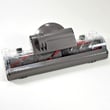
The most common problem we see with a Dyson upright vacuum like the Dyson DC41-2013 is loss of suction, almost always caused by a clog (blockage) or dirty filters that restrict airflow. The vacuum may also pulse, run louder, or shut off to protect the motor when airflow is restricted.
- Full bin or packed debris in the cyclone area
- Clogged airway in the wand, hose, cleaner head, or internal duct
- Dirty or wet filter (reduced airflow and suction)
- Brush roll not spinning (carpet cleaning feels weak even if suction is OK)
- Air leaks from a loose bin seal, cracked hose, or poor connection
- Empty the bin and remove any debris stuck above the flap.
- Check for blockages end-to-end: wand, hose, cleaner head intake, and any visible ducts.
- Clean the filters exactly as directed in the owner's manual. Let filters dry fully before reinstalling.
- Inspect the brush roll area for hair, string, or belt-related issues if carpet pickup is poor.
- If the vacuum shuts off or pulses, recheck for a restriction; that symptom strongly points to airflow blockage.
| Symptom | Most likely cause | Best first action |
|---|---|---|
| Weak suction | Clog or dirty filter | Clear blockage, clean filters |
| Pulsing or surging | Airflow restriction | Check hose, wand, cleaner head |
| Brush roll not spinning | Jam, belt/drive issue | Clear debris, inspect drive |
| Shuts off during use | Overheating from restriction | Remove clog, let unit cool |
Restricted airflow makes the DC41-2013 work harder, which reduces cleaning performance and can trigger protective shutoffs. Keeping air paths clear and filters clean is the fastest way to restore strong suction and normal operation.
For step-by-step repair help on common vacuum issues, use our vacuum repair-guides landing page.
Last updated: February 2026
Is it worth repairing a 10 year old Dyson?
Yes, repairing a 10-year-old Dyson is usually worth it when the vacuum still has strong suction and the problem is a common wear or clog issue (brush roll, belt, filters, or a blockage). For a Dyson DC41-2013, routine repairs and maintenance typically cost far less than replacing the vacuum and can restore cleaning performance.
We use these checkpoints to make the call fast:
- Repair if suction is weak due to a clog, dirty filters, or a full bin.
- Repair if the brush roll stops spinning (often hair wrap, belt wear, or a jam).
- Repair if it shuts off during use (commonly overheating from restricted airflow).
- Replace if the vacuum has burning smell, loud grinding, or repeated shutdowns after airflow is confirmed clear.
- Replace if the cost of a major repair approaches a large share of the price of a comparable new upright.
Most 10-year-old upright vacuums (including Dyson models) need attention in the airflow and floor-nozzle system before they need a motor.
| Symptom | Most common cause | Typical fix |
|---|---|---|
| Low suction | Clog, dirty filter, air leak | Clear blockage, wash/replace filters, reseat seals |
| Brush roll not spinning | Hair wrap, jam, belt issue | Clean brush roll, inspect belt and end caps |
| Shuts off mid-clean | Overheating from restricted airflow | Clear clogs, clean filters, let it cool |
| Warning light on | Nozzle jam or airflow restriction | Remove obstruction, reset after cleaning |
A DC41-2013 that is simply clogged or overdue for filter and brush roll maintenance can feel “worn out” even though the motor is fine. Restoring airflow and brush agitation usually brings back pickup on carpet and reduces overheating shutdowns.
- Check the bin and cyclone area for packed debris.
- Inspect the wand, hose, and floor head air path for clogs.
- Clean hair and string from the brush roll and end caps.
- Wash or replace filters on schedule.
- Use the troubleshooting and maintenance steps in the DC41-2013 owner's manual.
If you want step-by-step repair help for common wear items, use our DIY guides like vacuum brush roll on spinning and how to replace a vacuum beater bar.
Last updated: February 2026
How to make a Dyson vacuum stand upright?
To make your Dyson DC41-2013 stand upright, recline the handle slightly, then pull it back until you feel and hear the handle lock into the upright (park) position. If it will not lock, the handle release or recline latch is usually not fully engaging.
- Turn the vacuum off and place it on a flat, hard surface.
- Put one foot on the cleaner head to steady it.
- Gently recline the handle back a little (this helps the latch align).
- Pull the handle back toward you until it clicks into the upright lock.
- Lightly push the handle forward and back to confirm it is latched.
Common causes on upright vacuums like the Dyson DC41-2013 include a jammed recline mechanism, debris in the hinge area, or a worn latch.
- Check the handle pivot area for hair, grit, or broken plastic pieces.
- Make sure the cleaner head is not wedged against furniture or a thick rug edge.
- Inspect for a loose handle assembly or wobble at the base (a sign the latch is not catching).
- If the vacuum recently tipped over, re-try the lock with the base held steady.
- If the brush roll area is heavily clogged, clear it; strain and binding can keep the head from sitting correctly.
| What you notice | Most likely issue | What to do next |
|---|---|---|
| No “click” when pulling handle back | Latch not engaging | Re-try with slight recline; clear debris at hinge |
| It clicks but falls forward easily | Worn latch or loose pivot | Inspect base/handle connection; tighten/repair as needed |
| Hard to recline or return upright | Debris or binding in hinge | Clean hinge area; check for obstructions |
When the handle does not lock upright, the vacuum can tip, stress the handle pivot, and make normal use (tool mode, storage, and moving room to room) frustrating. Getting the recline latch to engage protects the handle and base.
If you suspect a clog or brush area binding is contributing, follow our troubleshooting steps in vacuum brush roll on spinning. For model-specific handle and base diagrams and usage notes, check the owner's manual.
Last updated: February 2026
What is the average lifespan of a Dyson vacuum?
A Dyson upright vacuum like the Dyson DC41-2013 typically lasts 8 to 10 years with normal home use and consistent maintenance (filter care, clearing clogs, and keeping the brush roll clean). Heavy use and neglected airflow restrictions shorten lifespan; routine upkeep extends it.
- 8 to 10 years: common for well-maintained upright vacuums
- 5 to 7 years: frequent use, lots of pet hair, or repeated clogs/overheating
- 10+ years: light-to-moderate use with regular cleaning and timely replacement of wear items
| Usage pattern | Expected lifespan | What usually ends it first |
|---|---|---|
| Light (small areas, weekly) | 10+ years | Hoses, seals, brush roll wear |
| Typical (whole home, weekly) | 8 to 10 years | Belt/brush roll issues, clogs, filter neglect |
| Heavy (daily, pets, large home) | 5 to 7 years | Overheating from restrictions, motor wear |
- Empty the bin before it is packed tight
- Check for clogs in the wand, hose, and cleaner head path
- Clean or replace filters on the schedule in your DC41-2013 owner's manual
- Inspect gaskets and seals for debris that can cause leaks
Hair and string can stall the brush roll, stress the belt/drive, and reduce carpet cleaning.
- Cut away wrapped hair and threads regularly
- If the brush roll stops or struggles, follow a proven repair path like vacuum brush roll on spinning
- If the brush roll is worn or damaged, use how to replace a vacuum beater bar
- Burning smell, unusual noise, or frequent shutoffs
- Loss of suction that returns only briefly after cleaning
- Brush roll not spinning consistently
Most “vacuum failures” start as restricted airflow (clogs, dirty filters, packed bin). Fixing those early prevents overheating and helps your Dyson DC41-2013 deliver strong suction for years.
Last updated: February 2026


