Owner’s manual
 Error Codes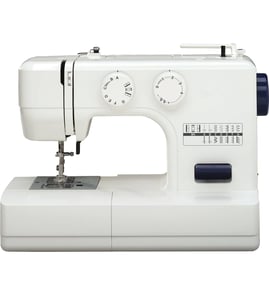

How to identify a sewing machine model?
For the Janome sewing machine on this page, the model is 8080LX200. You can also confirm the model by checking the identification label on the machine body and matching it to the model information shown in the owner's manual.
Where to look on the machine
Most sewing machines list the model number on a small label or plate. Check these common spots:
- Back of the machine near the power cord connection
- Underside of the base (tip the machine back carefully)
- Right side or rear panel near the handwheel
- Inside the front faceplate area (behind a removable cover)
- Near the foot control or machine socket area
What to write down (so you get the right parts)
When you find the label, record these details exactly as shown:
- Model number (for this page: 8080LX200)
- Brand name (Janome)
- Any alternate model code printed on the manual or label
- Electrical rating (often 110/120V in the U.S.)
Model number vs. other numbers
Some machines show multiple numbers; here is how to tell them apart.
| What you see | What it usually means | Use it for parts? |
|---|---|---|
| Model number (example: 8080LX200) | The main identifier for the machine | Yes |
| Serial number | Unique number for your specific unit | No |
| Foot controller model (example: 21249) | Identifies the pedal/controller type | Sometimes |
Why it matters
Parts, needles, bobbins, presser feet, and even the correct foot controller can vary by model. Using the exact model number helps us match the correct diagrams, repair instructions, and compatible replacements for your Janome 8080LX200.
Last updated: February 2026
How can I find out how much my sewing machine is worth?
Your Janome sewing machine model 8080LX200 is worth what buyers will pay for its exact model, condition, and completeness. The fastest way to estimate value is to confirm the model number, document working condition and included accessories, then compare recent sold prices for the same model.
Step-by-step: get a realistic value
- Confirm the model number (8080LX200) and any serial number on the machine label.
- Test basic operation: powers on, needle moves, feeds fabric, stitches form correctly.
- List what’s included: foot control/pedal, power cord, presser feet, bobbins, case, manual.
- Clean it lightly (remove lint around the needle plate and shuttle area) and take clear photos.
- Compare recent sold listings (not just asking prices) for the same model and similar condition.
Condition checklist buyers care about
| What you check | What it usually means for value | Quick note |
|---|---|---|
| Runs smoothly at multiple speeds | Higher | Sluggish or noisy machines sell for less |
| Makes balanced stitches | Higher | Tension issues reduce value |
| No lockups/jams | Higher | Frequent jams suggest timing or drive issues |
| Accessories included | Higher | Missing foot control or feet lowers value |
Typical price ranges (what to expect)
Most mechanical sewing machines like the Janome 8080LX200 sell in a broad range based on condition:
- As-is / not sewing: often low value (mainly for parts or repair)
- Working, normal wear: commonly mid-range
- Clean, fully working, with accessories and manual: higher end of the range
For the most accurate number, match your machine’s condition to recent sold listings for the same model.
Why it matters
A sewing machine’s resale value is driven more by working condition and completeness than age alone. A machine that stitches well and includes the foot control and presser feet is easier to sell and typically commands a better price.
Helpful references for your model
Use the 8080LX200 owner's manual to confirm standard setup and what accessories are supposed to be included (for example, spool pin setup and safe power-off/unplug steps when adjusting near the needle area).
Last updated: February 2026
What is the most trouble-free sewing machine?
The most trouble-free sewing machine is the one that matches your projects and is kept clean, correctly threaded, and properly adjusted. For dependable everyday sewing, a well-maintained Janome mechanical machine like the Janome 8080LX200 is typically low-fuss because it has straightforward controls and fewer electronics to troubleshoot.
What “trouble-free” really means
Most “problems” come from setup, threading, needle choice, and lint buildup, not from a bad machine. The Janome 8080LX200 is designed for normal home sewing; using the correct needle plate and avoiding bent needles helps prevent jams and needle breaks.
- Thread the upper path and bobbin exactly as shown in the 8080LX200 owner's manual
- Use a new, straight needle and insert it fully in the correct orientation
- Match needle size to fabric and thread weight (heavy thread needs a larger needle)
- Keep the bobbin area and feed dogs free of lint and loose thread
- Do not pull or push fabric while stitching; let the feed dogs move it
- Turn the power switch off before changing the needle, presser foot, or bobbin
Reliable machine types (quick comparison)
In general, these categories tend to be the least frustrating when they fit the user’s needs:
| Machine type | Why it’s often trouble-free | Best for |
|---|---|---|
| Mechanical (like 8080LX200) | Simple controls, fewer electronic parts | Basic sewing, learning, routine repairs |
| Computerized | Consistent stitch formation, easy stitch selection | Garment sewing, quilting features, convenience |
| Heavy-duty/metal frame | Better stability under thicker materials | Denim, canvas, multiple layers |
If you want fewer jams and thread breaks
These checks solve the most common “unreliable machine” complaints:
- Rethread with the presser foot up, then lower it to engage tension
- Reduce upper tension if the needle thread breaks; increase if loops form underneath
- Clean lint from the bobbin holder and under the needle plate
- Replace damaged bobbins and remove any tangled thread in the hook area
- If the machine locks up, stop immediately and clear the jam before restarting
For step-by-step troubleshooting, use sewing machine locks up to pinpoint the cause.
Why it matters
Choosing a machine that fits your fabric and stitch needs reduces skipped stitches, puckering, and broken needles. Routine cleaning and correct threading keep the Janome 8080LX200 running smoothly and quietly for everyday sewing.
Last updated: February 2026
Where is the sewing parts online store?
For Janome model 8080LX200, our sewing machine parts online store is the Sears PartsDirect parts listing for your model, where you can look up diagrams and order replacement parts by section. Use the 8080LX200 owner's manual to confirm the correct part name and location before ordering.
How to find the right part for your 8080LX200
- Match your model number exactly: 8080LX200.
- Use the exploded-view diagrams to identify the part by location (needle area, bobbin area, drive area).
- Cross-check the part description with the part’s position in the diagram.
- Confirm compatibility before ordering, especially for electrical items (motor, switch, foot control).
- If the machine is binding or jammed, troubleshoot first so you do not replace good parts.
Common sewing machine parts people shop for
| Area | What customers often need | What it affects |
|---|---|---|
| Needle and presser foot area | Needle clamp parts, presser foot parts | Skipped stitches, uneven feeding |
| Bobbin and hook area | Bobbin case, hook area parts | Thread nests, bobbin thread breaks |
| Drive and power | Belt, motor, on/off switch, foot control | Sluggish running, won’t turn on |
Why it matters
Ordering by model number prevents fit issues. On a mechanical sewing machine like the Janome 8080LX200, the same symptom (for example, a lock-up) can come from threading, lint buildup, or a worn drive component, so confirming the part location first saves time and cost.
Helpful DIY resources
If you are shopping because the machine is stuck or hard to turn, start with sewing machine locks up to narrow down the cause before ordering parts.
Last updated: February 2026
Is it worth repairing a sewing machine?
Yes, repairing a Janome 8080LX200 mechanical sewing machine is usually worth it because mechanical machines are built to be serviced and can run reliably for decades with cleaning, lubrication, and occasional part replacement. Repair is the better choice when the machine has good stitch quality and the issue is isolated (jam, belt, motor, switch).
Quick way to decide (repair vs. replace)
We use these practical checkpoints to decide if repair makes sense:
- Repair if the machine is mechanically solid and the problem is maintenance-related (lint buildup, dried oil, tension/threading, needle damage).
- Repair if the fix is a single component (foot controller issue, on/off switch, drive belt, drive motor).
- Repair if the machine has features you rely on (consistent straight stitch, zigzag, buttonhole capability) and you already own compatible presser feet and bobbins.
- Replace if the machine has multiple major failures at once (motor plus wiring plus timing damage).
- Replace if the machine has repeated electrical problems or unsafe power cord/plug damage.
Typical costs and what they usually mean
These ranges help set expectations for a mechanical sewing machine like the 8080LX200.
| Service type | What it usually includes | Typical outcome |
|---|---|---|
| Tune-up/cleaning | Lint removal, lubrication, basic adjustments | Restores smooth running and stitch consistency |
| Single-part repair | Belt, switch, motor, light/bulb circuit check | Fixes one clear symptom |
| Major overhaul | Timing work plus multiple worn parts | Worth it only if the machine is otherwise in great shape |
Why it matters
A mechanical sewing machine often fails from preventable friction and debris, not from “end of life.” Keeping ventilation openings clear of lint and unplugging before cleaning or servicing reduces wear and improves safety. For this model, follow the safety and maintenance guidance in the 8080LX200 owner's manual.
If you’re troubleshooting a specific symptom
Match the decision to what the machine is doing:
- Machine binds or handwheel is hard to turn: start with sewing machine locks up
- Needle bar does not move but motor hums: check sewing machine needle won't move
- Slow, weak, or inconsistent speed: review sewing machine runs sluggish
- Motor does nothing when you press the pedal: see sewing machine motor won't run
Last updated: February 2026