- Kenmore refrigerator water filters
- Whirlpool refrigerator water filters
- Samsung refrigerator water filters
- GE refrigerator water filters
- LG refrigerator water filters
- Frigidaire refrigerator water filters
- KitchenAid refrigerator water filters
- Maytag refrigerator water filters
- Kenmore Elite refrigerator water filters
- Estate refrigerator water filters
- GE Profile refrigerator water filters
- Amana refrigerator water filters
- Bosch refrigerator water filters
- Dacor refrigerator water filters
- Electrolux refrigerator water filters
Top DIY repair help
View All Repair Categories
Appliances
Lawn & Garden
Power Tools
Home Improvement
Sports & Leisure
Heating & Cooling
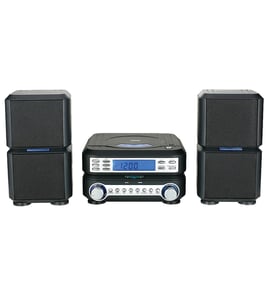
Yamaha Compact stereo system Parts — Browse All Models
Yamaha is a leading manufacturer of compact stereo systems in the United States. Yamaha compact stereo systems fit in tight spaces while providing the sound that you expect from a full-size stereo. When your Yamaha compact stereo system isn't working, get the replacement parts you need to fix the problem at Sears PartsDirect.


Yamaha R95 receiver
Shop Parts
21 Parts
Popular maintenance items for Compact Stereo Systems

Fuse
Part #152306751
This item is not returnable
In Stock
$2.65

Qty

Button
Part #422947901
This item is not returnable
In Stock
$8.04
Qty
Lxi Screw
Part #3019002605
This item is not returnable
In Stock
$2.16
Qty
Side Panel
Part #1014090747
This item is not returnable
In Stock
$2.16
Qty
Lever
Part #46-722354-3
This item is not returnable
In Stock
$4.99
Qty
Connector
In Stock
$42.89
Qty
Troubleshooting your Yamaha compact stereo system when the remote control doesn't work
- Check the batteries in the remote control. Weak or dead batteries won't power up the remote device. Replace the remote control batteries if they're weak or dead.
- The remote control has an effective range of about 20-feet. Make sure that you're within range of the compact stereo system when attempting to use the remote.
- Check for items blocking the RF sensor on the compact stereo system and move any items out of the way to allow the compact stereo to receive remote control RF signals.
- The microprocessor inside the remote can fill up its internal memory or the microprocessor can get the memory scrambled at times. Reset the microprocessor and drain the memory in the remote by removing the remote control batteries and holding down one or more buttons on the remote device for several minutes. Reinstall the batteries and the remote may work normally again.
- You may need to replace the remote if it won't work after resetting the microprocessor and it has good batteries.
Handling and care tips for compact discs used in your Yamaha compact stereo system
- Handle the compact disc by grasping it on the outer edge and inner hole when removing the disc from its case or the CD player disc tray. Don't touch the media side of the compact disc with your fingers because oil and dirt from your fingers can interfere with compact disc playback.
- Don't expose compact discs to direct sunlight or extreme heat sources such as heater air ducts or a car parked in direct sunlight.
- Insert and remove compact discs in the CD player disc tray carefully to avoid scratching the media side of the compact disc. Make sure the compact disc is properly inserted in the disc tray before pressing the button to insert the disc tray into the player to avoid marring the compact disc.
- After removing the compact disc from the CD player, store the disc in its storage case.
- Don't use tape or labels on the top of compact discs. Use a non-solvent-based felt-tip marker to label the top side of the disc.
Parts & More
Bottom-Mount Refrigerator
Dryer
Front-Engine Lawn Tractor
Gas Snowblower
Lawn Sweeper
Tool Storage
Weight System