 Owner’s manual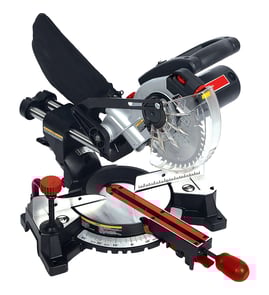

How to unlock a Craftsman miter saw?
To unlock your Craftsman compound miter saw model 137211940, release the lock that matches what is stuck: the cutting head (down-lock), the sliding carriage (slide lock knob), or the miter table (miter handle). The exact steps and control locations are shown in the 137211940 owner's manual.
Unlock the cutting head (down position lock)
Use this when the saw arm is pinned down for storage.
- Unplug the saw.
- Push down slightly on the switch handle.
- Pull out the hold-down latch.
- Let the cutting head rise to the up position.
- For storage later, push the head down and push the hold-down latch into the locking hole.
Why it matters
The cutting head lock is for transport and storage. Using the hold-down latch to keep the head down during cutting can lead to binding and unsafe operation.
Unlock the sliding carriage (for slide cuts)
Use this when the head will not slide forward and back.
- Locate the slide carriage lock knob on the right side of the slide carriage.
- Loosen the slide carriage lock knob to allow the head to slide freely.
- For chop cuts on small workpieces, slide the head fully to the rear and tighten the knob.
| What you want to do | Carriage lock knob setting |
|---|---|
| Chop cut (small stock) | Tighten (locked) |
| Slide cut (wide boards) | Loosen (unlocked) |
Unlock the miter table (to change miter angle)
Use this when the table will not rotate left or right.
- Turn the miter handle counterclockwise to unlock.
- Lift the positive stop locking lever to move off a detent.
- Rotate to the desired angle, then release the lever (if using a positive stop).
- Tighten the miter handle clockwise to lock before cutting.
Quick safety checks before you cut
- Confirm the miter handle is tight and the table is locked.
- Return the carriage to the full rear position after each crosscut.
- Clamp the workpiece for slide cuts.
- Let the blade reach full speed before contacting the wood.
Last updated: February 2026
What are the parts of a miter saw?
On the Craftsman 137211940 compound miter saw, the main parts include the base and table (where the workpiece sits), the miter and bevel controls (to set cutting angles), the blade and arbor (that mount and spin the blade), and the safety guards and switch that control operation. For the full labeled breakdown, use the owner's manual.
Core parts you will use most
- Base and table: supports the workpiece and provides mounting holes for securing the saw.
- Miter scale and miter lock: sets left and right miter angles for miter cuts.
- Bevel pivot and bevel lock: tilts the cutting head for bevel and compound cuts.
- Cutting arm and return spring: lowers the blade into the work and returns the arm upward.
- Lower blade guard and cover plate: shields the blade; the cover plate rotates open for blade changes.
- Switch/trigger and power cord: starts and stops the motor.
Blade mounting parts (important for blade changes)
The manual calls out these blade-mounting components during removal and installation:
| Part | What it does | Where you see it used |
|---|---|---|
| Arbor | Shaft the blade mounts to | Blade installation and alignment |
| Arbor lock | Locks the arbor so you can loosen/tighten the bolt | When removing the blade |
| Arbor bolt | Secures the blade to the arbor | Loosen/tighten with the blade wrench |
| Arbor collar | Helps clamp and center the blade | Removed with the bolt |
| Blade wrench | Tool used to turn the arbor bolt | Stored on the saw (wrench storage) |
Why it matters
Knowing the correct part names helps you set angles accurately (miter cut vs. bevel cut), change a 7-1/4 inch blade safely, and troubleshoot issues like vibration (often tied to the blade, arbor bolt, or mounting).
Quick safety and setup reminders
- Unplug the saw before changing the blade or inspecting guards.
- Confirm the lower blade guard closes fully after you release the cutting arm.
- Tighten the arbor bolt securely; a loose bolt can cause shaking.
- Clamp the workpiece and mount the saw to a stable surface when possible.
Last updated: February 2026
Will any miter saw stand work with any miter saw?
No. Miter saw stands are often “universal,” but they are not truly one-size-fits-all. For your Craftsman 137211940 compound miter saw, the stand must accommodate the saw’s base mounting holes and let you bolt or clamp the saw securely on a level surface; that prevents shifting during a cut.
What to check for Craftsman 137211940 compatibility
A stand “works” when it supports safe mounting and stable cutting:
- Adjustable mounting rails or brackets that can match the saw’s base hole spacing
- A fastening method that allows bolting through the base (bolt, washers, nut) or solid clamping
- A rigid frame that does not rock on a level floor
- Extension supports (arms or rollers) for long boards so the saw does not tip
- Clearance so nothing interferes with the fence, blade path, or head travel
The Craftsman guidance is to support the saw on a level work surface and always bolt or clamp the saw to its support; see the owner's manual.
Quick measure-before-you-buy checklist
Measure your saw base and compare it to the stand’s mounting range:
- Distance between the four mounting holes in the saw base
- Stand’s maximum and minimum bracket spacing
- Stand weight rating (saw plus typical workpiece)
- Whether the stand includes hardware or requires your own bolts and washers
If the holes do not line up
Most fitment issues have straightforward fixes:
| Stand situation | Practical fix | Result |
|---|---|---|
| Brackets are adjustable | Reposition rails/brackets | Matches hole spacing |
| Brackets are fixed | Use a rigid adapter plate, then bolt plate to stand | Creates a custom pattern |
| Stand is stable but mounting is awkward | Use clamps only if the stand is designed for clamping | Prevents movement |
Why it matters
A saw that is not firmly mounted can shift, vibrate, or bind during startup and cutting. Secure mounting improves accuracy and keeps your hands positioned safely away from the blade path.
Last updated: February 2026