- Kenmore refrigerator water filters
- Whirlpool refrigerator water filters
- Samsung refrigerator water filters
- GE refrigerator water filters
- LG refrigerator water filters
- Frigidaire refrigerator water filters
- KitchenAid refrigerator water filters
- Maytag refrigerator water filters
- Kenmore Elite refrigerator water filters
- Estate refrigerator water filters
- GE Profile refrigerator water filters
- Amana refrigerator water filters
- Bosch refrigerator water filters
- Dacor refrigerator water filters
- Electrolux refrigerator water filters
Top DIY repair help
View All Repair Categories
Appliances
Lawn & Garden
Power Tools
Home Improvement
Sports & Leisure
Heating & Cooling
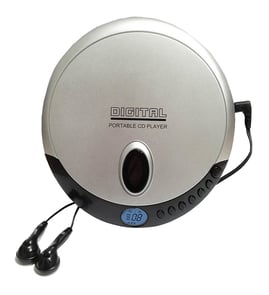
Soundesign Audio equipment Parts — Browse All Models
Soundesign audio equipment combines volume, sound quality and ease of use into the ideal audio system for any of your needs. Featuring speakers, receivers, turntables and many other pieces of equipment, Soundesign builds high-quality products that deliver the sound output you desire. Soundesign engineers sound audio equipment that is built to last for many years, allowing you to enjoy the music of your choice.
Browse by Category
Audio Equipment
Audio Equipment


Frequently bought Soundesign parts

Fisher Integrated Circuit
In Stock
$51.62

Qty

Popular maintenance items for Audio Equipment
Jack
Part #181504511
This item is not returnable
In Stock
$8.04
Qty
Svc Manual
In Stock
$33.49
Qty
Panel
In Stock
$36.56
Qty
Ser Manual
In Stock
$13.63
Qty
Ic
In Stock
$67.40
Qty
Connector
In Stock
$27.97
Qty
Top repair parts needed for Soundesign audio equipment speakers
- Tweeter. The tweeter is a speaker component that produces the clear, crisp high frequency sounds above 2kHz up to around 20kHz in the speaker.
- Woofer. The woofer is a speaker component that produces bass sounds in the frequency range of about 50Hz-1kHz in the speaker.
- Speaker grill. The speaker grill covers and protects the front of the speaker components while allowing sound to pass easily through the grill.
- Speaker wire terminal. The speaker wire terminal attaches to the back of the speaker cabinet. The terminal has a spring loaded plug that allows you to connect speaker wires to the speaker.
Troubleshooting your Soundesign audio equipment when the speakers won't play
- Check the output settings on your receiver's control panel first. Make sure that you have the correct speaker output selected. Adjust the audio output settings if necessary.
- Check to see if you have the headphones plugged into the headphone jack. Unplug the headphones play the speakers if you find the headphones plugged into the headphone jack.
- Check the speaker wire connections. Make sure that speaker wires are plugged fully into the speaker jacks on the back of the receiver. Make sure that the speaker wires are securely connected to the speakers. Reconnect any loose wiring connection.
- Check speaker wires for damage. Repair or replace any damaged speaker wire.
Parts & More
Air Compressor
Bottom-Mount Refrigerator
Chest Freezer
Gas Walk-Behind Mower
Impact Wrench
Microwave
Parts
Power Pruner
Radial Arm Saw
Refrigerator
Side-By-Side Refrigerator
Television
Upright Vacuum
Washer